B) Programs
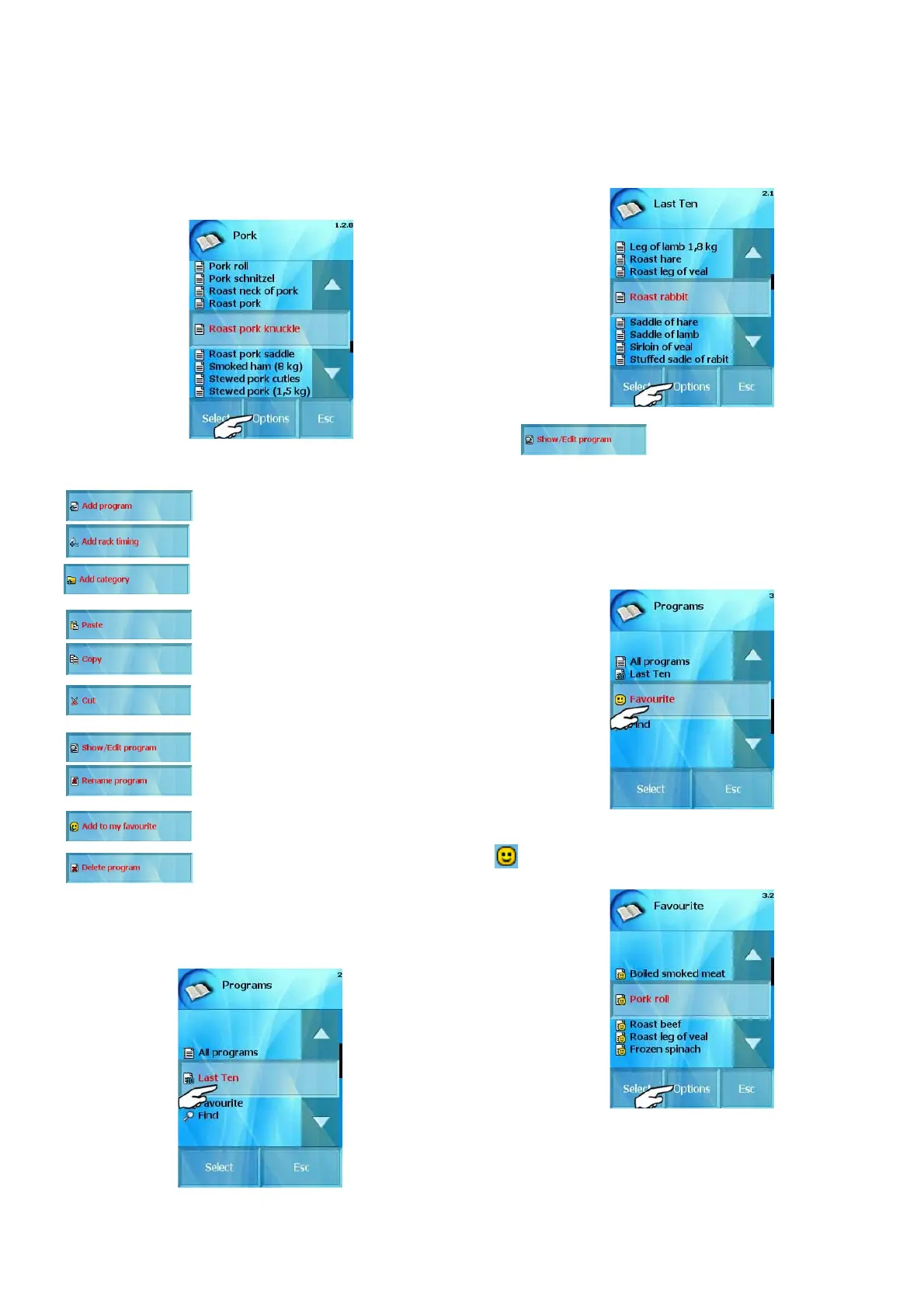
If you mark any program in any category you have several
choices in „Options“ option:
- Create a new program.
- Create a new program for „Rack timing“
function.
- Create a new category, which will be placed
among the programs.
- Paste a category or a program.
- Copy a category or a program.
- Cut a category or a program
.
- Show the program’s steps and you can
edit them.
- Rename the selected program.
- Add this program to your favourites.
- Delete the selected program.
1.2 “Last ten” option
Last ten used cooking processes are stored in this section. The
combi-steam oven remembers it automatically. It could be your own
program, the Easy Cooking technology or the manual mode.
I
n „Last ten“ section you can choose „Options“ option
- Show the program steps and you can edit
them
1.3 “Favourites” option
You can store your favorite recipes here for quick access. You can
create your own database of programs, which you use most often or
like the most.
Programs saved in this category are specified with the „Smile“ icon.
.
You can edit this program as well by click on „Options“ option:
17
OPERATION MANUAL FOR GOLDSTEIN VISION COOKING CENTRES


 To Next Page