XII. Settings
T
he “Settings” section allows special setting of the combi-steam
oven, as well as access to technical information regarding the combi-
steam oven and the service settings for advanced users.
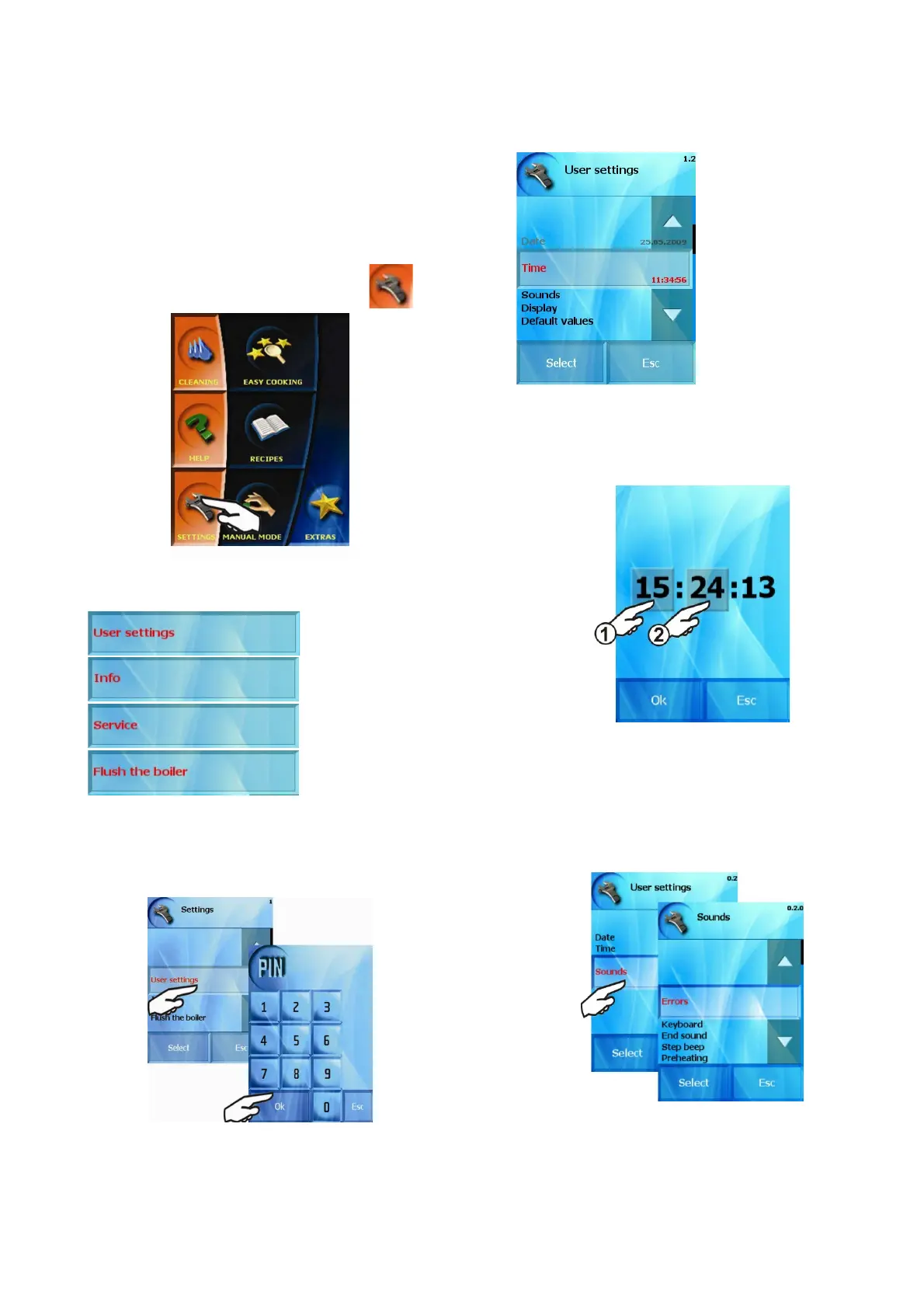
The “Settings” section is selected by pressing
The following functions are available to set the combi-steam oven:
1. “User settings” option
This function allows setting of time, brightness of display, sounds
and default values. In “User settings” option a four-digit PIN code is
required. For advanced users the PIN code has been set to 1001.
Select the correct PIN code and press “OK”. The combi-steam
oven will offer:
1.1 Setting “Clock”
By using this button we set the actual time, i.e. the hour and
minutes. The procedure is similar to the one setting the actual date.
1.2 Setting “Sounds”
By using this option you can assign sound effects or tunes to
individual events announced by the combi-steam oven (e.g. the sound
of pressing a button, announcement of end of cooking process etc.) or
change it volume.
Select event to which a sound should be assigned or changed (e.g.
End of cooking process)
33
OPERATION MANUAL FOR GOLDSTEIN VISION COOKING CENTRES


 To Next Page