IM067B2 – June 2010
9
5. CONTROLS
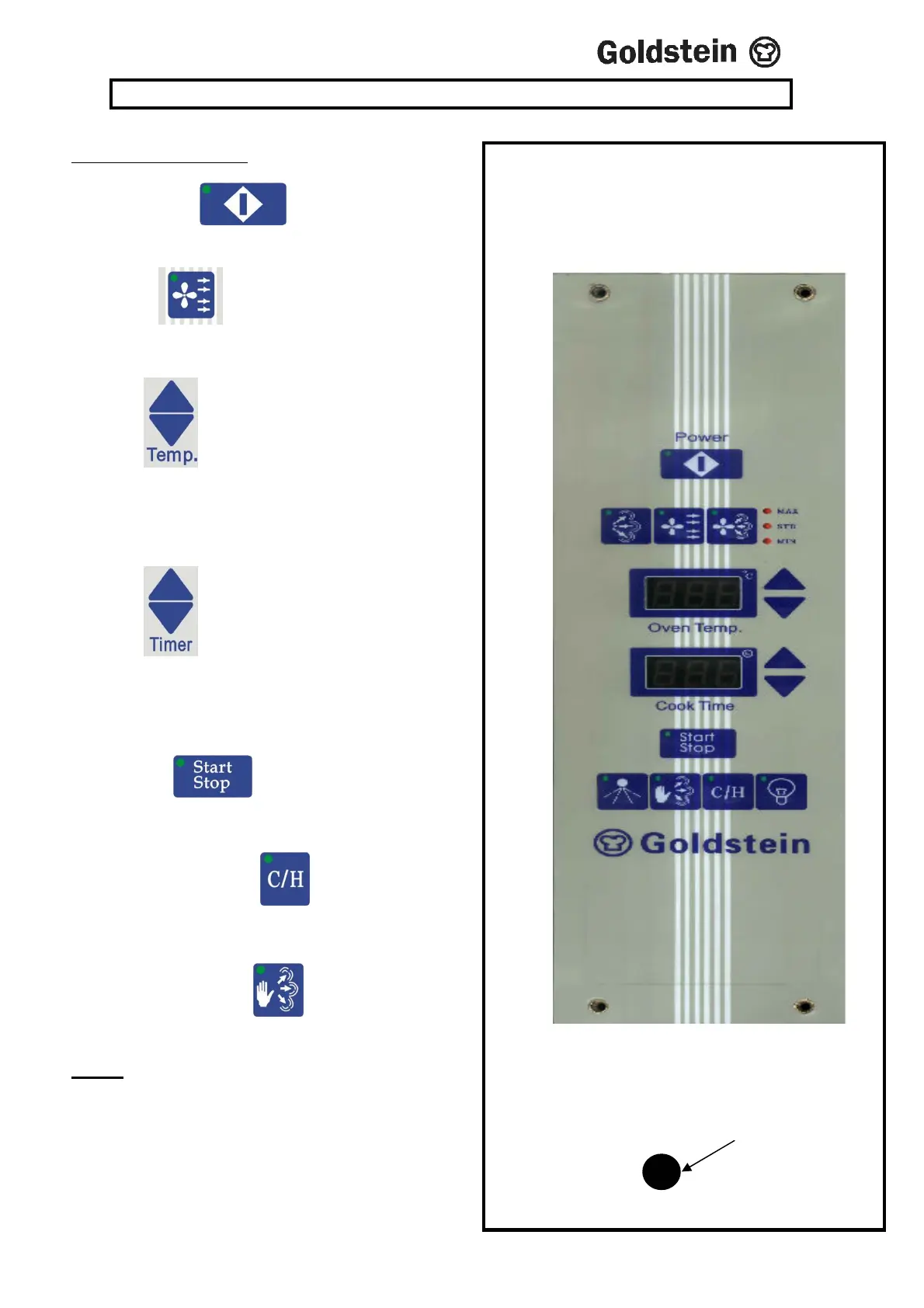
COOKING CYCLE
(i) Turn on Power .
(ii) Select the cooking mode by pressing the
Convection Button
(iii)
Press button up or down to set desired
temperature, the display will flash to indicate the
setting mode, when arrow is released set temperature
will display for 3 seconds and then display will stop
flashing and read actual oven temperature.
(iv)
Press button up or down to set desired
cooking time. Timer display will flash to indicate that
it is in the setting mode, it will stop after the button
has been released and will display the set cooking
time.
(viii) Press the button so that the green LED
lights up. This will start the cooking cycle which will
operate until the set time has elapsed and the buzzer sounds.
(ix) Cook & Hold. Press the button. It will hold the
oven temperature at 70ºC after the cooking cycle finishes,
for up to 999 minutes.
(x) Hand Steam. Press the button; it will inject
steam, for 2 seconds.
NOTE
Push the Pilot reset button, if the light is on.
If the light remains ON after 3 or 4 attempts, call
a Service Technician
X500
Pilot
Button


 To Next Page