15
ADVANCED PROGRAMMING (MONITOR FUNCTIONS)
Continued from previous page.
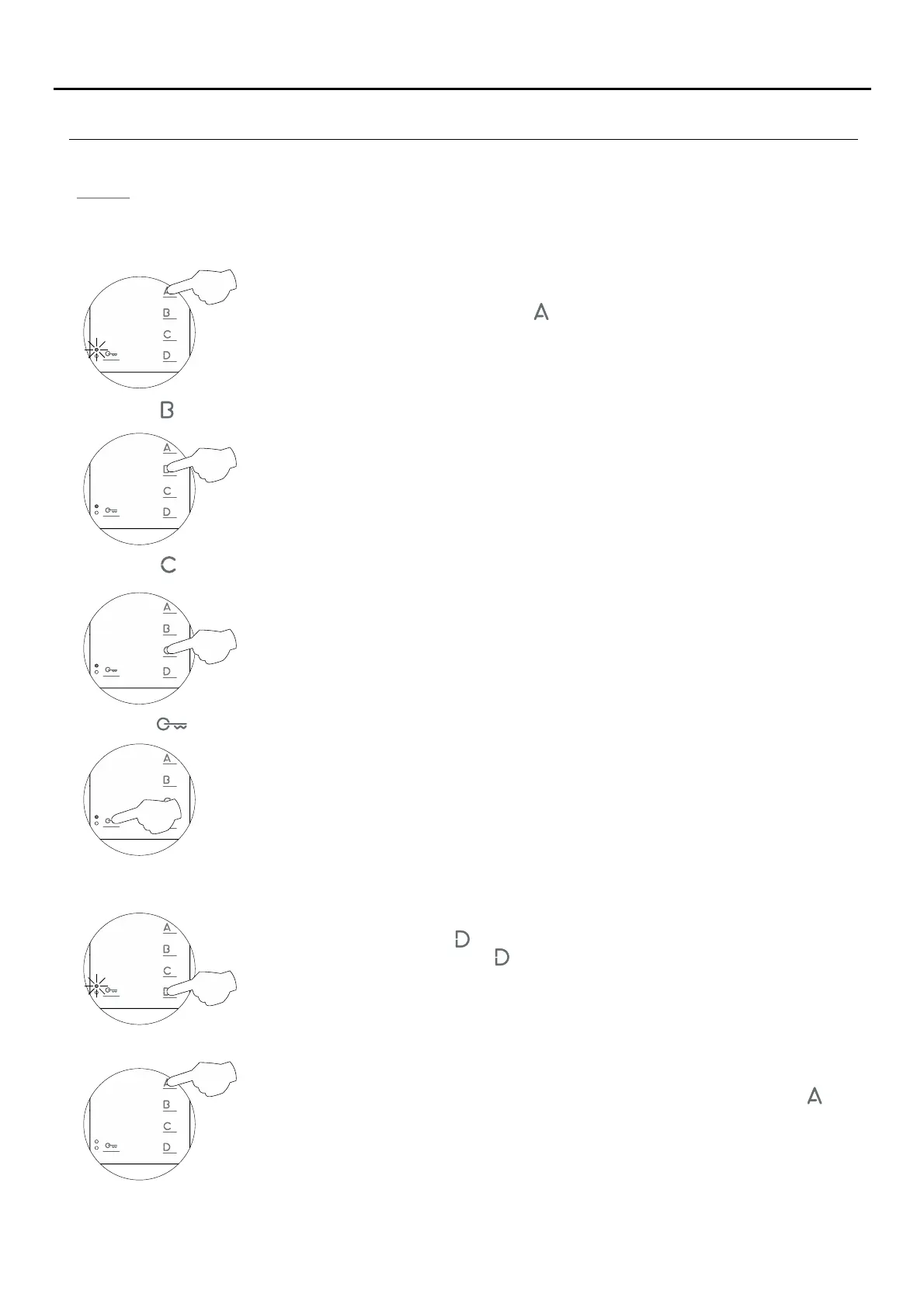
Men 4:u
Then adjust the settings as required:
- Setting to the 'default setting' all of the monitor's advanced programming options:
No function.
- Button has no function.
No function.
- .Button has no function
No function.
- .Button has no function
- :Accessing 'Menu 1' or exiting programming mode
To access 'Menu 1,' press button , and the programming LED will blink once (see p. 12).
To exit programming mode, press button for 3 seconds and the programming LED will turn off.
When exiting advanced programming mode, the monitor will turn off: Press button for 1
second to turn on the monitor (the monitor's LED will illuminate red). After any resetting of
the monitor and for the following 45 seconds, no operation with it can be performed.
- Turning on the monitor when exiting programming:
Setting to the 'default setting': Press button and the monitor will indicate with two audible
tones that all of the options of the monitor's advanced programming (pp. 12-15) are set to
their default setting.
TEKNA-S PLUS MONITOR


 To Next Page