OPTIONAL CONNECTIONS
17
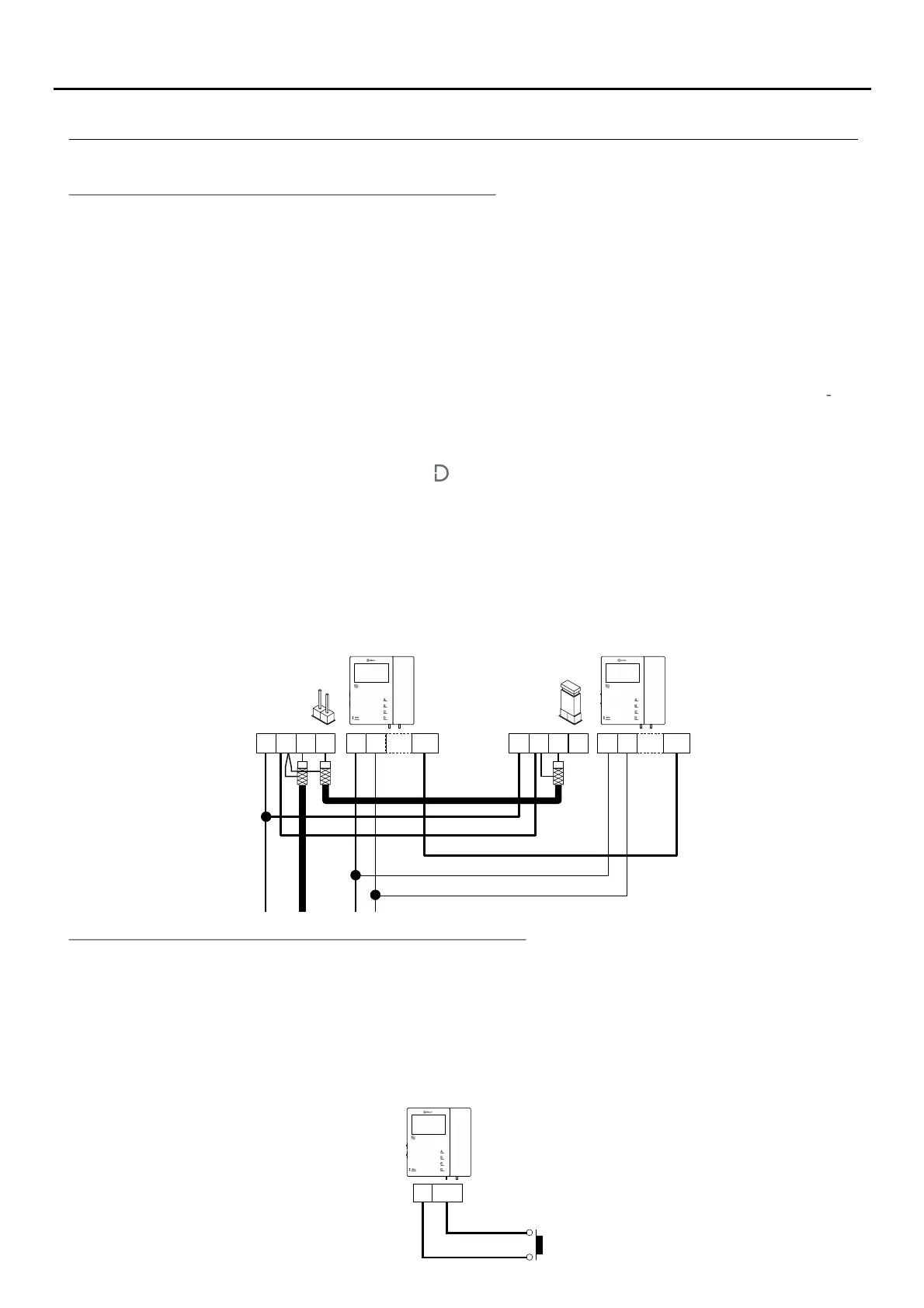
Intercom between two points in the same apartment:
CN4
The Tekna S Plus monitor features as standard an intercom function between two points in the same apartment. To
enable this function, the following is necessary:
- One of the monitors needs to be configured as master and the other as slave with intercom, as described on p.
10. In the case of intercom between a monitor and a telephone, it is recommended to configure the monitor as
the master.
- The INT terminals of the intercom devices need to be joined (see diagram below).
To use the intercom function to call all of the monitors in the apartment, lift the handset and press the button until a
confirmation tone can be heard. To call individual devices, press the button once to call the 'master' monitor, twice
to call 'slave 1,' 3 times to call 'slave 2,' 4 times to call 'slave 3' and 5 times to call 'slave 4.' This selective intercom
call mode is only available with Tekna S Plus, Tekna HF Plus and Tekna Plus SE monitors. This only functions if
no call or communication is in progress. A number of audible tones emitted by the handset will confirm that the call
is being made or that the unit being called is in communication with the door panel. To establish communication,
lift the handset of the unit being called. If a call is received from the door panel during an intercom process, the
handset of the master unit will emit a number of audible tones and an image will appear; to establish
communication with the door panel, press button on the unit configured as master or press the door release
button to simply open the door.
The ringtones vary depending on where the call is being made from, enabling the user to identify its origin.
Remember: If the apartment also has Tekna Plus monitors, the Tekna S Plus, Tekna HF Plus and Tekna Plus SE
monitors must be configured as 'Intercom with Tekna Plus monitors' (see p. 13). This configuration mode does
not allow selective intercom calls to different monitors in the apartment; when the intercom button is pressed, all
of the monitors in the apartment will receive the call.
Tekna S Plus
CN4
Tekna S Plus
Continued overleaf
Continued from previous page.
Button for receiving calls from the apartment front door:
HZ-
-
The Tekna S Plus monitor features as standard the ability to receive calls from the apartment front door. This feature
precludes the need to use the bell by positioning a button between terminals 'HZ—' and '—' of the monitor.
The ringtones vary depending on where the call is being made from, enabling the user to identify its origin. If a call is
made from the apartment front door during a conversation with the door panel, the handset will emit a number of
tones to indicate so.
Note: Regardless of the volume set for the monitor's ringtones (see p. 5) and the 'night mode' function, the
'apartment front door call' ringtone will always sound at the highest level.
Tekna S Plus
TEKNA-S PLUS MONITOR
A
_
+
D INT
V
in
V
out
A
_
+
D INT
V
in
V
out
CN3
CN2
CN3
CN2
CN2


 To Next Page