~ 5 ~
MA-5188
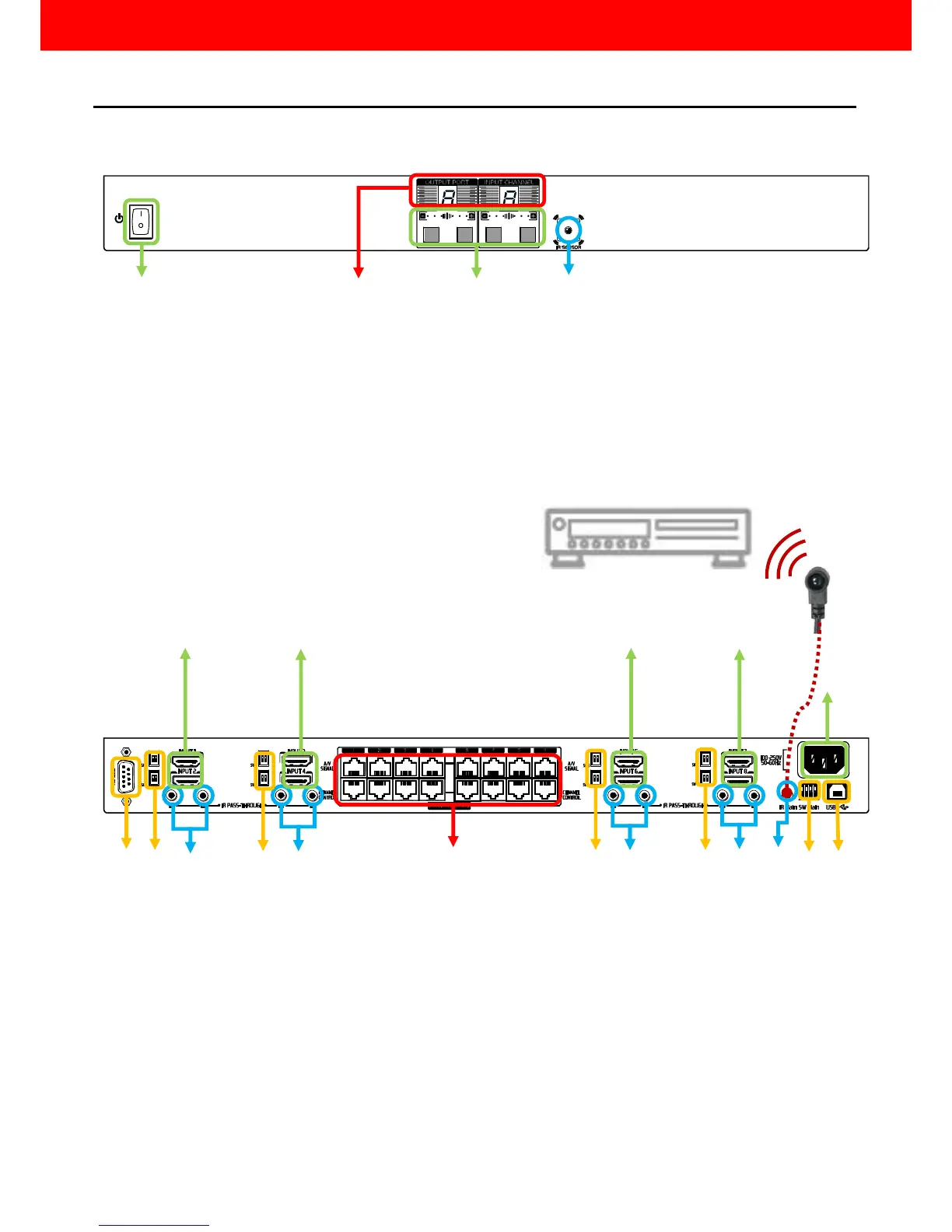
1. Power On/Off control switch
2. LED display for output ports and input channels
3. Front panel push buttons used to select the number of input source and display channel
4. IR SENSOR: IR sensor for receiving the IR commands from the IR remote
5. AC Power: 100-240V
6. RS-232: RS-232 control port
7. USB: USB control port
8. SW Main: DIP switches (see DIP Switch section in p.8)
9. SW 1–8: DIP switch (see DIP Switch section in p.8)
10. INPUT 1 –8: HDMI inputs
11. IR PASS-THROUGH 1–8: 3.5mm IR blaster socket for individual HDMI source control
12. OUPUT PORT 1–8: RJ-45 outputs for each output channel
13. IR Main: 3.5mm IR blaster socket for HDMI source control on all 8 inputs [default
socket for IR blaster]



 To Next Page