EasyManua.ls Logo

Goodmans 329176 - Quick Setup; Power On; Playing Music Via Radio

Goodmans 329176
8 pages
Print Icon
To Next Page IconTo Next Page
To Previous Page IconTo Previous Page
Loading...
PORTABLE AM/FM RADIO
Quick Setup3
Power On
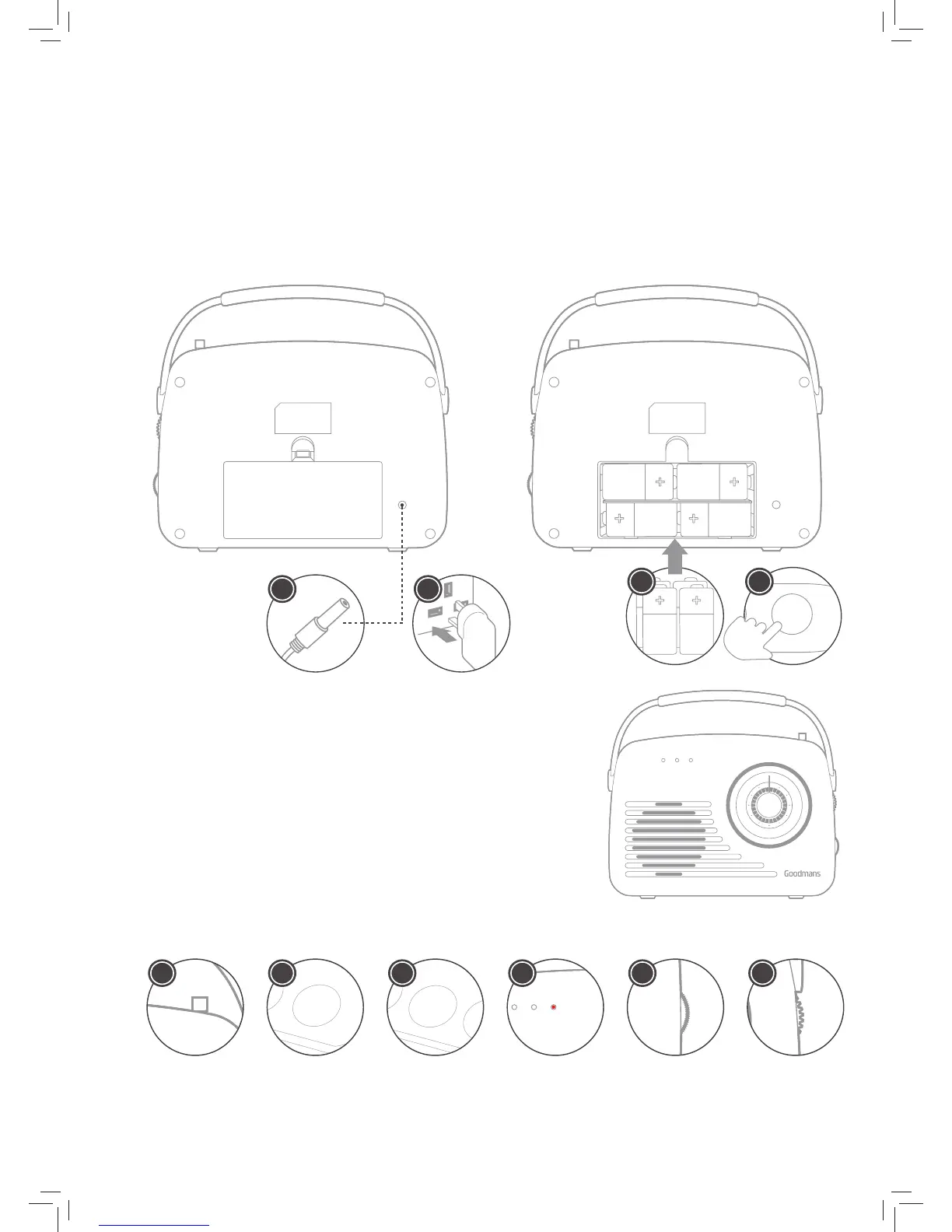
1. Connect the power cord into the DC-ln socket.
2. Connect the Power Plug to the mains socket.
3. Or insert 4 x type ‘C’ batteries into the battery compartment
4. Press the power on button.
3.1
Playing Music Via Radio
1. Fully extend the antenna while in FM mode.
2. Press the Power button to turn the radio on.
3. Press the Function button to select RADIO mode.
4. Press the Function button to switch to FM or AM.
5. Adjust the volume with the Volume Control.
6. Rotate the Tuning Dial to change the radio frequency.
3.2
IN DC 6V
IN DC 6V
1 2
3

PREV
PHONES AUX IN SD CARD USB
NEXT FUNC STOP PLAY POWER
4
OR
F
M
8
7
.
5
9
0
9
3
9
8
1
0
3
1
6
0
1
0
8
K
H
z
A
M
5
2
0
6
0
0
8
0
0
1
0
0
0
1
2
0
0
1
4
0
0
1
6
2
0
K
H
z
AUX USB/SD RADIO
PREV
NEXT
FUNC
STOP
PLAY
POWER
2
PREV
NEXT
FUNC
STOP
PLAY
POWER
3
F
M
8
7
.
5
9
0
9
3
9
8
1
0
3
1
6
0
1
0
8
K
H
z
A
M
5
2
0
6
0
0
8
0
0
1
0
0
0
1
2
0
0
1
4
0
0
1
6
2
0
K
H
z
AUX USB/SD RADIO
5
F
M
8
7
.
5
9
0
9
3
9
8
1
0
3
1
6
0
1
0
8
K
H
z
A
M
5
2
0
6
0
0
8
0
0
1
0
0
0
1
2
0
0
1
4
0
0
1
6
2
0
K
H
z
AUX USB/SD RADIO
6
F
M
8
7
.
5
9
0
9
3
9
8
1
0
3
1
6
0
1
0
8
K
H
z
A
M
5
2
0
6
0
0
8
0
0
1
0
0
0
1
2
0
0
1
4
0
0
1
6
2
0
K
H
z
AUX USB/SD RADIO
1
F
M
8
7
.
5
9
0
9
3
9
8
1
0
3
1
6
0
1
0
8
K
H
z
A
M
5
2
0
6
0
0
8
0
0
1
0
0
0
1
2
0
0
1
4
0
0
1
6
2
0
K
H
z
AUX USB/SD RADIO
4

Related product manuals