336700
Quick Setup3
Power On/Off and Function Selection
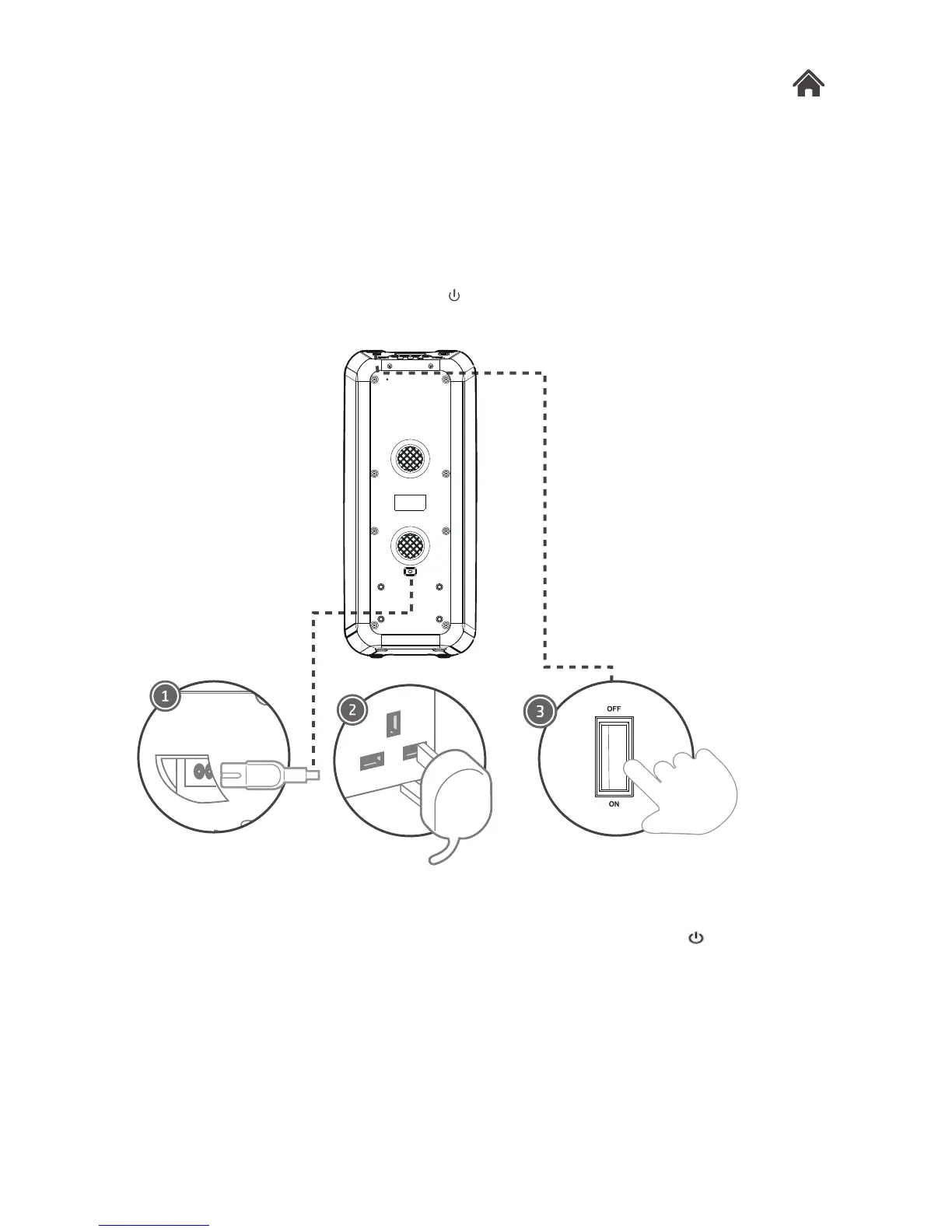
1. The Bluetooth Speaker is supplied with a mains cable.
To connect the power, insert the figure of 8 shaped
end into the rear of the unit.
2. Insert the plug into a power socket, and switch the power on.
3. Press the power ON/OFF button to switch the unit on/off. To change
the function modes, press the SOURCE/ button repeatedly
to change between USB1/USB2/Bluetooth /and Line in functions.
3.1
Standby
3.2
In USB/Bluetooth/LINE IN mode, when the unit is not providing the main function for around
20 minutes,
it
to turn on the unit again.
, "langis oidua on " sa dezingocer eb yam ecruos oidua eht ni gnittes emulov wol taht eton esaelP
this will affect the capability of signal detection mode from the device and can also initiate an
automatic switch into standby mode. If this happens, please in crease the volume setting on
the audio source player in order to resume playback.



 To Next Page