TRUE WIRELESS EARPHONES
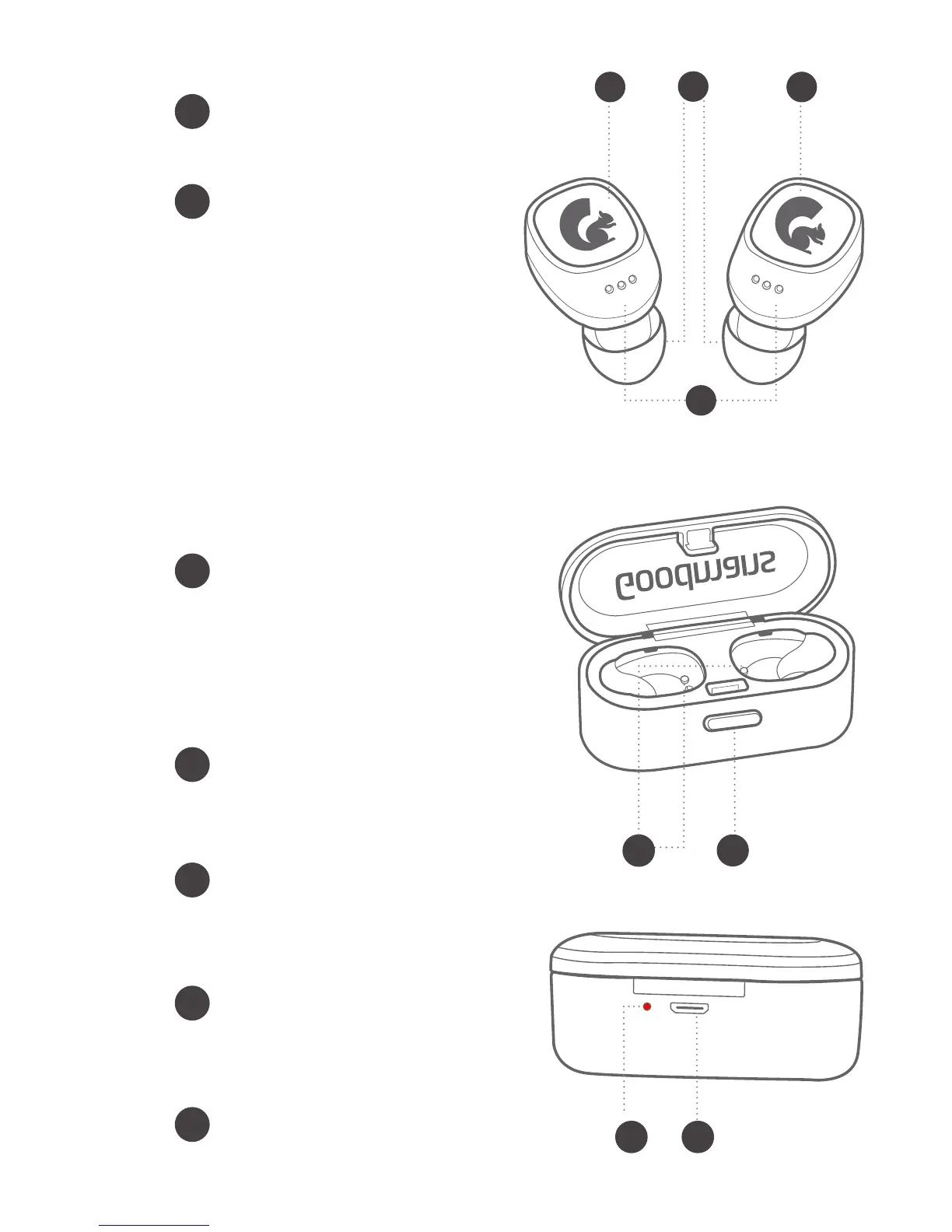
Overview Charging Station
Overview Earphones
2.3
2.2
Earbud Charging Contacts
These small round metal pieces
charge the LEFT & RIGHT
earphones
Open Case Button
Press to open the hinge design
case allows for quick charging
and removal of earphones
LED Indicator Light
This light illuminate when
charging and turn o when
nished
Micro USB Port
For charging the station
Ear Tips
3 soft silicone sized ear tips
for you to choose from.
Multi-Function Button
Press to pause or play a
song this works for both
RIGHT & LEFT earphones.
Only for the RIGHT
earphone: When receiving a
call short press the button
once to answer/hang up a
phone call. Long press for
about 2 seconds to reject a
phone call. Redial that last
number you called by
pressing the button twice
Earphone Status Light
Light will indicate if the
earphones are on/o,
pairing, and charging.
C
B
A
B
A
C
C
A
A
D
D
B
BB
C


 To Next Page