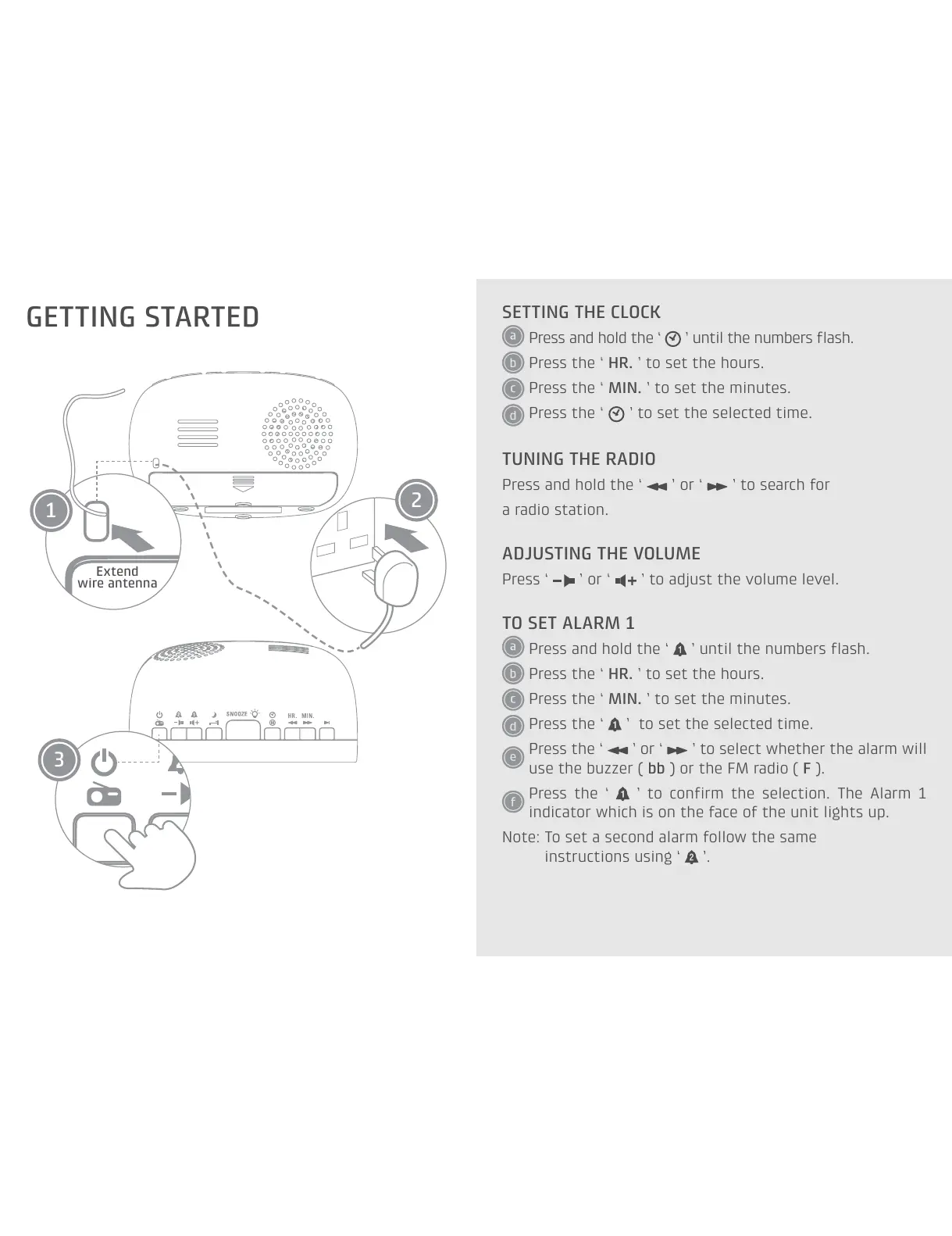
GETTING STARTED
SETTING THE CLOCK
Press and hold the ‘ ’ until the numbers flash.
Press the ‘ HR. ’ to set the hours.
Press the ‘ MIN. ’ to set the minutes.
Press the ‘ ’ to set the selected time.
TUNING THE RADIO
Press and hold the ‘ ’ or ‘ ’ to search for
a radio station.
ADJUSTING THE VOLUME
Press ‘ ’ or ‘ ’ to adjust the volume level.
TO SET ALARM 1
Press and hold the ‘ ’ until the numbers flash.
Press the ‘ HR. ’ to set the hours.
Press the ‘ MIN. ’ to set the minutes.
Press the ‘ ’ to set the selected time.
Press the ‘ ’ or ‘ ’ to select whether the alarm will
use the buzzer ( bb ) or the FM radio ( F ).
Press the ‘ ’ to confirm the selection. The Alarm 1
indicator which is on the face of the unit lights up.
Note: To set a second alarm follow the same
instructions using ‘
’.
3
1
2
Extend
wire antenna


 To Previous Page