Need help?
Do you have a question about the Goodmans NOD and is the answer not in the manual?
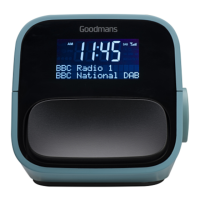
Details the dial control for volume/menu and snooze/backlight functions.
Explains the functions of Power/Mode, FAV, Info/Menu, Alarm, Sleep, and Alarm on/off buttons.
Identifies the DC IN, USB socket, earphone jack, and Aux-in jack ports.
Connect power, extend aerial, press Power/Mode to turn on and scan stations.
Instructions for switching between DAB, FM, and Aux modes.
Details on performing automatic or manual DAB station scans.
Guide on how to control the audio volume using the dial.
Instructions for turning off the radio using the Power/Mode button.
In DAB mode, scroll and rotate dial to select station, then press dial to confirm.
Performs automatic DAB station scan on power up or manual scan via dial.
Manually tune DAB radio stations by frequency for optimal reception.
Mute active alarm for 9 minutes by pressing the SNOOZE button.
Adjust display backlight brightness by pressing the Snooze button.
Switch to DAB mode from FM mode by long pressing the Power/Mode button.
Switch to FM mode from DAB mode by long pressing the Power/Mode button.
Tune to station, long press FAV to open menu, select preset number (1-10).
Press FAV, use dial to select station, and push dial to confirm recall.
Press INFO/MENU to cycle through station broadcast information displayed on screen.
Long press INFO/MENU to access Time, EQ Set, Factory Reset, and SW version.
Steps to set up Alarm 1 or Alarm 2, including active status, duration, and sound source.
Enable/disable alarms via the Alarm On/Off switch; icon indicates enabled status.
Set sleep timer to automatically turn off radio after 15-90 minutes.
Scans all available DAB stations in your location, taking 1-2 minutes.
Manually tune DAB radio stations from channel 5A to 13F.
Deletes DAB stations from the list that are no longer broadcasting or receivable.
System settings, refer to section 4.11 for details.
Perform automatic FM station scan by long pressing the dial.
Manually scan FM radio stations by briefly pushing the dial.
System settings, refer to section 4.11 for details.
 General
| Brand | Goodmans |
|---|---|
| Model | NOD |
| Category | Clock Radio |
| Language | English |

 To Next Page