Need help?
Do you have a question about the Goodmans 329796 and is the answer not in the manual?
Lists the items included in the clock radio packaging, like the radio itself, AC adapter, and guides.
Details the power requirements (230V AC, 50 Hz) and the need for a CR2025 battery.
Provides guidelines on where to place the clock radio for optimal performance, avoiding direct sunlight and heat.
Explains how to unravel the aerial for good radio reception and potential adjustments.
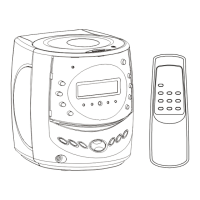
Identifies and labels all the controls and displays on the front of the clock radio.
Identifies and labels components located on the rear of the clock radio, including the aerial and power input.
Step-by-step instructions to prepare the clock radio for its first use, including aerial and power connection.
Detailed steps on how to set the current time and date on the clock radio using the control buttons.
Instructions for setting Alarm 1 and Alarm 2, including time, day selection, and confirmation.
Explains how to activate or deactivate alarms, noting button functions when the radio is on.
Guides users on configuring the alarm to sound a buzzer, indicated by 'bb' on screen.
Instructions to set the alarm to play the last tuned radio station upon activation.
Describes the snooze feature, allowing a 9-minute delay before the alarm sounds again.
Details how to turn off the alarm for the current day, preventing it from sounding until the next set day.
Explains how to adjust the brightness of the LED display using the snooze/sleep button.
Instructions for powering the radio on/off and switching between AM and FM bands.
Guides on performing auto or manual searches to find available radio stations on the desired band.
Explains how to save and recall up to 20 favorite FM and AM radio stations.
Details how to set the radio to automatically turn off after a specified period.
 General
| Brand | Goodmans |
|---|---|
| Model | 329796 |
| Category | Clock Radio |
| Display Type | LED |
| Snooze Function | Yes |
| Battery Backup | Yes |
| Alarm Type | Buzzer or Radio |
| Power Source | Mains |
| Radio Bands Supported | FM |

 To Next Page