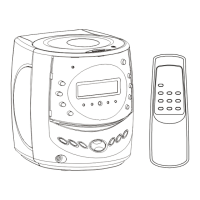
Features4
Setting The Time And Date
1. Press and hold the M button for a few seconds. The ‘hour’
digit(s) on the led display will begin to blink. Press either the
or the button to adjust the ‘hour’ digit(s). Once the
correct ‘hour’ is displayed press the M button to confirm.
2. The ‘minute’ digits will now being to blink. Press either the
or the button to adjust the ‘minute’ digits. Once the
correct ‘hour’ and ‘minutes’ are displayed press the M
button to confirm.
3. Now press either the
or the button to select 12 or 24
hour time (shown on the screen as ‘12h’ or ‘24h’). Once you
have made your selection press the M button to confirm.
4. The ‘year’ will then begin flashing, press either the
or the
button to adjust the year. Once the correct year is
displayed, press the M button to confirm.
5. The 2 numbers that are now flashing represent the current
‘month’. You can press either the
or the button to
adjust the ‘month’ and then press the M button to confirm.
6. The letter ‘d’ followed by 2 numbers will flash on the led
display. This represents the ‘day’ of the month. You can
press either the
or the button to adjust the ‘day’ and
then press the M button to confirm.
7. The led display will now show the correct time and all of the
changes you have made to the time and date will be saved.
4.1
Setting The Alarm
1. Press and hold the ‘Power’ button for a few seconds, and
begin by setting Alarm 1. The current time for Alarm 1 will
appear on the display with the ‘Hour’ digit(s) flashing along
with the Alarm 1 LED indicator.
2. Press either the
or the button to adjust the ‘Hour’
digit(s). After the desired ‘Hour’ is displayed, press the
Power button to confirm.
3. The ‘Minute’ digits will blink. Press either the
or the
button to adjust the ‘Minute’ digits. Once the correct ‘Hour’
and ‘Minutes’ are displayed press the Power Button to
confirm.
4. Next, select the days you want to set the alarm for. Press
either the
or the button to select one of the options (on
the next page) to choose the days the alarm will be
activated. Once you have selected your desired setting,
press the Power button TO CONFIRM.
5. Repeat steps 2-4 to set Alarm 2 and the Alarm 2 LED
indicator will flash. Enter the desired time for Alarm 2. Once
this is completed your settings for Alarms 1 and 2 will be
saved.
4.2
1-7: Set on Every day of the week
6-7: Set on Saturday & Sunday
1-5: Set on Monday to Friday
1: Set on Monday only
2: Set on Tuesday only
3: Set on Wednesday only
4: Set on Thursday only
5: Set on Friday only
6: Set on Saturday only
7: Set on Sunday only
SETTING UP YOUR CLOCK RADIO


 To Next Page