13131313
GDR10 Di
ital TV receiver
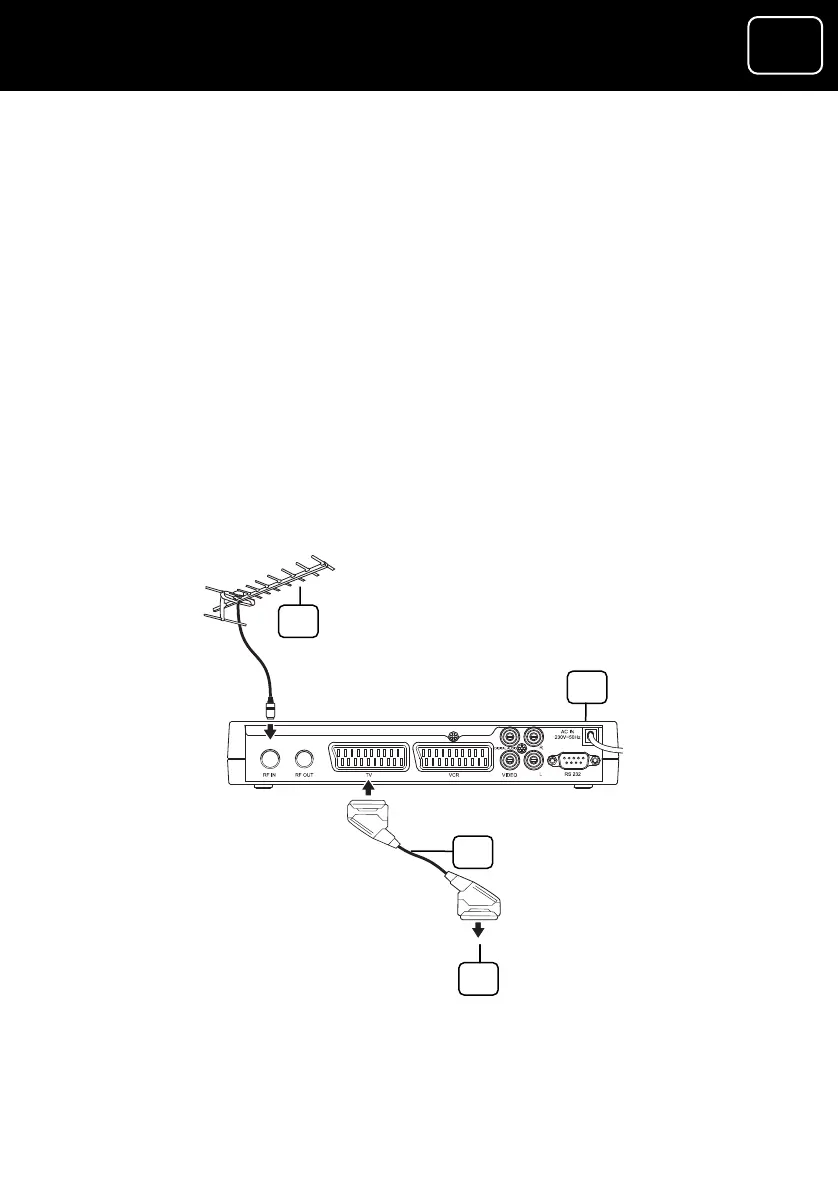
Connection 1 (If your TV has a SCART socket)
1 Plug the SCART cable (which came with the receiver) into the
et on the back panel
n your TV.
ur receiver in this way will give you a high-quality
ur TV.
h it on. A green
light should come on.
4 Switch on your TV.
If there is more than one SCART connector on your TV, look in your
TV instruction manual to check which one you should use.
1 Outside aerial
2 Receiver
3 SCART cable (included with your receiver)
4 To your TV’s SCART ‘in’ socket
1
SCART ‘out’ socket (you will find the sock
of the receiver labelled ‘TV’).
2 Connect the other end to the SCART socket o
Connecting yo
picture on yo
3 Plug your receiver into a wall socket and switc
2
3
4



 To Next Page