1414
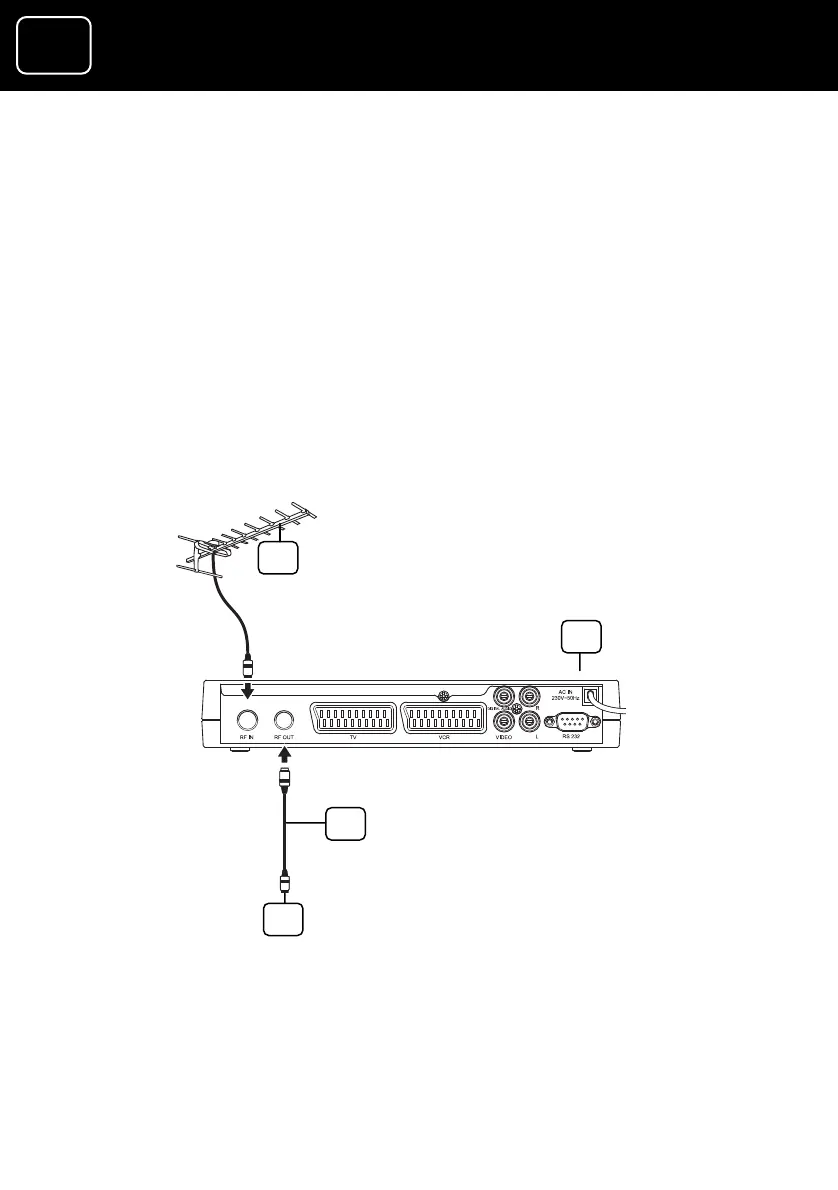
Connection 2 (If your TV does not have a SCART socket)
its power supply.
ect it to the ‘RF IN’
h the receiver)
F OUT’ socket on the receiver and the aerial
e TV.
4 Plug your receiver in a wall socket and switch it on. A green
light should come on.
5 Switch on your TV.
1 Outside aerial
2 Receiver
3 RF cable (that was supplied with the receiver)
4 To your TV’s aerial socket
1 Disconnect your TV from
2 Take the aerial lead out of the TV and conn
socket on the receiver’s back panel.
3 Connect the RF cable (that was supplied wit
between the ‘R
socket on th
1
2
3
4
GDR10 Di
ital TV receiver



 To Next Page