11
User Manual V1.0-2022-01-17 03 Product Introduction
Inverters Designed with LCD
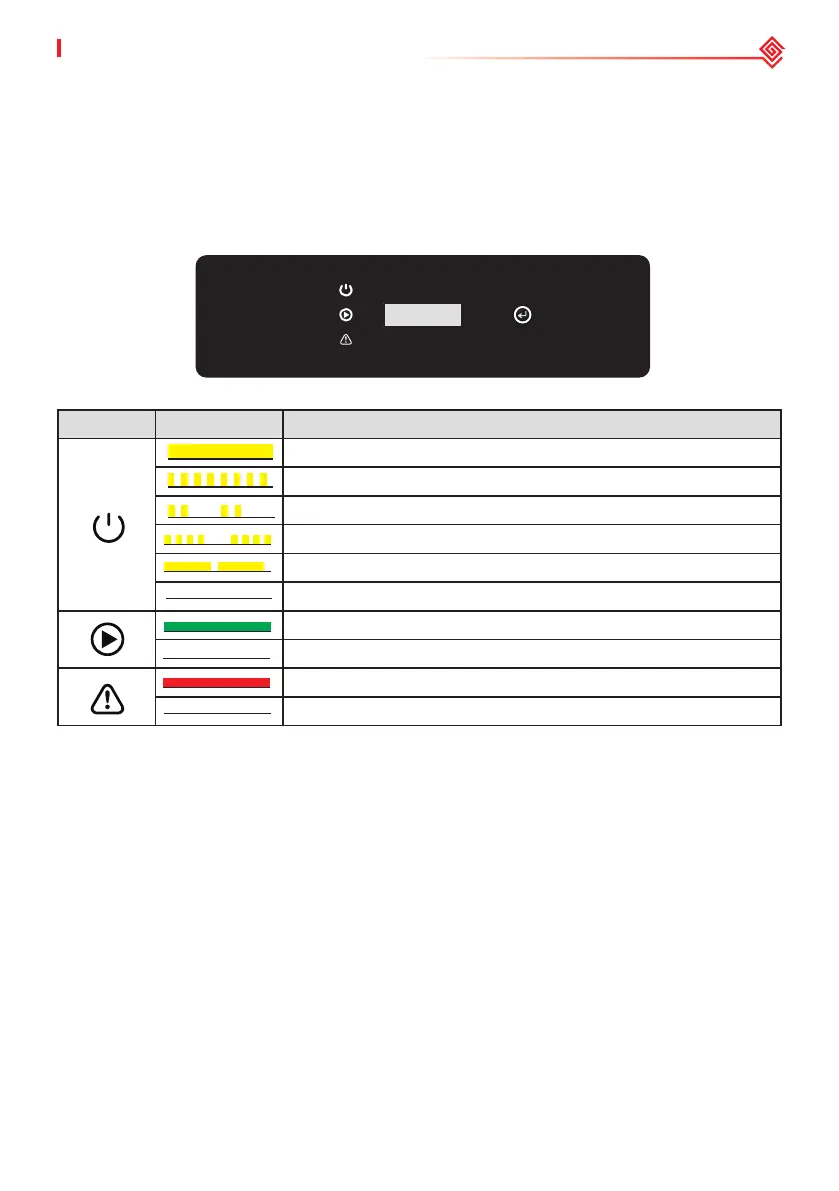
3.4.3 Indicators
As a human-computer interaction interface, LCD display panel comprises of LED indicators,
buttons and LCD display on the front panel of the inverter. LED indicates the working status of the
inverter. Buttons and LCD are used for conguration and viewing parameters.
Indicator Status Description
ON = Wi-Fi IS CONNECTED/ACTIVE
BLINK 1 = Wi-Fi SYSTEM IS RESETTING
BLINK 2 = NOT CONNECTED TO THE ROUTER
BLINK 4 = Wi-Fi SERVER PROBLEM
BLINK = RS485 IS CONNECTED
OFF = Wi-Fi IS NOT ACTIVE
ON = THE INVERTER IS FEEDING POWER
OFF = THE INVERTER IS NOT FEEDING POWER AT THE MOMENT
ON = A FAULT HAS OCCURRED
OFF = NO FAULT


 To Next Page
 Loading...