31
06 Electrical ConnectionUser Manual V1.0-2023-03-20
NOTICE
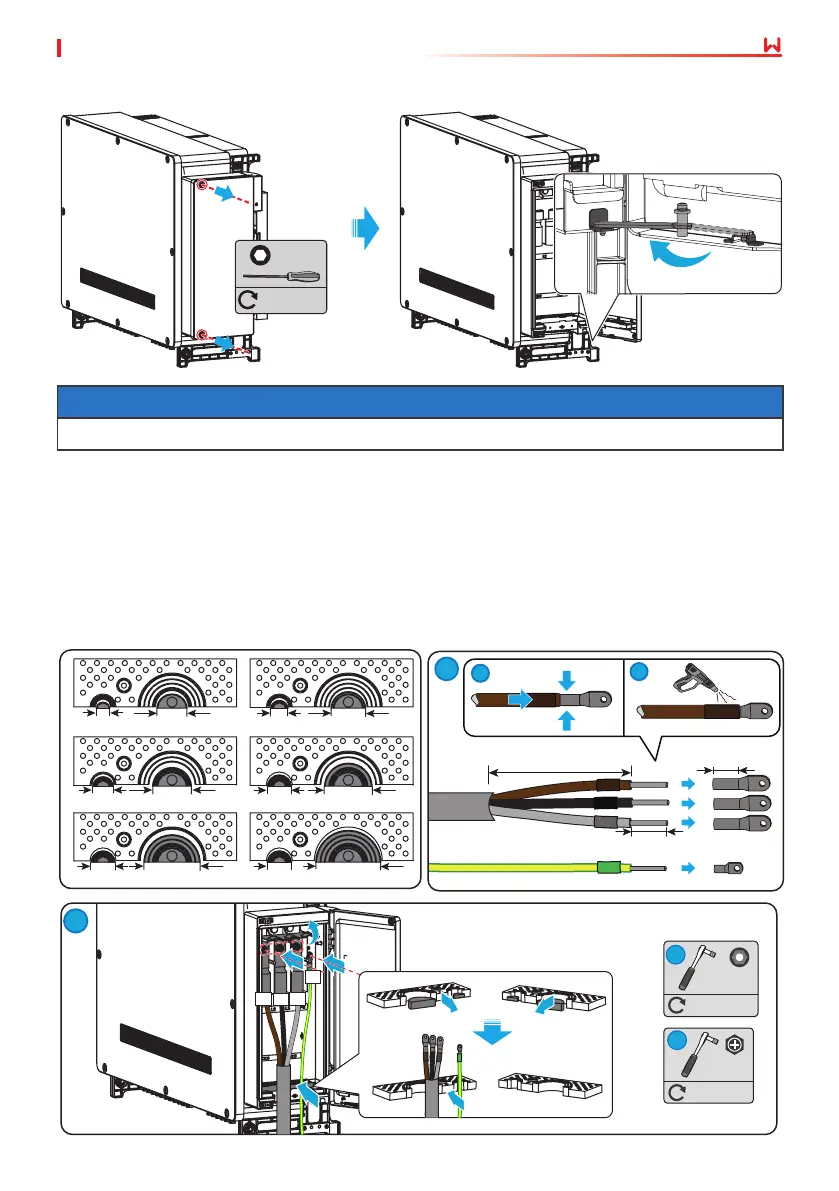
Keep the wiring box door open using the attached limit rod during wiring process.
Opening the AC wiring box
M5
2.5~3N·m
• Multi-core copper cable:
• The gure below takes the three-core copper cable as an example.
Connecting the AC output cable
Step 1 Prepare the AC output cable and crimp the OT terminals.
Step 2 Cut the rubber seal ring to a proper size.
Step 3 Open the wiring box door and x the cable conductors the corresponding terminals.
L1
L2=L1+3mm
1
1
2
1
2
1
M12
M8
> 300mm
33 - 35mm14 - 16mm
53 - 55mm
73 - 75mm
43 - 45mm
63 - 65mm
38 - 40mm
26 - 28mm
22 -
24mm
26 - 28mm
26 - 28mm
18 - 20mm
M8
7~9N·m
3
M12
25~30N·m
4
2


 To Next Page