Gmail 127
NOUG-2.1-update1-105 Nexus One User’s Guide
Working with conversations in batches
You can archive, label, delete, or perform other actions on a batch of conversations at
once, in your Inbox or in another labeled list of conversations.
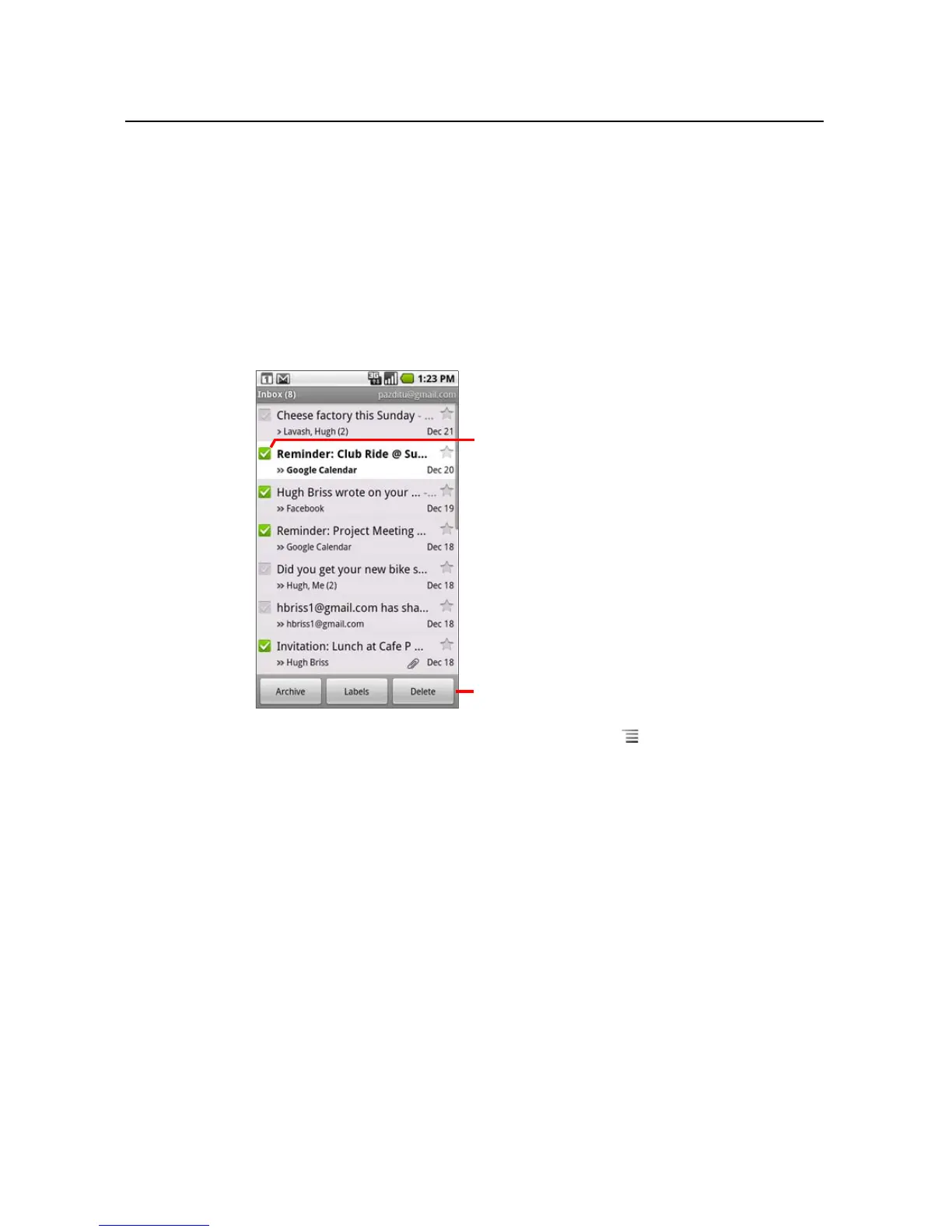
1 In the Inbox or other conversation list, check the conversations that you want to
work with as a batch.
When you check a conversation, the Archives, Labels, and Delete buttons
appear at the bottom of the screen.
2 Touch Archive, Labels, or Delete. Or press Menu and touch Add star,
Report spam, Mute, Mark read/Mark unread, or Deselect all.
Your action affects the entire batch of messages.
If you delete a batch of conversations, you can touch Undo in the yellow bar at the
top of the screen to undelete them. You can also use Undo after muting,
archiving, and reporting spam.
If you never work with batches of messages, you can hide the checkboxes to leave
more room for the subjects of conversations. See “Changing Gmail settings” on
page 137.
Check conversations to add them to the
batch.
Touch a button to act on the batch, or
press
Menu to act on the batch in other
ways.



 To Next Page