GoTab connects to the internet using a wireless broadband (Wi-Fi)
connection*. You can connect using a home network, or when you’re out
and about with Wi-Fi hotspots.
To connect to Wi-Fi please follow these simple instructions:
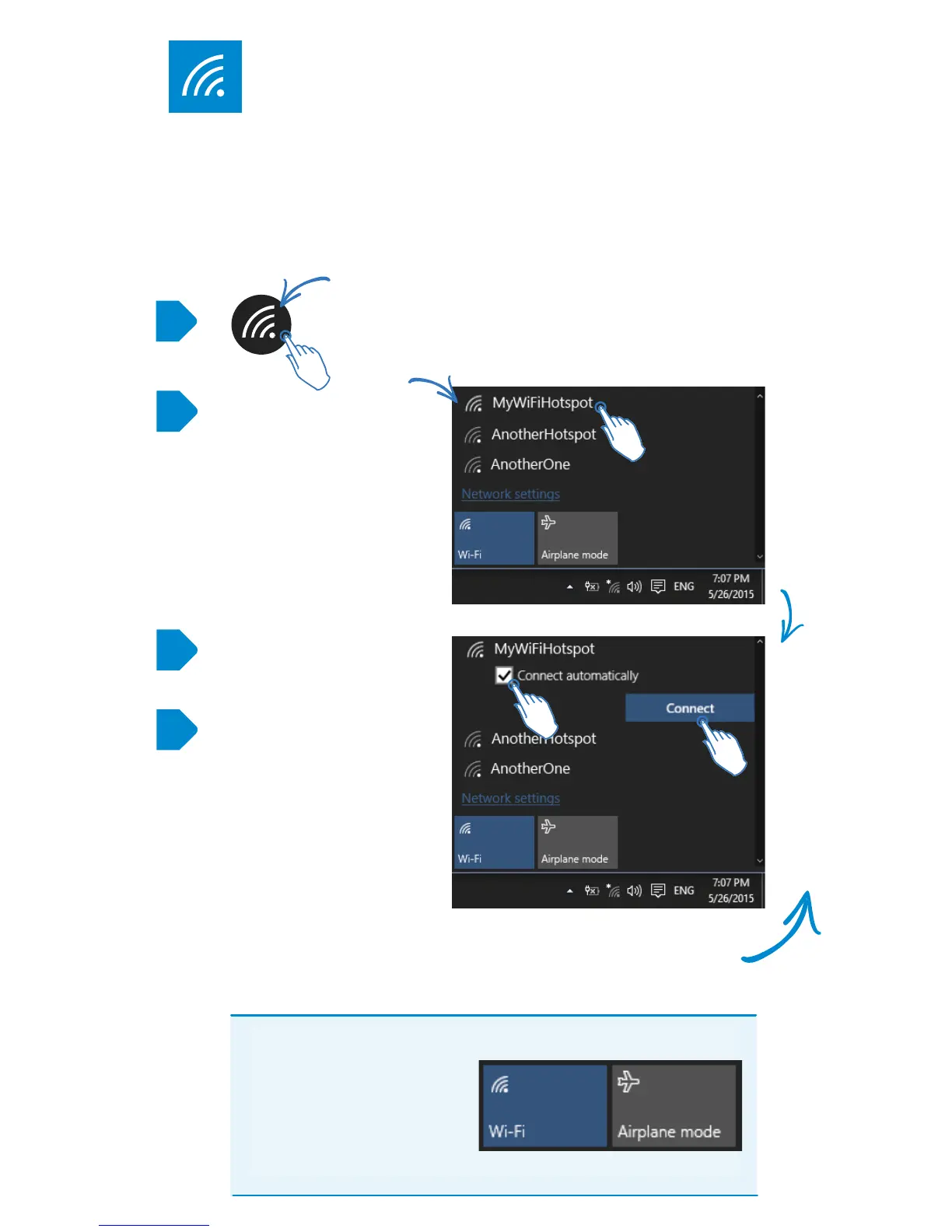
Tap the Wi-Fi icon at the bottom right of your Start Screen
Your GoTab will
search for all the
surrounding Wi-Fi
hotspots.
Tap the name of
your Wi-Fi hotspot
(this may be called
SSID on your router)
CONNECT TO WI-FI
If the Wi-Fi hotspot doesn’t need a password (open network),
your GoTab will automatically connect and you can start surng
straight away. Hurrah!
1
2
3
4
If it’s a hotspot you use
regularly, you can tick
Connect Automatically
Then tap Connect
Toggling Wi-Fi or Airplane
mode means your GoTab
won’t attempt to connect to
any networks. This also
preserves the battery life if
you don’t need to go online.


 To Next Page