EasyManua.ls Logo

Graco RTX 650 - Page 10

Graco RTX 650
24 pages
Print Icon
To Next Page IconTo Next Page
To Previous Page IconTo Previous Page
Loading...
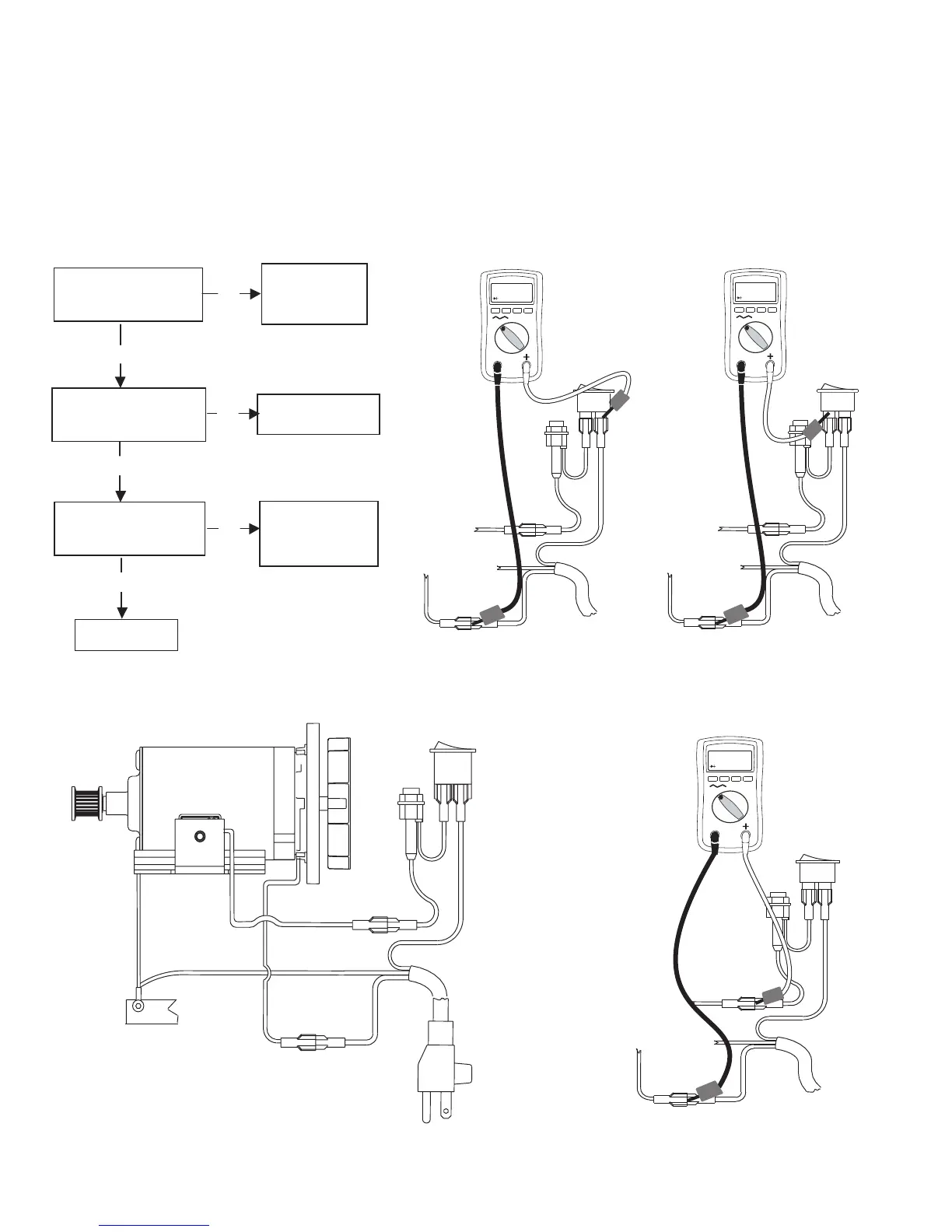
ON/OFF
Swit
ch
Red
Bla
ck
Power Cord
Chassis Ground
Whit
e
Wh
ite
Green
Gree
n
Moto
r
Black
Fuse
Red
Step 1
110-120 AC
V
--
++
Power switch ON.
Cord plugged in.
Meter on AC Volts
Red
Bla
ck
Power Cord
Whit
e
Wh
ite
Bla
ck
Fuse
Red
Green
--
Step 2
110-120 AC
V
--
Power switch ON.
Cord plugged in.
Meter on AC Volts
Red
Bla
ck
Power Cord
Whit
e
Wh
ite
Bla
ck
Fuse
Red
Green
--
++
Step 3
110-120 AC
V
--
Power switch ON.
Cord plugged in.
Meter on AC Volts
Red
Bla
ck
Power Cord
Whit
e
Wh
ite
Bla
ck
Fuse
Red
Green
--
++
NO
See step 2. Do you have
over 100 AC volts?
YES
See step 1.Do you have
over 100 AC volts?
YES
Repair or
replace the
power Cord.
Replace the
power switch.
Replace Motor
NO
See step 3.Do you have
over 100 AC volts?
NO
YES
Check the 3amp
Fuse, if ok repalce
fuse holder.
Motor will not run.
RTX 650 and TX 65
10

Related product manuals