765042196 Rev. 000 17
Operating the product (Carel MPXpro controller)
Starting up
Plug in the appliance
Default setting of the cabinet controller is that it is delivered turned on.
This means that the controller will start regulating, when power supply is connected,
and the main switch is in the on position.
Turning the cabinet on/off
To turn the cabinet on/off the 2-pole main switch, on the left side of the main control
box, placed in “the compressor compartment” is used.
The display
The display, used for adjusting settings and displaying temperature or alarm codes, is
placed behind the top panel and can be accessed by opening the top panel.
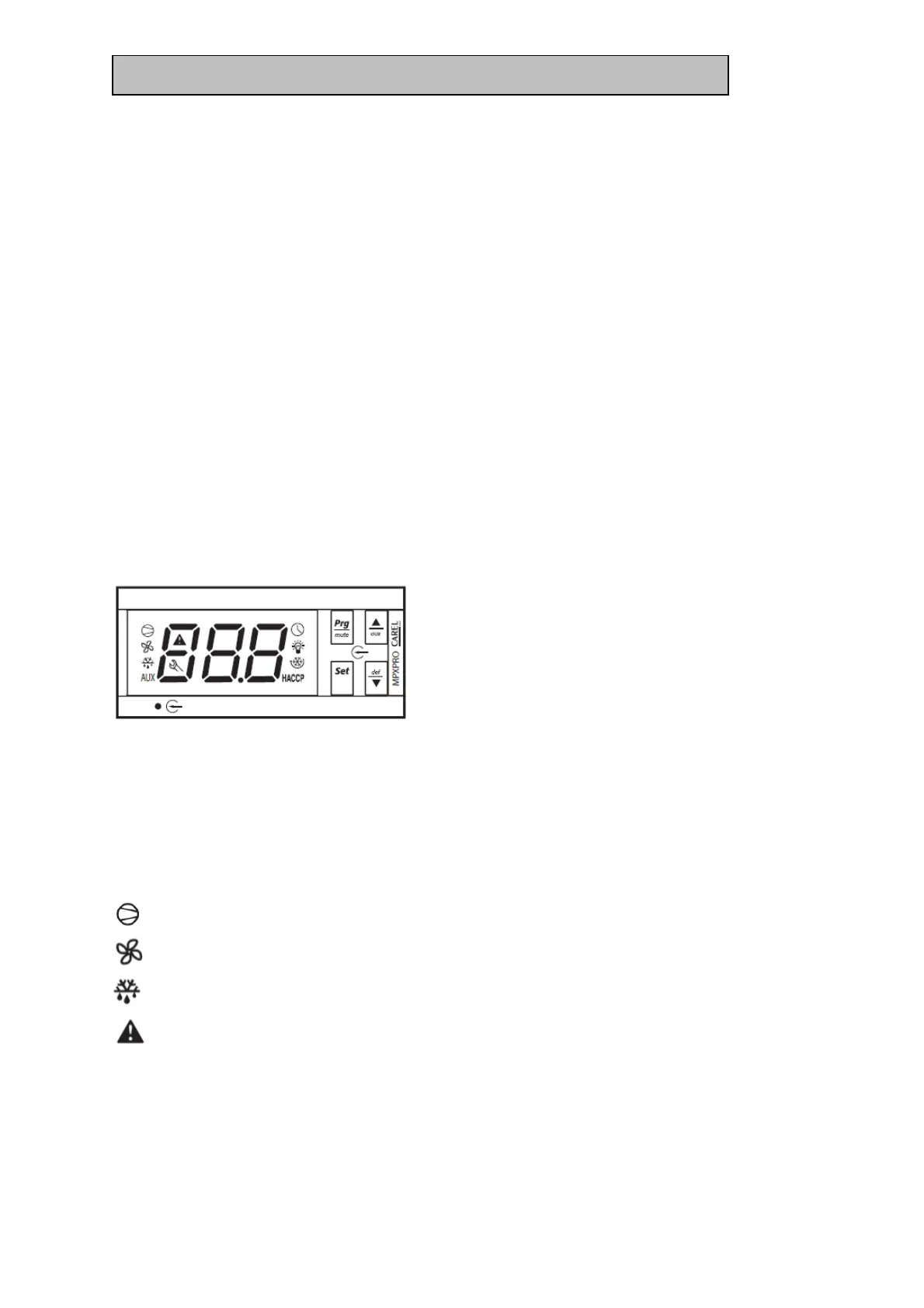
Display layout/explanation:
The above shown display has a three-digit read-out.
Within the read-out area, several LEDs are placed. These LEDs give the following
indications.
In general = When a LED is flashing the activation is delayed or limited.
= Cooling on (when this LED is lit, cooling is on)
= Inside fan running (when this LED is lit, the internal/evaporator fan is on)
= Defrost on (when this LED is lit, a defrost cycle is ongoing)
= If the LED is flashing, this is an indication for the door being open or an
ongoing alarm or error.
HACCP = When this LED is lit, a HACCP alarm is ongoing. When this LED is flashing
there is a saved HACCP alarm.



 To Next Page