EasyManua.ls Logo

Grant SAP18 - User Manual

Default Icon
28 pages
Print Icon
To Next Page IconTo Next Page
Loading...
JB Academy, JB Nova and SUB Aqua Pro 31394 V7
Detailed operating manual Page 1
www.grantinstruments.com
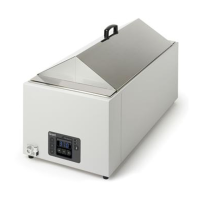
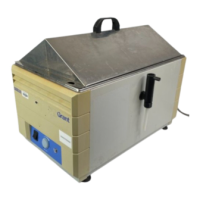
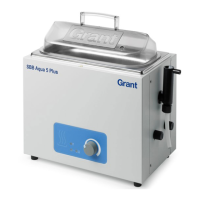
Unstirred Water Baths
JB Academy
JB Nova
SUB Aqua Pro
Operating Manual
www.grantinstruments.com
salesdesk@grantinstruments.com
Tel: +44 (0)1763 260811

Table of Contents

Other manuals for Grant SAP18

Questions and Answers

  • D
    David ReevesAug 10, 2025
    Why temperature continues to rise when not expected in Grant Laboratory Equipment?
    • A
      Abigail PattersonAug 10, 2025
      If the temperature continues to rise unexpectedly in your Grant Laboratory Equipment, it may be because the set temperature is higher than the liquid temperature. Ensure the bath set temperature is correct. Alternatively, the set temperature might be too close to the ambient temperature. In this case, increase the set temperature, keeping in mind that the minimum temperature should be 5°C above ambient.
  • E
    efowlerAug 17, 2025
    How to resolve if temperature does not rise when expected in Grant Laboratory Equipment?
    • Z
      Zachary HughesAug 17, 2025
      If the temperature in your Grant Laboratory Equipment isn't rising as expected, the set temperature might be lower than the liquid temperature. Verify that the bath set temperature is correct. Also, if the set temperature is too close to ambient, increase it, noting that the minimum temperature should be 5°C above ambient.
  • C
    Carol AguirreAug 25, 2025
    What to do if Grant Laboratory Equipment display shows '????'?
    • A
      Aaron AndersonAug 25, 2025
      If the Grant Laboratory Equipment display shows '????', it could indicate a faulty temperature probe. A competent person should check the probe for an open or short circuit fault, or contact Grant.
  • S
    Sonya VaughnAug 31, 2025
    What to do if the Grant Laboratory Equipment display shows '???'?
    • T
      Travis HaasSep 1, 2025
      If the Grant Laboratory Equipment display shows '???', it means that the bath is running on its default settings. Contact Grant Instruments' Service Department for assistance.

Summary

Use of Products

Safety Information

Covers safety compliance, symbols, and essential warnings for operating the water bath safely.

Safety Warnings

Crucial warnings regarding hot surfaces, water usage, electrical safety, environment, and cleaning procedures.

Operating Instructions

Operating Procedures

Operation

General operational guidance including water level, dry operation, and temperature settings.

Operating the Bath Without Water

Details on the dry start protection mechanism and warnings against repeated dry starts.

Allowing the Bath to Run Dry

Information on the dry protection alarm (DPA) and how to manage it.

Using the Bath with Heat Transfer Beads

Instructions for using heat transfer beads as an alternative to water, noting model compatibility.

Using the Water Bath

Using the JB Academy

Detailed guide on operating the JB Academy model, including controls and indicators.

Setting the Control Temperature

Instructions for setting the control temperature on the SUB Aqua Pro bath, referencing JB Academy.

Enabling the Keypad Lock

Procedure to lock and unlock the control panel on the SUB Aqua Pro model.

Setting Over Temperature Protection

How to set a maximum temperature limit to protect samples from overheating.

Calibration

Single Point Calibration

Details on applying a single offset for calibration, typically at the working temperature.

Dual Point Calibration

Explanation of dual point calibration for baths used over a range of temperatures, using low and high points.

Technical Specifications

Maintenance and Service

Troubleshooting

Grant SAP18 Specifications

General IconGeneral
TypeShaking Incubator
Timer1 minute to 99 hours 59 minutes
Weight35 kg
Orbit Diameter19 mm
Maximum Volume6 x 1L flasks
Capacity6 x 1L flasks

Related product manuals