EN - 34
5. Repeat until levers are at desired
operating height and aligned to each
other.
6. Tighten lock nuts.
IMPORTANT: Ensure that both levers are
aligned and do not make contact with each
other.
Adjust Forward Position
(Figure 25)
1. Shut off engine. Remove the ignition
key.
2. Loosen pivot bolt and angle adjustment
bolt.
3. Rotate the steering lever assembly to
desired forward lever position.
4. Tighten hardware.
IMPORTANT: Ensure that both levers are
aligned and do not make contact with each
other
ADJUSTING THE UNIT TO TRACK
STRAIGHT
Check and adjust tire pressure. Increase
pressure on side unit tracks to. DO NOT
exceed maximum recommended tire
pressure (see Specifications on page 46).
If tire pressure adjustment does not solve
tracking problem, adjust the limiter bolts on
the stop bracket (Figure 26). Front bolts
adjust forward and rear bolts adjust reverse.
Lengthen the limiter bolt (move closer to
lever) on side which is too fast.
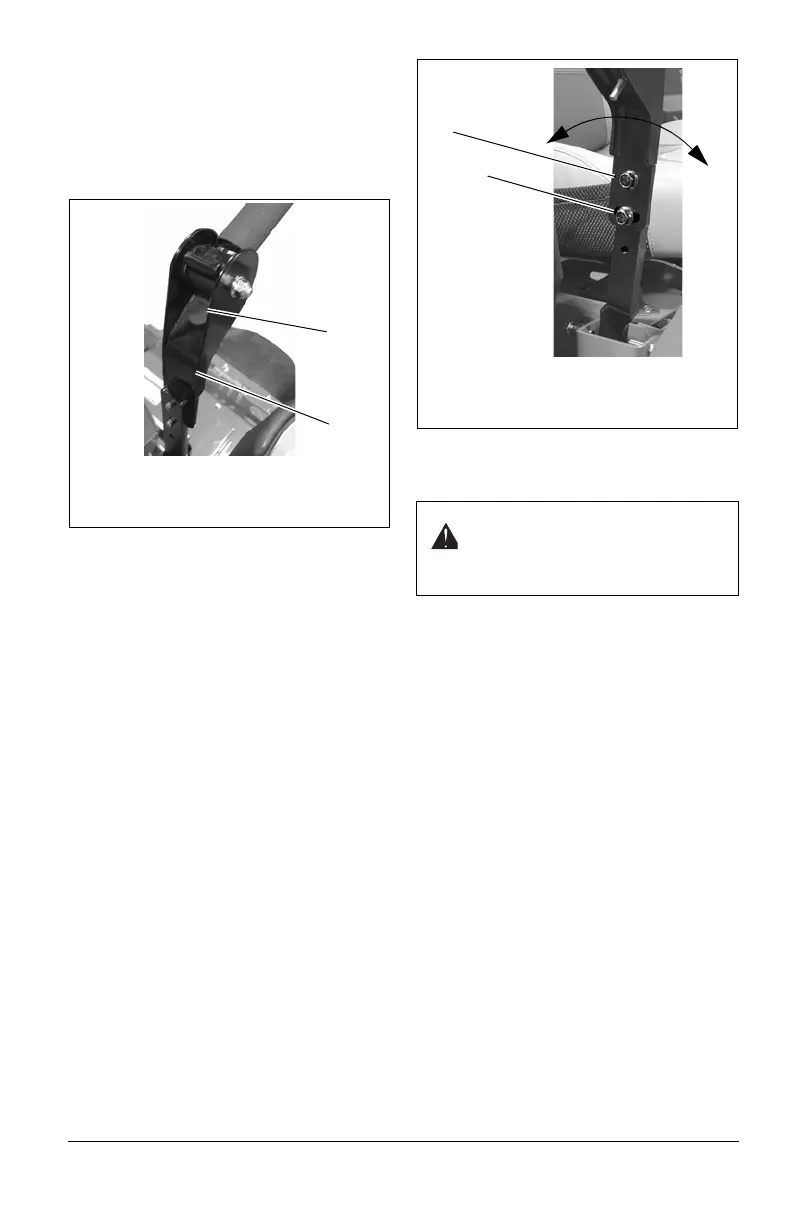
Figure 24
1. Steering Lever Assembly
2. Steering Lever Stop
1
2
WARNING: Prior to adjusting the
tracking of the unit, shut OFF
engine, engage parking brake, and
remove the ignition key.
Figure 25
1. Pivot Bolt
2. Angle Adjustment Bolt
1
2



 To Next Page