EN - 12
1. Remove wrap and packaging materials
from unit.
2. Remove unit from shipping container.
See Move Unit Manually on page 22.
3. Assemble seat.
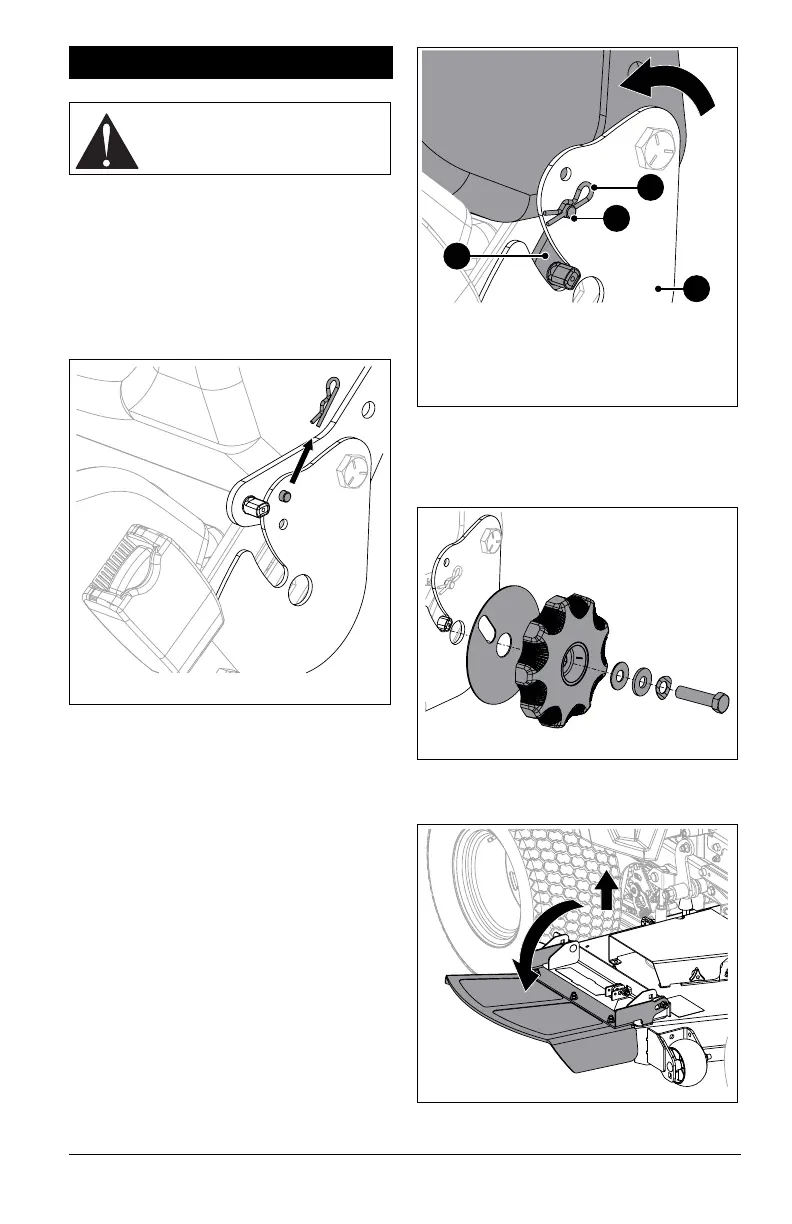
a. Remove hairpin from clevis pin and
remove clevis pin from seat cushion
bracket. See Figure 3.
See Figure 4.
b. Rotate seat forward so top edge of
seat cushion bracket is below lower
hole in seat plate.
c. Reinstall clevis pin through lower hole
in seat plate and secure with hairpin.
d. Remove backrest angle dial and
hardware from literature pack around
steering lever and secure dial to seat.
See Figure 5.
4. Lift discharge chute up slightly and rotate
to operating position. See Figure 6.
ASSEMBLY
WARNING: Read and
understand the Safety section
before proceeding.
Figure 4
1. Seat Cushion Bracket
2. Seat Plate
3. Hairpin
4. Clevis Pin
1
2
3
4



 To Next Page