EN - 39
REMOVE / INSTALL MOWER
DECK
Remove Deck
1. Place unit in service position. See
Service Position on page 23.
2. Remove PTO belt from clutch. See
Remove PTO Belt on page 34.
3. Push deck lift pedal completely forward to
engage transport lock.
4. Position supports such as blocks or jack
stands under each side of the deck.
5. Release transport lock and slowly lower
deck until it rests on supports.
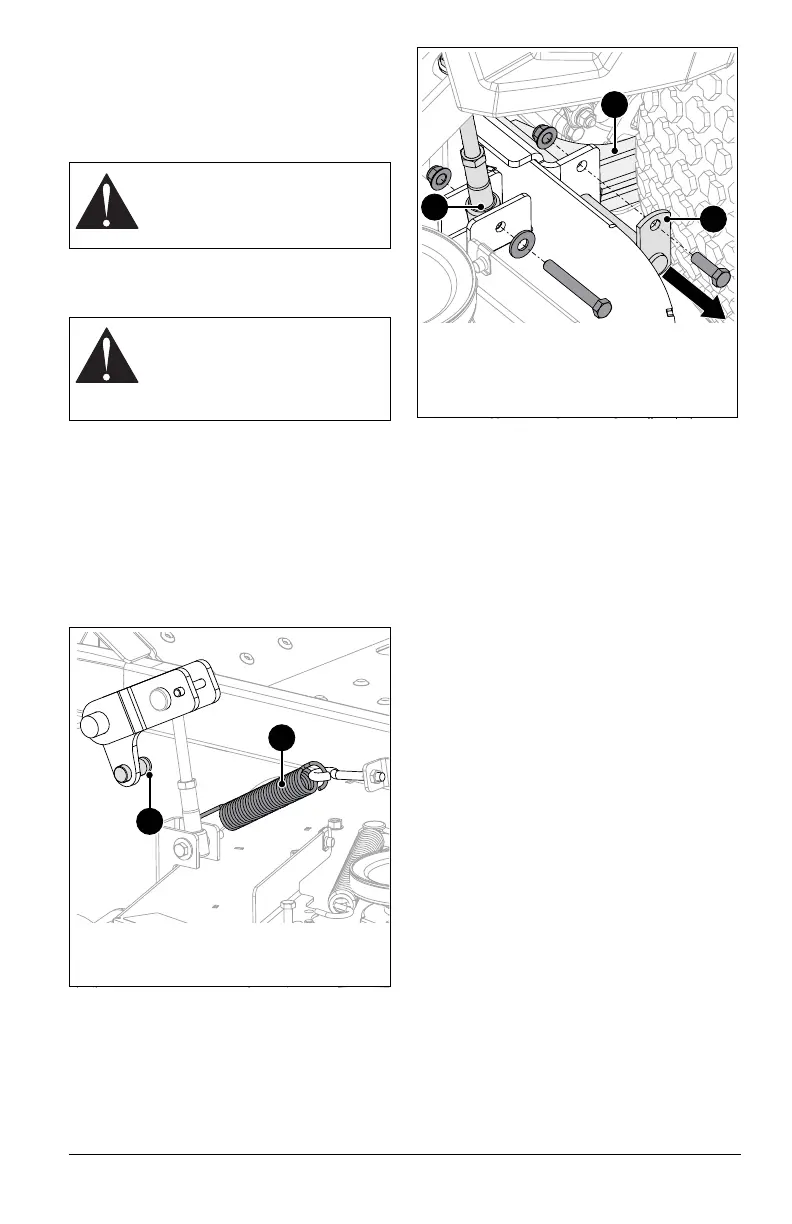
6. Slowly disconnect lift-assist springs from
spring peg on each side of deck. See
Figure 58.
See Figure 59.
7. Remove hardware retaining deck lift links
to deck lift brackets.
8. Remove rear mounting pins securing
mounting arms to deck.
9. Slide deck out from under unit.
Install Deck
See Figure 59.
1. Position deck under unit.
2. Connect rear mounting arms to deck with
mounting pins. Secure with original
hardware.
3. Secure deck lift links to deck lift brackets
with original hardware.
4. Reinstall PTO belt around clutch. See
Install PTO Belt on page 36.
5. Push deck lift pedal completely forward to
engage transport lock.
6. Reconnect lift-assist springs to spring
pegs.
7. Level the deck. See Level and Pitch
Mower Deck on page 40.
WARNING: AVOID INJURY.
Springs store energy. Keep body
parts away from pinch points
when removing the deck.
WARNING: AVOID INJURY.
Mower lift arms and lift pedal
could cause severe injury if the
lift-assist springs are not
disconnected before the lift links.
Figure 58
1. Lift-Assist Spring
2. Spring Peg
1
2
Figure 59
1. Mounting Pin
2. Deck Lift Link
3. Mounting Arm
1
2
3



 To Next Page