11
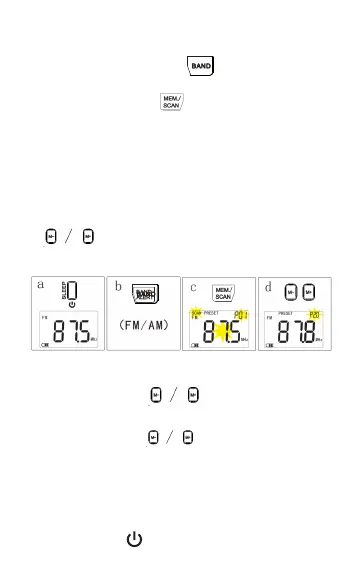
a. In radio state, press “ ” to select the FM/
AM band.
Auto scan & stored stations
b. Long press the “ ” button for 2 seconds
and release it, then the radio will start to scan the
station automatically. When a station is received,
it can be automatically stored in the memory
space. Total 20 storage spaces for the AM/FM
band (P01-20).
c. After finished of the scanning, press the
“ ” button to call up the stations in the
memory space (P01-20).
Tune the stations
1.Short press the “ ” button to call up the
stations (P01-20) in the memory space.
2.Long press the “ ” button for 2 seconds
and then release it, then the stations will be
searched automatically. The search is completed
after the stations are received.
Manually store the stations
a. Press the “ ” button to turn on the radio.


 To Next Page