13
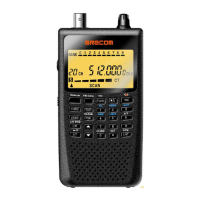
PGM (Program) – programs frequencies into channels.
ENT – completes the entry of frequencies and text.
1 – enters a 1, or inputs characters 0 through 9 in text mode.
2/ABC – enters a 2, or inputs characters A, B, or C.
3/DEF – enters a 3, or inputs characters D, E, or F.
4/GHI – enters a 4, or inputs characters G, H, or I.
5/JKL – enters a 5, or inputs characters J, K, or L.
6/MNO – enters a 6, or inputs characters M, N, or O.
7/PQRS – enters a 7, or inputs characters P, Q, R, or S.
8/TUV – enters an 8, or inputs characters T, U, or V.
9/WXYZ – enters a 9, or inputs characters W, X, Y, or Z.
0 – enters a zero, or inputs characters .,-,#,_,@,+,*, &, /, ,, $, %, !, ^, (, ), ?, ~,
‘, or .
•/DELAY – enters a decimal point (necessary when programming frequen-
cies), space, or programs delay time for the selected channel/search bank, or
enters a hyphen (in trunking ID setting).
CL (Clear) – clears an incorrect entry.
PWR DC 9V – connect a power source here.
PC/IF – connect an optional PC interface cable here to use the scanner with
your computer.
Antenna Jack – connect the supplied antenna or an external antenna here.
– connect an earphone or headphone here.
OFF VOL/SQ – turn the scanner on or off and adjust the squelch.


 To Next Page