12
YOUR SCANNER’S CONTROLS
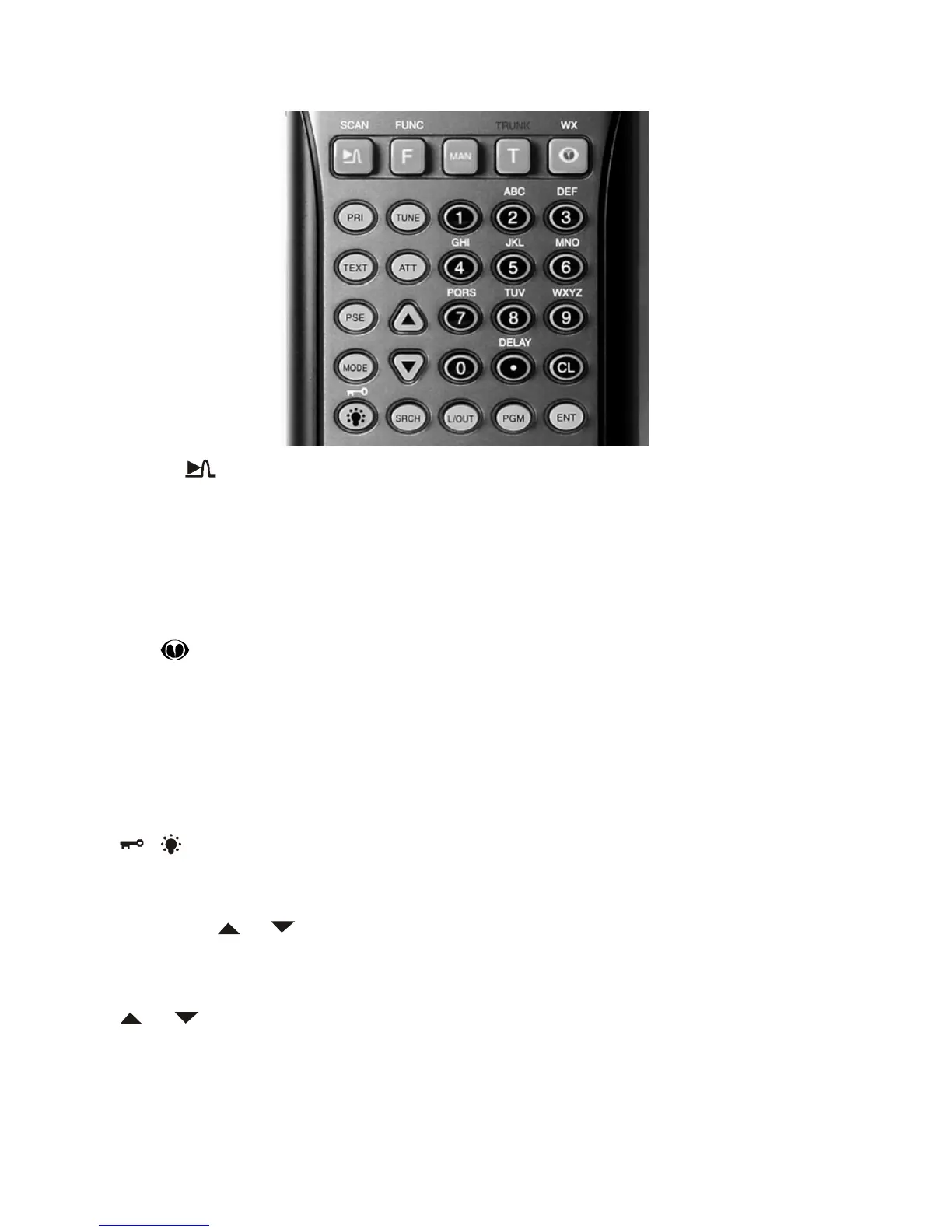
SCAN/ – scans through the programmed channel, or activates the Spec-
trum Sweeper function.
FUNC (function) – lets you use various functions by pressing this key in combi-
nation with other keys.
MAN – stops scanning and lets you directly enter a channel number.
TRUNK – stores the trunking ID code or holds the trunking ID while scanning.
WX/ – scans through the seven preprogrammed weather channels, or
jumps to a Skywarn channel you programmed (999CH).
PRI (Priority) – sets and turns the priority function on or off.
TEXT – lets you input text.
PSE – stops search.
MODE – changes the receive mode (AM, FM, CT, DC, MO, ED, LT).
/ – turns on/off the backlight, or when used with FUNC locks/unlocks the
keypad to prevent accidental entries.
TUNE – lets you input a frequency and allows you to fine tune a frequency
along with or .
ATT (Attenuate) – turns attenuation on to reduce the scanner’s sensitivity and
block extremely strong signals, or turns it off to return the sensitivity to normal.
or – selects the scan or search direction.
SRCH – lets you search the seven search banks.
L/OUT (Lock Out) – lets you lock out a selected channel, skip a specified fre-
quency during search, or lock out a selected ID code.


 To Next Page