3. Remove all the unassembled parts from the box.
4. Remove the machine from the box.
5. Discard the box and package in compliance with
local regulations.
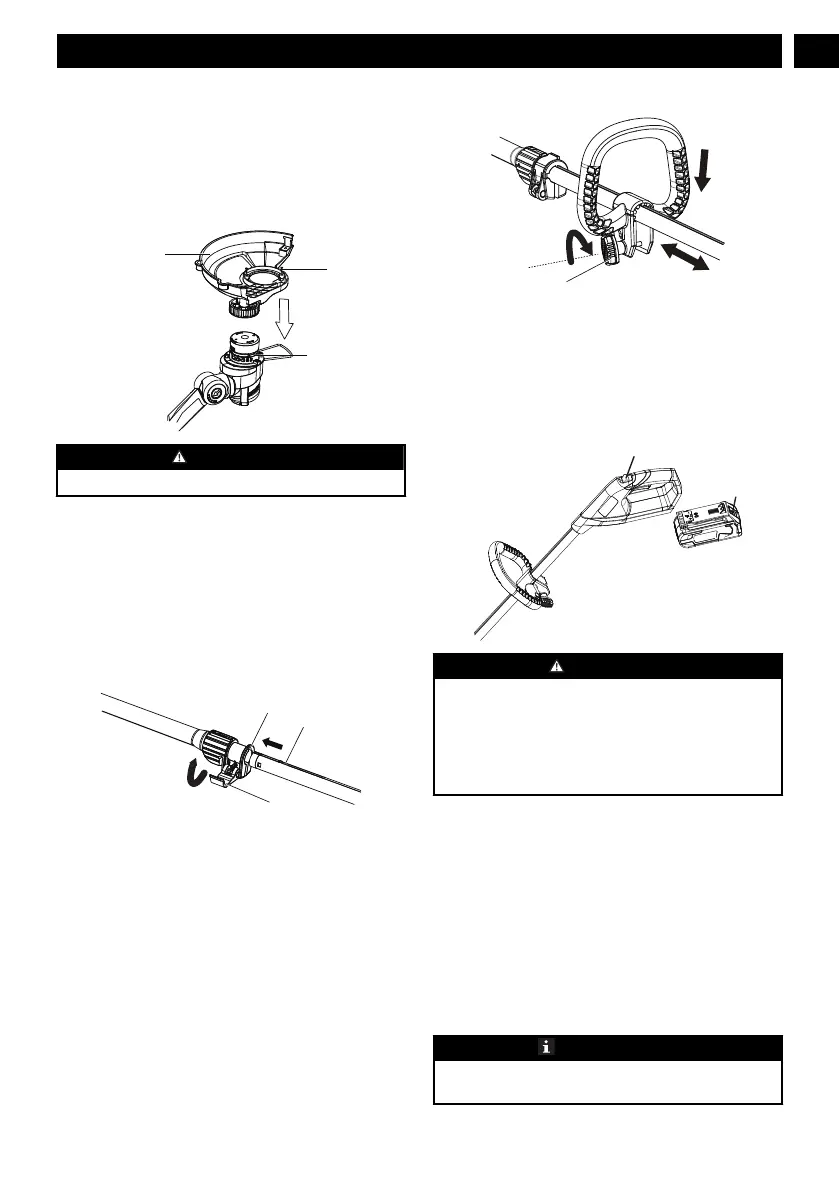
7.2 ATTACH THE GUARD
WARNING
Do not touch the cut-off blade.
1. Remove the screws from the trimmer head with a
Phillips head screwdriver (not included).
2. Install the guard (11) into the slots on trimmer head.
3. Turn the guard counterclockwise to lock it into place.
4. Align the screw holes on the guard with the screw
holes on the trimmer head.
5. Tighten the screws (14).
7.3 ASSEMBLE THE SHAFT
1. Unlock the cam lever (5).
2. Insert the lower shaft through the guide groove (16)
until you hear a "click".
3. Adjust the shaft to the most suitable position.
4. Lock the cam lever.
7.4 ATTACH THE AUXILIARY HANDLE
1. Remove the knob (15) from the handle.
2. Attach the auxiliary handle on the shaft.
3. Set the auxiliary handle in the comfortable position.
4. Tighten the auxiliary handle with the knob .
7.5 INSTALL THE BATTERY PACK
WARNING
• If the battery pack or charger is damaged, replace
the battery pack or the charger.
• Stop the machine and wait until the motor stops
before you install or remove the battery pack.
• Read and understand the instructions in the
battery and charger manual.
1. Align the lift ribs on the battery pack with the
grooves in the battery compartment.
2. Push the battery pack into the battery compartment
until the battery pack locks into place.
3. When you hear a click, the battery pack is installed.
7.6 REMOVE THE BATTERY PACK
1. Push and hold the battery release button.
2. Remove the battery pack from the machine.
8 OPERATION
IMPORTANT
Before you operate the machine, read and understand
the safety regulations and the operation instructions.
5
English
EN






 To Next Page