WARNING
Be careful when you operate the machine.
8.1 START THE MACHINE
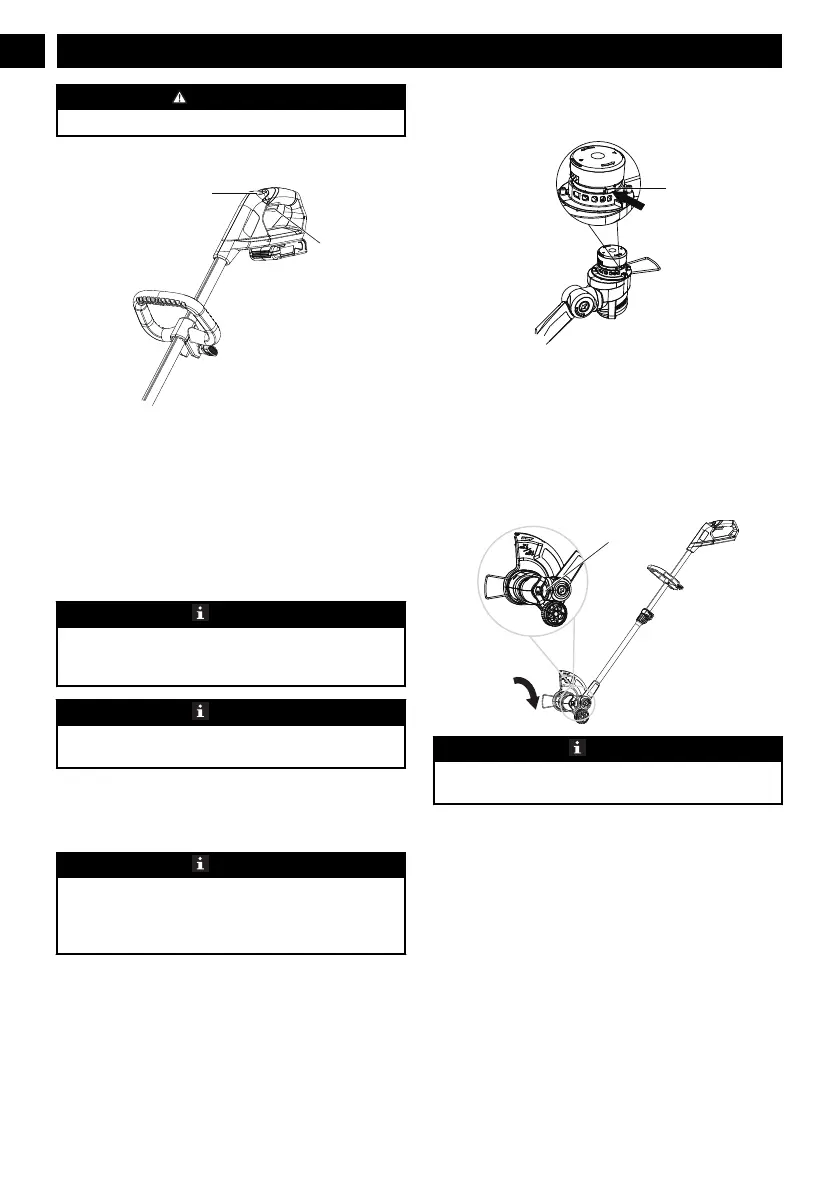
1. Pull back on the lock-out button (2) and pull the
trigger (1). Once the machine is running you can
release the lock-out button.
8.2 STOP THE MACHINE
1. Release the trigger to stop the machine.
8.3 ADJUST THE LENGTH OF THE
CUTTING LINE
NOTE
The machine has an auto-feed head. It will damage
the machine if you hit the head to try to advance the
line.
NOTE
If the cutting line does not automatically advance, it
can be tangled or empty.
1. When the machine is on, release the trigger.
2. Wait two seconds, push the trigger again.
3. Resume trimming.
NOTE
The line will extend approximately 0.4 in. with each
stop and start of the switch trigger until the line
reaches the cut-off blade and the cut-off blade cuts the
excess length.
8.4 ADJUST THE LENGTH OF THE
CUTTING LINE MANUALLY
1. Stop the machine. Remove the battery from the unit.
2. Push the spool retainer button (26) and pull on
cutting line to manually advance the cutting line.
3. After you extend new cutter line, always return the
machine to its normal position before you start it
again.
8.5 CHANGE TO THE EDGING MODE
NOTE
You can change the trimmer to an edger to keep
patios, driveways and sidewalks well groomed.
1. Stop the machine.
2. Push on the edge button (7) and turn the trimmer
head 90 degrees until the trimmer head locks into
position.
3. Release the edge button.
6
English
EN






 To Next Page