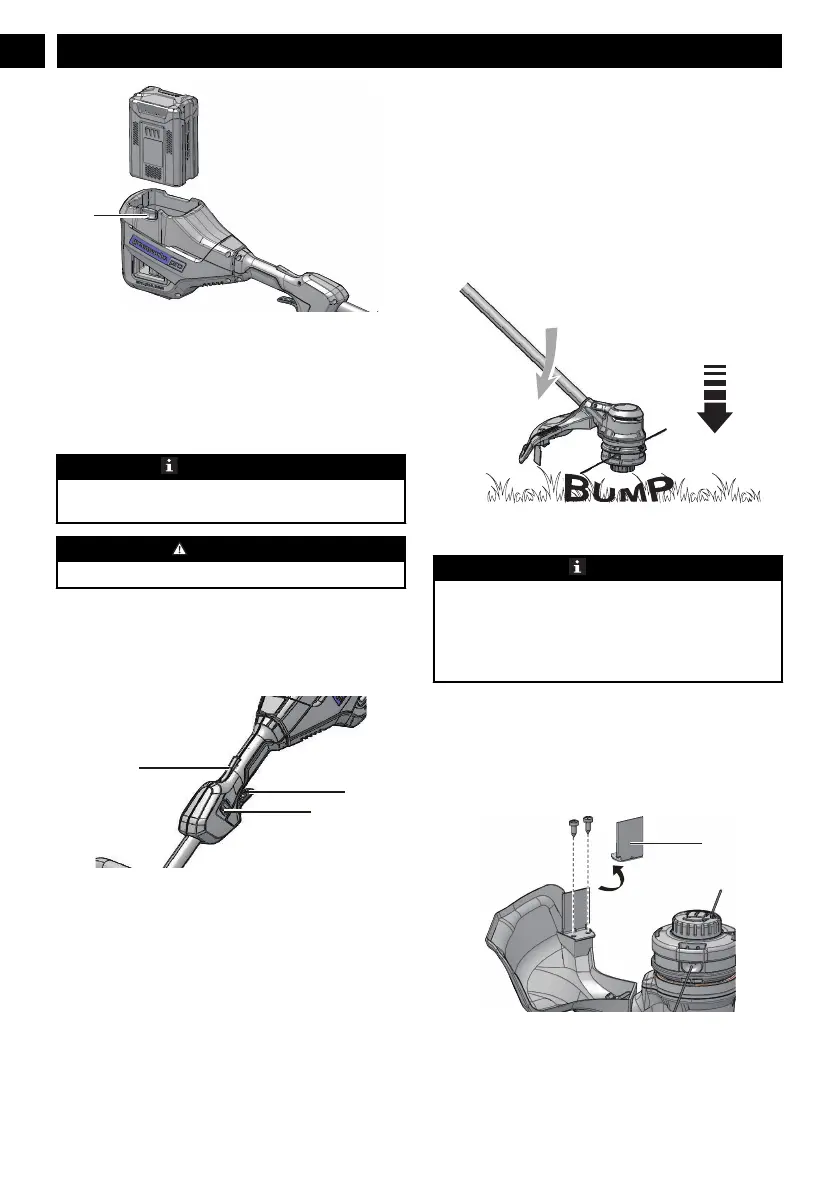
7.6 REMOVE THE BATTERY PACK
1. Push and hold the battery release button (1).
2. Remove the battery pack from the machine.
8 OPERATION
IMPORTANT
Before you operate the machine, read and understand
the safety regulations and the operation instructions.
WARNING
Be careful when you operate the machine.
8.1 CONTROLS
8.2 START THE MACHINE
1. Push the lock-out button (3) and pull the trigger (4).
2. Push the speed switch (5) to the desired operating
speed. Push the speed switch to position 1 for low
speed or position 2 for high speed.
8.3 STOP THE MACHINE
1. Release the trigger to stop the machine.
8.4 ADJUST THE LENGTH OF THE
CUTTING LINE
While you operate the machine, the cutting line gets
worn shorter. You can adjust the length of the cutting
line.
1. Hit the trimmer head against the ground while you
operate the machine.
2. Line is automatically released and the cut-off blade
cuts the excess length.
8.5 ADJUST THE CUTTING DIAMETER
NOTE
The machine is set at a 14 in. (35.6 cm) cutting
diameter. You can adjust to a 16 in. (40.6 cm) cutting
diameter.
Set the cutting diameter to 14 in. (35.6 cm) for greater
runtime and 16 in. (40.6 cm)for a larger cutting area.
1. Remove the battery pack.
2. Remove the blade screws from the cut-off blade
(17).
3. Turn the cut-off blade 180°.
4. Tighten the blade screws.
8.6 LINE CUT-OFF BLADE
This trimmer is equipped with a line cut-off blade (17) on
the guard. The line cut off blade continuously trims the
6
English
EN





 To Next Page