• Clean the product and perform full servicing before
long-term storage.
• Use transportation guards on the product to prevent
injury or damage during transportation and storage.
• Securely stow the product during transport to ensure
safe handling.
7.2 DISPOSAL OF THE BATTERY, BATTERY
CHARGER, AND PRODUCT
Symbols on the product or the package of the product
mean that the product is not domestic waste. Recycle
it at a recycling station for electrical and electronic
equipment. This helps to prevent damage to the
environment and persons.
Get in touch with your local authorities, domestic waste
service, or your dealer for more information about how
to recycle your product.
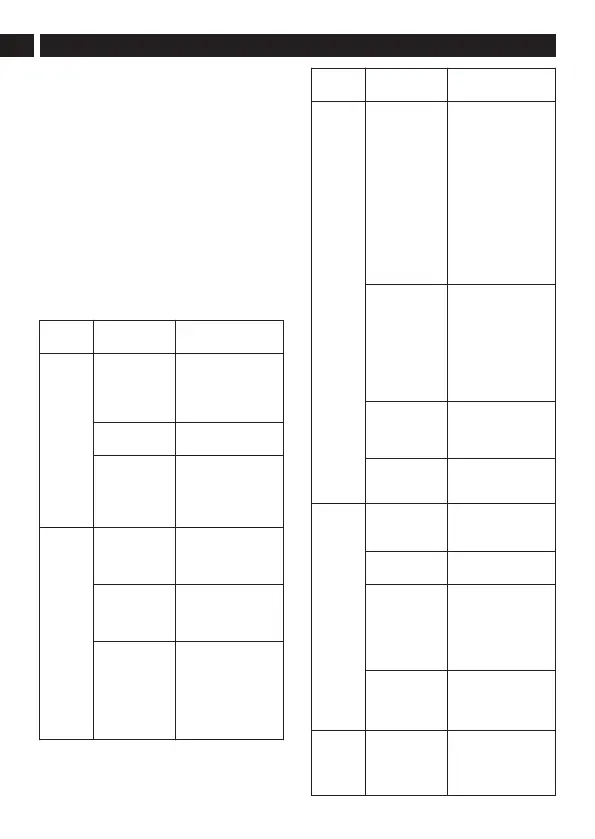
8 TROUBLESHOOTING
Problem Possible
Cause
Solution
The prod-
uct does
not start
when the
trigger is
pulled.
No electrical
contact be-
tween the prod-
uct and the bat-
tery.
1. Remove battery.
2. Inspect the metal
contacts and re-
insert the battery.
The battery is
depleted.
Charge the battery
pack.
The safety-lock
button and trig-
ger are not op-
erated at the
same time.
1. Push the safety-
lock button and
hold it.
2. Pull the trigger to
start the product.
The prod-
uct stops
when you
are cut-
ting.
The guard is
not attached to
the trimmer
head.
Remove the battery
and attach the guard
to the trimmer head.
Cutting line is
too heavy.
Use only with the
nylon cutting line of
0.095" (2.4 mm) diam-
eter.
The grass be-
comes tangled
around the mo-
tor shaft or the
trimmer head.
1. Stop the product.
2. Remove the bat-
tery.
3. Remove the
grass from the
motor shaft and
trimmer head.
Problem Possible
Cause
Solution
The motor is
overloaded.
1. Pull the trimmer
head away from
the grassy area.
2. Allow the prod-
uct to cool for at
least 10 minutes.
3. Cut in stages
and guide the
trimmer head in
and out of the
grass, making
sure not to cut
more than 8" per
pass.
The battery or
product is too
hot.
1. Allow the battery
or product to
cool for at least
10 minutes. Re-
move the battery
from the product
to help the prod-
uct cool down
more quickly.
The battery
pack is discon-
nected from the
product.
Install the battery
again.
The battery
pack is deple-
ted.
Charge the battery
pack.
The cut-
ting line
does not
extend.
Lines are inter-
locked.
1. Remove the in-
terlocked lines.
2. Rewind the lines.
Not enough line
on spool.
Install more line.
Lines are worn
too short.
1. Remove the bat-
tery.
2. Press and hold
the bump head.
3. Pull out lines
manually.
Lines are tan-
gled on spool.
1. Remove the
lines from the
spool.
2. Wind the lines.
The cut-
ting line
keeps
breaking.
The product is
used incorrectly.
1. Cut with the tip
of the line, avoid
stones, walls,
and other hard
objects.
14
English
EN





 To Next Page