8. Starting up the product
CAUTION
Radiation
Minor or moderate personal injury
‐ This equipment complies with FCC
and ISED radiation exposure limits
set forth for an uncontrolled
environment. This equipment must
be installed and operated with a
minimum distance of 20 cm (0.66
ft) between the radiator and your
body.
1. Fill the system with liquid and vent it.
2. Make sure the required minimum inlet
pressure is available at the pump inlet.
3. Switch on the power supply.
The pump is factory set to valve AUTOADAPT.
You can change the settings on the operating
panel or via Grundfos GO. We recommend to
follow the guided setup in Grundfos GO.
9. Control functions
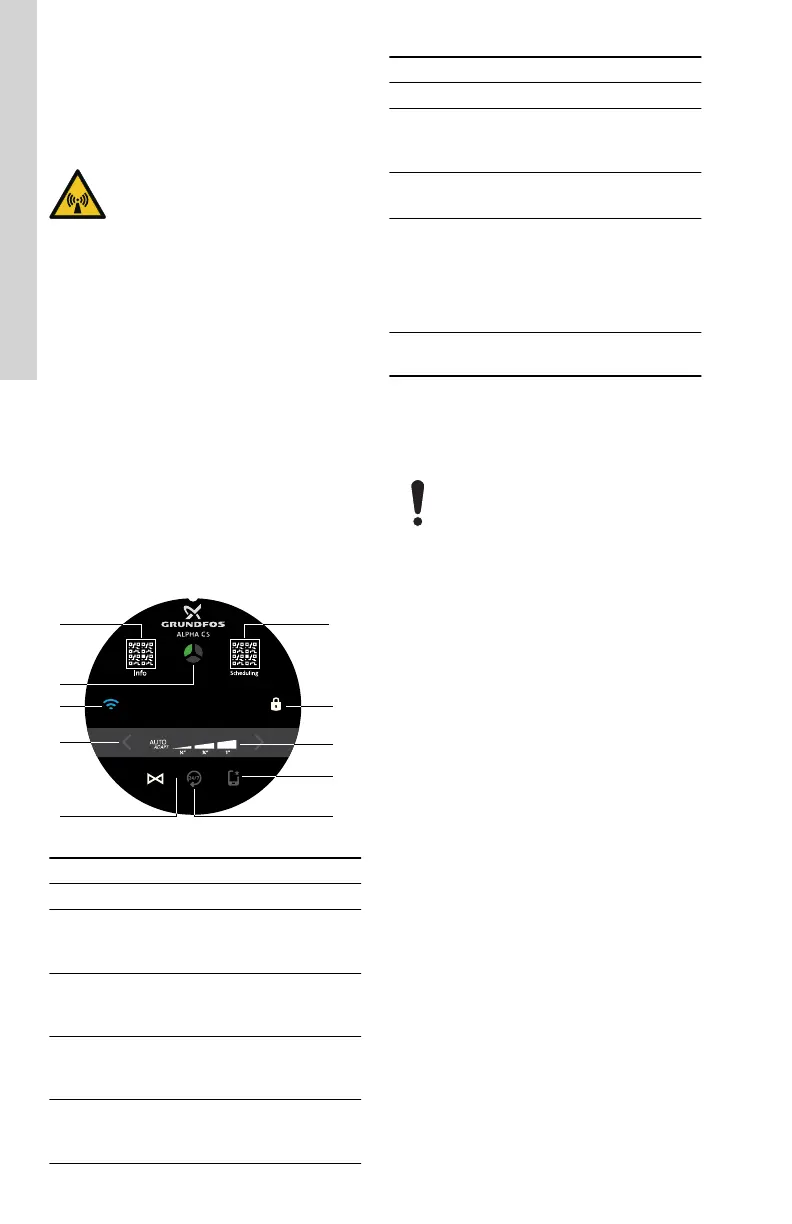
9.1 Operating panel
LED symbols and buttons on the pump display
TM085719
Pos. Description
1 QR code for Grundfos Product Center
2
Grundfos mini Eye
The indicator light shows the operating
status of the product.
3
Connect
If lit, the pump is connected to Grundfos
GO via Bluetooth.
4
Settings for control modes
Use the arrows to toggle between the
control modes.
5
Control mode
You can select the control mode
COMFORT SYSTEM AUTOADAPT.
Pos. Description
6 Always on
7
Grundfos GO
The pump has been set
via Grundfos GO.
8
Settings for the selected control mode
1/2", 3/4", 1" or AUTOADAPT
9
Lock
This indicates that the operating panel is
locked and no buttons can be used. It
automatically locks after a few seconds.
To unlock the panel, push and hold the
icon for 1 second.
10
QR code for Grundfos GO and Grundfos
HOME landing page
The operating panel has a touchscreen which
means you can change settings by touching the
icons on the operating panel.
Due to interference of the
touchscreen, keep a distance of
minimum 5 mm from the front of the
operating panel to all conductive
materials, for example, metal cabinets
and cables.
14
English (US)






 To Next Page