EasyManua.ls Logo

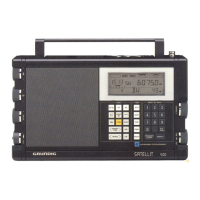
Grundig 800 MILLENNIUM - User Manual

Grundig 800 MILLENNIUM
30 pages
Print Icon
To Next Page IconTo Next Page
Loading...

Questions and Answers

  • N
    Natalie ShawJul 30, 2025
    How to unlock the front panel on a Grundig 800 MILLENNIUM Receiver?
    • A
      Amanda MillsJul 30, 2025
      If the Grundig Receiver's front panel is not operating for tasks like tuning or frequency entry, the lock function may be enabled. To unlock the front panel, press and hold the designated button for 3 seconds.
  • A
    andrewherreraAug 5, 2025
    Why does the timer not operate on my Grundig Receiver?
    • D
      Douglas GalvanAug 5, 2025
      If the Grundig Receiver's timer isn't working, there might be a few reasons: * The clock(s) may not be set. Make sure to set the clock(s). * The timer might not be programmed correctly. Set the clock(s) and program the timer ON/OFF times. * An alternate clock could be selected. Verify that the last displayed clock is the one you want to use for the timer event.
  • M
    Misty CrawfordAug 11, 2025
    What to do if no signals are heard when antenna is connected to Grundig Receiver?
    • V
      Vincent Mcdonald IVAug 11, 2025
      If you're not hearing any signals from your Grundig Receiver when an antenna is connected, or if the sensitivity seems low, here are a couple of things to check: * Ensure that the correct antenna input is selected. * Make sure the 'ATTENUATOR' is turned off.
  • S
    Stacey YoungAug 17, 2025
    Why is there no sound from my Grundig 800 MILLENNIUM Receiver despite S meter indication?
    • G
      garciaandrewAug 17, 2025
      If your Grundig Receiver shows an S meter indication but you're not hearing any sound, it could be due to: * An improper mode selection. Check your mode selection. * A defective external speaker, if one is connected. Check the external speaker.
  • N
    Nicole AlexanderAug 23, 2025
    How to troubleshoot a Grundig 800 MILLENNIUM Receiver with no front panel display?
    • J
      Justin ChenAug 23, 2025
      If the front panel display or light on your Grundig Receiver isn't working, here's what you can check: * **Power connection**: Ensure the power supply cables are properly connected. * **AC Adapter**: Check the AC adapter for any defects. * **Batteries**: If operating on batteries, make sure they are correctly installed and not discharged. Also, verify that there is no AC power if you intend to use batteries.

Summary

Specifications

Important Safeguards

Power Supply

AC Adapter and Battery Operation

Details on using the AC adapter and installing batteries for power.

Installation

Antenna Requirements

Guidance on selecting and connecting appropriate antennas for various bands.

Front Panel Description

Function Keys and Memory Access

Using keys for memory storage, recall, scanning, and other functions.

Front Panel Features (Continued)

Memory and Scan Access Controls

Controls for VFO, SKIP, DEL, SCAN, and SW BAND operations.

LCD Display Description

Getting Started

Advanced Operation

Signal Reception Techniques

Techniques for AM Synchronous, SSB, and FM reception.

Memory Functions

Memory Channel Management

Storing, recalling, and deleting up to 70 memory channels.

Scan Functions

Clock and Timer Functions

Timer Operation and Programming

Understanding and programming timer functions for automatic operation.

Troubleshooting

Problem Solutions

Solutions for common problems encountered during operation.

Service and Warranty

Grundig 800 MILLENNIUM Specifications

General IconGeneral
Output power2 x 100W (4Ω)
Input sensitivity200mV
Dimensions430 x 150 x 360 mm
Weight10.5 kg
TypeReceiver
Tuning rangeFM, MW
Signal to noise ratio106 dB (line)
Speaker load impedance4Ω - 8Ω
Tuner TypeFM, MW
Signal-to-Noise Ratio80dB

Related product manuals