Home
Gtech
Vacuum Cleaner
AirRam AR20
Page 6 (Operating the AirRam)
Gtech AirRam AR20 - Operating the AirRam; Powering On the Vacuum; Power Button Location
16 pages
Manual
Save Page as PDF
To Next Page
To Next Page
To Previous Page
To Previous Page
Loading...
6
Operation
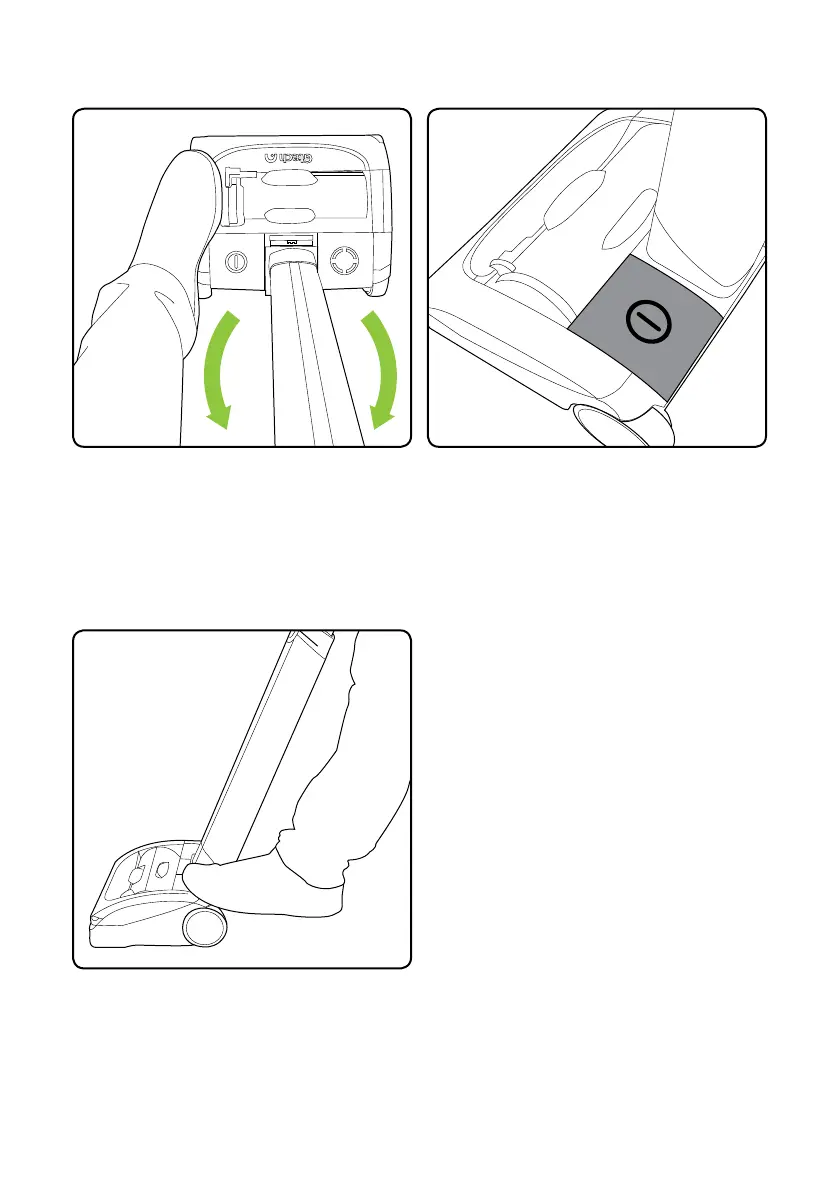
Without pressing the power button, place
your foot on the left side of the AirRam
head and pull the handle back.
Press the button with your foot to turn the
AirRam on.
The power button is located on the left
hand side of the AirRam head.
5
7
Table of Contents
Main Page
Important Safeguards
2
Electrical Safety
2
Battery Safety
2
Intended Use
3
What's in the Box
4
Product Serial Number
4
Operation
6
Battery Charging
8
Emptying the bin
9
Removing/Cleaning Brush Bar
11
Replacing the Filters
11
Clearing a Jam/Fault
13
Troubleshooting
13
Product Care
14
For Household Use Only
14
Warranty Terms and Conditions
15
Related product manuals
Gtech AirRam AR29
16 pages
Gtech AirRAM AR01
12 pages
Gtech AirRAM AR05
28 pages
Gtech AirRam
68 pages
Gtech AirRAM 3
20 pages
Gtech AirRAM MK2
13 pages
Gtech AirRAM MK2 K9
14 pages
Gtech Multi ATF004
32 pages
Gtech MULTI ATF036
24 pages
Gtech MULTI ATF001
12 pages
Gtech Multi K9 ATF011
16 pages
Gtech POWER FLOOR ATF038
16 pages














 To Next Page