Gtech helpline : 0870 7944001 email : support@greytechnology.co.uk
The battery is tted in the handle and CANNOT be removed.
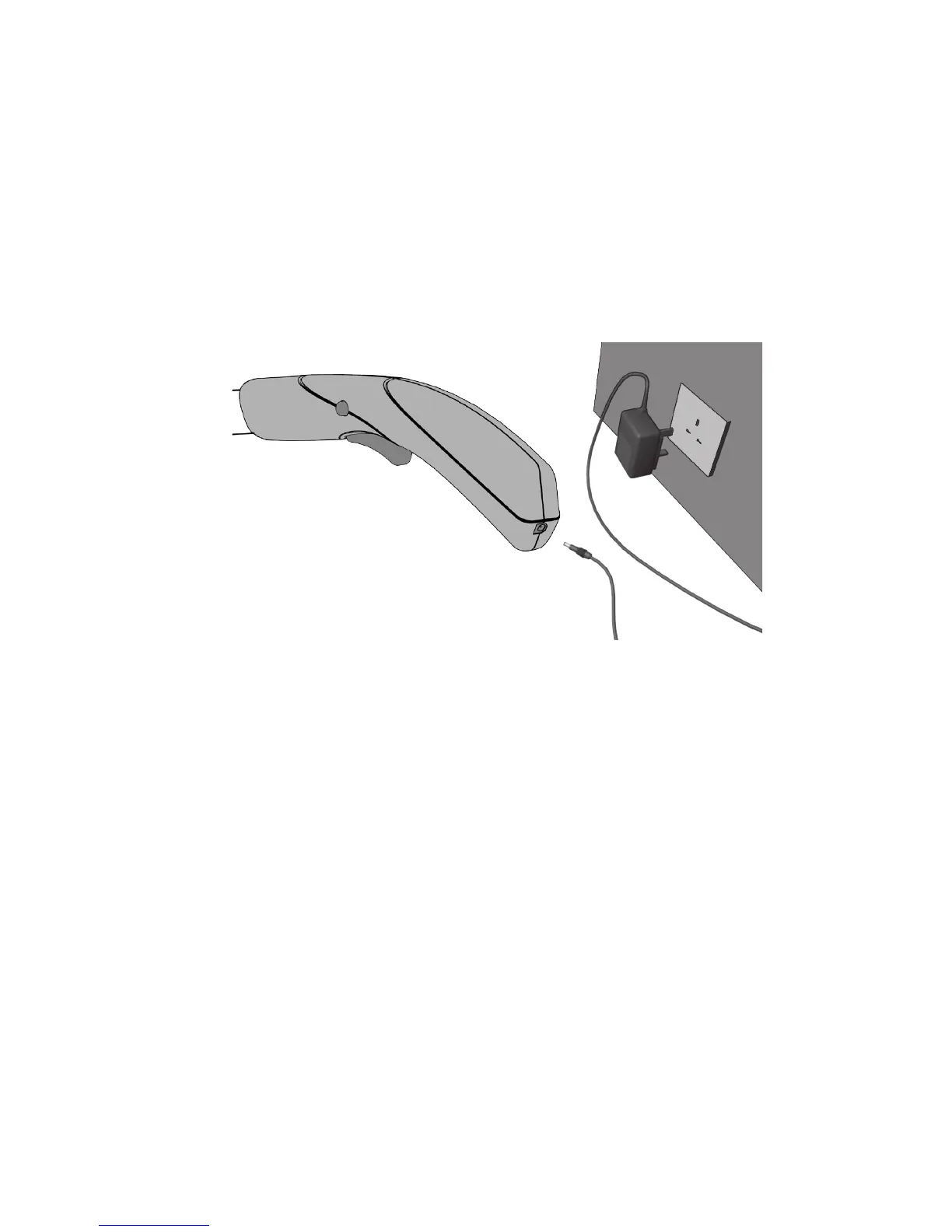
Connect the supplied battery charging adaptor to the charging socket located on the rear of
the handle.
Plug the charger into a suitable electrical socket and switch on.
The indicator light on the charger will light RED when the battery is charging.
When the battery is fully charged the indicator light will turn GREEN.
From at the battery will take approximately 3 hours to fully charge.
Battery Charging & Recharging
WARNING : ONLY USE THE CHARGER PROVIDED WITH THE PRODUCT.
USING ANY OTHER CHARGER MAY DAMAGE THE PRODUCT AND THE
BATTERY.
Once the battery is fully charged remove the charging plug from the handle,
switch off the charger at the mains socket, and unplug the charger from the mains
socket.
WARNING : DO NOT PULL THE CHARGER BY THE CORD.
IMPORTANT NOTE : when the battery is running low a cut out mechanism will
stop the product from working. This is to protect the Li-Ion battery from running
completely at, and will maintain the battery life.
CAUTION : do not charge the battery when the surrounding air temperature or
the batterys are below 0
0
C or above 45
0
C
After heavy use or in high temperatures the battery may become warm. Allow the
product to cool for 15 - 30 minutes before charging.


 To Next Page