15
!
WARNING
To prevent SERIOUS INJURY or DEATH from electrocution:
- Power MUST NOT be connected until instructed.
To prevent SERIOUS INJURY or DEATH from using the Deluxe Door Control Console or Push Button and
a closing door:
- Install the Deluxe Door Control Console or Push Button within sight of the door at a minimum height
of 5 feet (1.5m) above the floor. Make sure it is out of the reach of children and moving parts of door
and hardware.
- NEVER permit children to access the Deluxe Door Control Console , Push Button or Remote Controls.
- Operate the door ONLY when it is adjusted properly with no obstructions present and is in clear sight.
- ALWAYS keep a moving door in sight until it’s completely closed.
- NEVER cross the path of a moving door.
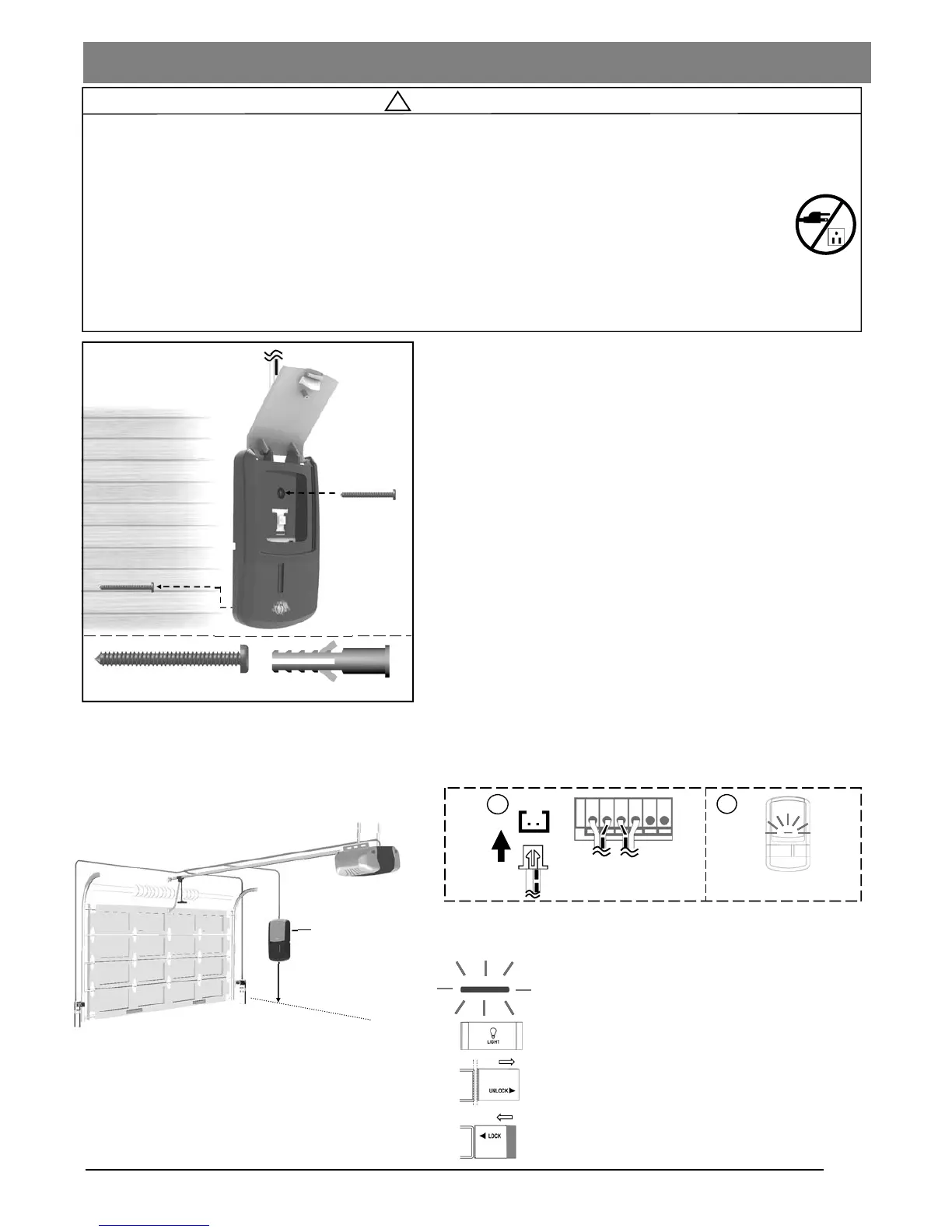
Fig. 1
Connecting Deluxe Door Control Console (*OPTIONAL)
The Deluxe Door Control Console is a wired, illuminated door
control placed inside your garage.
To install the Deluxe Door Control Console:
1. Lift the large actuator cover on door the control console and
the upper screw post is exposed
2. Position the deluxe door control console at minimum height of
5 feet (1.5m) above the floor to keep out of the reach of children,
within sight of door and free from any moving parts on the door.
3. Mark the position of both upper screw post and lower screw
hole on the deluxe door control console.
4. Fasten the bottom screw to a solid surface with 1-3/8” screws.
If attaching to drywall or other hollow surface, drill 3/16” holes
and use the provided Drywall Anchors.
5. Align the bottom hole with the bottom screw, slide the door
control down into place.
6. Repeat #4 to secure the deluxe door control console with the
upper screw
7. Flip down the actuator cover back into place
To Connect the Deluxe Door Control Console to the Opener
Connect the plug from the Deluxe Door Control Console to the
“Wall Panel” outlet on the rear of the Opener, as shown in Fig.2.
Using the Deluxe Door Control Console
(ONLY after installation is completed )
Min. 5 feet (1.5m)
above floor
Deluxe Door Control
Console
Drywall Anchor
Screw #6 x1-3/8”
From Deluxe Door Control
Console
Wall
Panel
1
2
Check illumination after
connecting power
Door — Press and release to access the door
Vacation Lock
Unlock — Door can be accessed by either Door
button or controls
Lock — Prevent access of door by any
controls and Door button.
Light — Turns the courtesy light On/Off
Fig. 2


 To Next Page