20
To Program Remote Control(s):
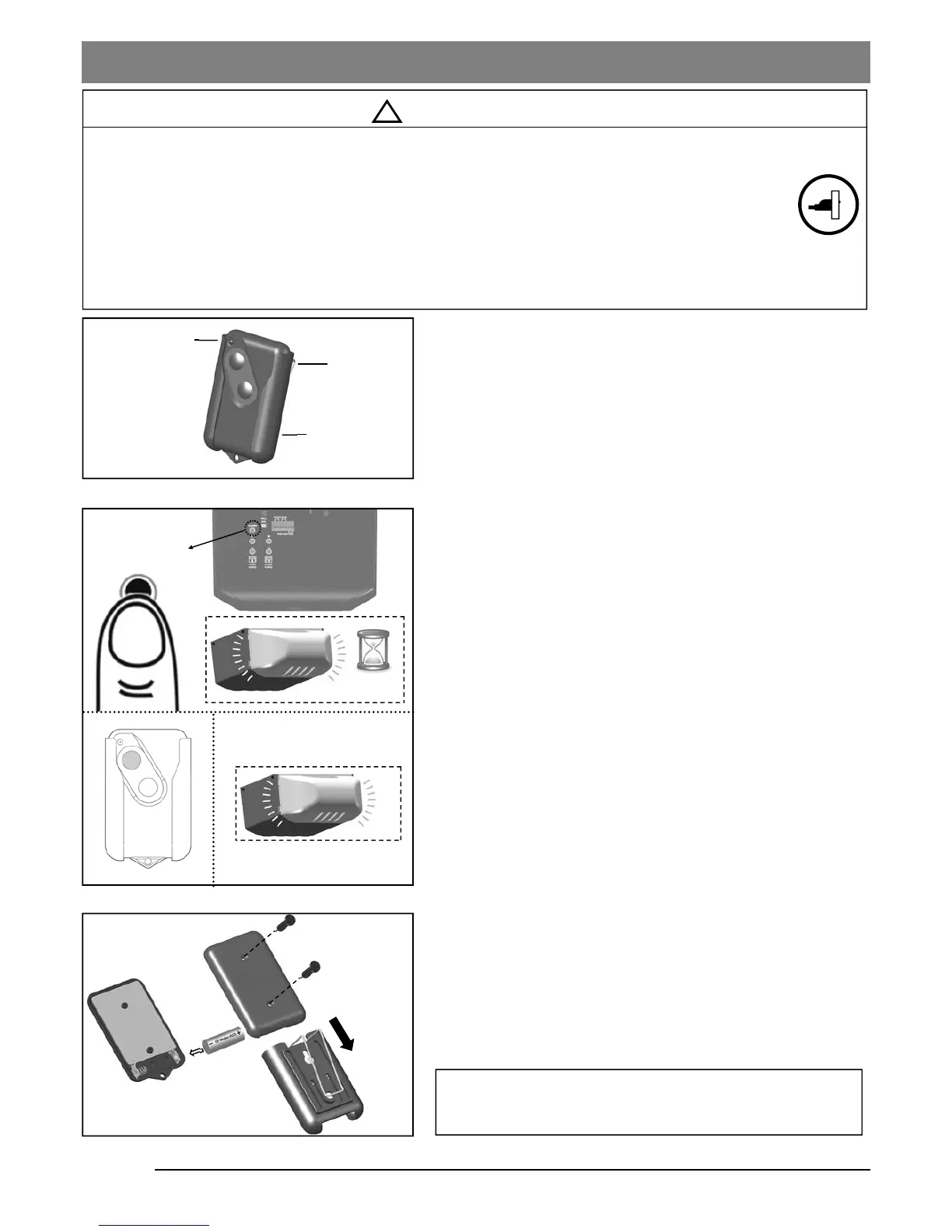
1. See Fig.2 to add a Remote Control. Press the “LEARN”
button on the rear control panel of the Opener. The
courtesy light will illuminate with an audible click*. The unit
is now ready to learn a Remote Control.
2. Within 30 seconds, press the button on the Remote
Control.
3. The courtesy light will flash twice indicating Remote
Control has been stored successfully**.
Up to 20 Remote Controls (including wireless keypad codes)
can be added to the unit by repeating the above procedures.
If more than 20 Remote Controls are stored, the first stored
Remote Control will be replaced. (i.e. the 21st Remote Control
replaces the 1st stored Remote Control.)
* If the courtesy light is already on, it will flash once and stay
illuminated for 30 seconds.
** If a Remote Control is not accepted, the courtesy light will
stay on for 30 seconds, flash 4 times and then stay on for 4-1/2
minutes. Retry programming the Remote Control by repeating
the steps above.
Removing ALL Remote Controls:
To remove ALL Remote Controls from memory, press and hold
the “LEARN” button for 5 seconds. The courtesy light will flash 7
times indicating ALL Remote Controls have been removed from
memory.
Replacing Remote Control Battery:
When the battery of the hand held Remote Control is low, the
indicator light will become dim and/or the range of the Remote
Control will diminish. To replace the battery, remove the battery
cover from the Remote Control as shown in Fig 3. Replace with
a 23AE 12 volt alkaline battery with polarity shown in Fig.3.
Fig.1
Fig.3
This device complies FCC Rules for HOME OR OFFICE USE. Operation is
subject to the following two conditions: (1) this device may not cause harmful
interference, and (2) this device must accept any interference received,
including interference that may cause undesired operation.
x2
Fig.2
LEARN
30
seconds
Programming Remote Controls
!
WARNING
To Prevent SERIOUS INJURY or DEATH:
- Keep Remote Control and battery out of reach of children.
- NEVER permit children to access the Push Button nor Remote Controls.
- Operate the door ONLY when it is properly adjusted, and there are no obstructions present.
- ALWAYS keep a moving door in sight until completely closed. NEVER cross the path of a moving door.
To reduce risk of fire, explosion or electric shock:
- DO NOT short circuit, recharge, dissemble or heat the battery.
- Replace with 23AE 12 Volt batteries ONLY. Dispose of batteries properly.
23AE 12 Volt Alka-
line Battery
Visor Clip
Holster
Signal and Battery
Indicator


 To Next Page