EasyManua.ls Logo

Guest 2621A - User Manual

Guest 2621A
15 pages
Print Icon
To Next Page IconTo Next Page
Loading...
R
Cruising Charger Series
OWNER’S MANUAL
ON BOARD BATTERY CHARGERS
Models DC Amperage No. Of Banks Volts
2614A 5,10 Amps 2 Bank 12/12
2614A-230
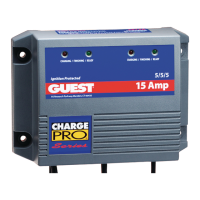
2621A 5,5,10 Amps 3 Banks 12/12/12
2621A-230
2622A 10,10 Amps 2 Bank 12/12
2622A-230
* : See Section 3 diagrams for specific connection instructions
IMPORTANT NOTICE
This manual contains important safety and operating instructions for the charger. Read
the entire manual before using. Also read all instructions and cautions for and on the
charger, batteries and equipment in the vicinity of the batteries.

Questions and Answers

  • C
    Christopher BurkeAug 9, 2025
    What to do if the Guest 2621A red LED stays on for more than 24 hours?
    • C
      Courtney TaylorAug 9, 2025
      If the red LED on your Guest Battery Charger remains on for more than 24 hours, it could be due to several reasons: * One or more defective or damaged cells. In this case, load test the batteries and replace them if necessary. * The charger has reduced its output voltage due to a DC overload or short. Remove the source of the overload or short, disconnect the charger’s black (NEGATIVE) ring terminal from the battery, and then reapply AC power. The green LED only should light. * On-board DC systems are drawing more current than the charger can replace. Try turning off all DC equipment while charging.
  • J
    Jaime RoweAug 16, 2025
    Why are the red and green LEDs on my Guest 2621A Battery Charger both staying on for more than 24 hours?
    • R
      Robert PetersAug 16, 2025
      If both the red and green LEDs on your Guest Battery Charger stay on for more than 24 hours, it could indicate the following: * On-board DC systems are drawing enough current to prevent the charger from switching into the Float or Ready State. To resolve this, turn off all DC equipment while charging. * One or more defective or damaged cells may be the cause. Load test the batteries and replace if necessary. * Extremely low AC voltage at the battery charger. Try applying a higher AC voltage source or reduce the length of the extension cord.
  • D
    Donna MorganAug 25, 2025
    What to do if the Guest 2621A Battery Charger green LED stays on when the battery is known to be low?
    • G
      Gerald BerryAug 25, 2025
      If the green LED stays on when the battery is known to be low, consider the following: 1. Check for an open circuit breaker or DC output fuse. Check connections to the battery, reset the circuit breaker if equipped, or replace the fuse. 2. Inspect for faulty or contaminated terminal connections. Clean and tighten or repair all terminal connections. 3. One or more defective or damaged cells. Load test the batteries and replace if necessary.
  • J
    Jennifer BoydAug 30, 2025
    How to fix Guest 2621A when neither of the LEDs turn on when AC power is applied?
    • F
      flemingbrendaAug 31, 2025
      If neither of the LEDs on your Guest Battery Charger turn on when AC power is applied, it could be due to: * No AC power available at the charger. Connect AC power or reset the AC breaker on the main panel. * Charger failure. Return charger to the Guest Service Dept.

Summary

Important Notice

Safety and Operating Instructions

Manual contains important safety and operating instructions. Read entire manual before use.

Introducing the Charger

Charger Features and Benefits

Describes the 3-stage electronic chargers, outputs, and LED indicators for battery status.

Charger Usage Warnings

Use only for lead acid, AGM, or gel cell batteries to avoid explosion or injury.

Explosive Gas Risk

Lead acid batteries generate explosive gases. Follow instructions exactly before each use.

Personal Safety Precautions

Precautions for working with chargers and batteries, including acid contact, fire, and short circuits.

Preparing to Charge Precautions

Pre-charge Safety Checks

Pre-charge safety checks including cable condition, accessories off, terminal handling, ventilation, and battery state.

Installing the Charger

AC Connection and Grounding Precautions

DANGER: Do not use 2-prong adapters or wire energized cords. Use GFCI protected outlets.

Making AC Connections

Procedure for wiring AC Hot, Neutral, and Earth Ground terminals.

Cable Size Guidelines

AC Cable Size Guidelines

Guidelines for selecting appropriate AWG cable size based on length for AC connections.

DC Cable Size Guidelines

Guidelines for selecting appropriate AWG cable size based on length and output for DC connections.

DC Connections

Making DC Connections

Notes on polarity, color coding, and terminal connections for DC wiring.

Charger Installation Details

Circuit Breaker Operation

Explains how circuit breakers trip and how to reset them after an overcurrent situation.

Output Cable Fusing Recommendations

Recommends in-line fuses on DC positive outputs per ABYC standards to prevent damage.

Choosing Charging Location

Guidance on selecting a location for optimal cooling and performance, avoiding heat buildup.

Mounting the Charger

Instructions for physically mounting the charger using bolts, washers, and securing hardware.

Battery Size Recommendations

Recommended maximum battery sizes for 5 amp and 10 amp output banks.

Charger Specific Wiring Drawings

2614 A Connections and Diagrams

Wiring specifications and diagrams for 2614A models, including input/output parameters.

2614 A Connection Warnings

Warnings about connecting outputs in series/parallel and battery switch settings.

2621 A Connections and Diagrams

2621 A Wiring Specifications

Details wiring specifications and diagrams for 2621A models, including input/output parameters.

2621 A Connection Warnings

2621 A Output Warnings

Warnings about connecting output 3 in series/parallel and battery switch settings.

2622 A Connections and Diagrams

2622 A Wiring Specifications

Details wiring specifications and diagrams for 2622A models, including input/output parameters.

2622 A Connection Warnings

Information on connecting output 1 and output 2 in parallel or series.

Operating the Charger (10;5 Amp Output)

LED Function Chart and Charging Stages

Explains LED indicators (Red/Green) for charging, finishing, and ready states.

Operating the Charger (5 Amp Output)

5 Amp Output Charging Details

Details the LED functions and charging stages specific to the 5 amp output.

Troubleshooting Common Issues

LED Status Troubleshooting

Addresses issues with Red LED, Red/Green LEDs, and Green LED staying on.

Charger Not Powering On

Troubleshoots cases where neither LED turns on when AC power is applied.

Maintaining the Charger

Periodic Maintenance

Instructions for cleaning battery terminals and tightening connections.

Technical Specifications

Model Specifications Table

Details output volts, amps, banks, circuit breakers, input volts, and max input amps for each model.

FCC Class A EMC Notice

Limited Warranty Information

Guest 2621A Specifications

General IconGeneral
BrandGuest
Model2621A
CategoryBattery Charger
LanguageEnglish

Related product manuals