EasyManua.ls Logo

Guest Trolling Charger 2613A - User Manual

Guest Trolling Charger 2613A
13 pages
Print Icon
To Next Page IconTo Next Page
Loading...
R
Trolling Charger Series
OWNER’S MANUAL
ON BOARD BATTERY CHARGERS
Models Amperage No. Of Banks Volts
2613A 5,5,5 Amps 3 Bank 12/24/36
2620A 10,10 Amps 2 Banks 12/24
2623A 10,5,10 Amps 3 Banks *12 or 24
2631A 10,10,10 Amps 3 Banks 12/24/36
* : See Connection diagrams for warnings.
IMPORTANT NOTICE
This manual contains important safety and operating instructions for the charger. Read
the entire manual before using. Also read all instructions and cautions for and on the
charger, batteries and equipment in the vicinity of the batteries.
1. INTRODUCING THE CHARGER
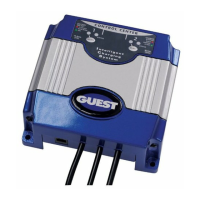
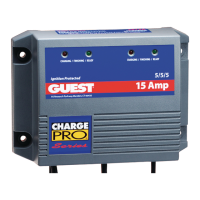
The Guest model 2613A, 2620A, 2623A and 2631A are designed to both recharge
your batteries, and extend your battery’s life in applications where it is stored for long
periods of time. They are “3-stage” electronic, completely automatic, lightweight, silent,
battery chargers and each output produces 12 Volts DC at either a full 5 Amps or 10
Amps (model specific), while using much less AC current than other charger types.
Unlike automotive “trickle” chargers, the 2613A, 2620A, 2623A and 2631A will not boil
off the electrolytes in properly installed and maintained batteries. When the charger is
attached to your batteries and plugged into a standard 115 Volt / 60 Hz AC outlet, the
red and green LED’s, mounted on the face of the charger let you know the unit is
recharging and maintaining your batteries. This sophisticated device is ideal for
recharging and maintaining the 12VDC batteries in your boat, electric vehicle or cart,
ATV, snowmobile or motorcycle.
SAVE THESE INSTRUCTIONS

Questions and Answers

  • R
    rhondaromeroJul 31, 2025
    What to do if the red and green LEDs stay on for more than 24 hours on my Guest Trolling Charger 2613A?
    • K
      Karen CrawfordJul 31, 2025
      If both the red and green LEDs on your Guest Battery Charger remain lit for over 24 hours, it could be due to several reasons: * On-board DC systems drawing between 1.5 – 3.5A: Turn off all DC equipment while charging. * Defective or damaged cells: Load test the batteries and replace if necessary. * Extremely low AC voltage: Apply a higher AC voltage source or reduce the length of the extension cord.
  • W
    William HarmonAug 8, 2025
    What to do if the red LED stays on for more than 24 hours on my Guest Battery Charger?
    • W
      wilsonbrianAug 8, 2025
      If the red LED on your Guest Battery Charger remains on for more than 24 hours, consider the following potential causes and solutions: 1. Defective or damaged cells: Load test the batteries and replace if necessary. 2. DC overload or short: Remove the source of the overload or short. Disconnect the charger’s black (NEGATIVE) ring terminal from the battery. Reapply AC power; only the green LED should now light. 3. On-board DC systems drawing too much current: Turn off all DC equipment while charging.
  • D
    dschaeferAug 14, 2025
    What to do if neither of the LEDs turn on when the AC power is applied to my Guest Trolling Charger 2613A?
    • H
      Holly WilliamsAug 15, 2025
      If neither LED turns on when AC power is applied to your Guest Battery Charger, the issue might be: * No AC power: Connect AC power or reset the AC breaker on the main panel. * Component failure: Return charger to the Guest Service Dept.
  • B
    Brittany ChoiAug 23, 2025
    What to do if the green LED stays on when the battery is known to be low on my Guest Trolling Charger 2613A Battery Charger?
    • H
      hdonovanAug 23, 2025
      If the green LED stays on even when the battery is low on your Guest Battery Charger, check the following: * Open DC output fuse: Replace the DC output fuse with a Bussman (AGC-14) 15 amp. * Faulty terminal connections: Clean, tighten, or repair all terminal connections. * Defective battery cells: Load test the batteries and replace if necessary.

Summary

Introducing the Charger

Important Warnings and Precautions

Personal Safety Precautions

Safety guidelines for individuals working with chargers, covering personal protection and emergency preparedness.

Preparing to Charge Precautions

Essential steps before charging, including checking equipment, battery removal, ventilation, and terminal cleaning.

AC Connection and Grounding Precautions

Critical safety advice on AC power connections, grounding, and avoiding improper plugs or extension cords.

Installing the Charger

Choosing Charging Location

Guidance on selecting an appropriate installation site for optimal charger cooling and performance.

Mounting the Charger

Instructions for physically attaching the charger unit to a mounting surface using specified hardware.

Operating the Charger - 10 Amp Output

Operating the Charger - 5 Amp Output

Troubleshooting Common Issues

Maintaining the Charger

Product Specifications

Guest Trolling Charger 2613A Specifications

2613A

Power Specifications IconPower Specifications
input voltage115 VAC
input voltage options12/24/36 Volts
output amperage5/5/5 Amps
Physical Dimensions IconPhysical Dimensions
size (L x W x H)9.6 x 7 x 2.6 inches
DC cable length6’/4’/4’

2620A

Power Specifications IconPower Specifications
input voltage115 VAC
input voltage options12/24 Volts
output amperage10/10 Amps
Physical Dimensions IconPhysical Dimensions
size (L x W x H)9.6 x 7 x 2.6 inches
DC cable length6’/6’

2623A

Power Specifications IconPower Specifications
input voltage115 VAC
input voltage options12/24 Volts
output amperage10/5/10 Amps
Physical Dimensions IconPhysical Dimensions
size (L x W x H)13 x 7 x 2.6 inches
DC cable length6’/6’/6’

2631A

Power Specifications IconPower Specifications
input voltage115 VAC
input voltage options12/24/36 Volts
output amperage10/10/10 Amps
Physical Dimensions IconPhysical Dimensions
size (L x W x H)13 x 7 x 2.6 inches
DC cable length6’/6’/6’

Related product manuals