PLANEBOOK
TM
OWNER’S MANUAL
PlaneBook™ Owner’s Manual 38 © Gulfstream 2008
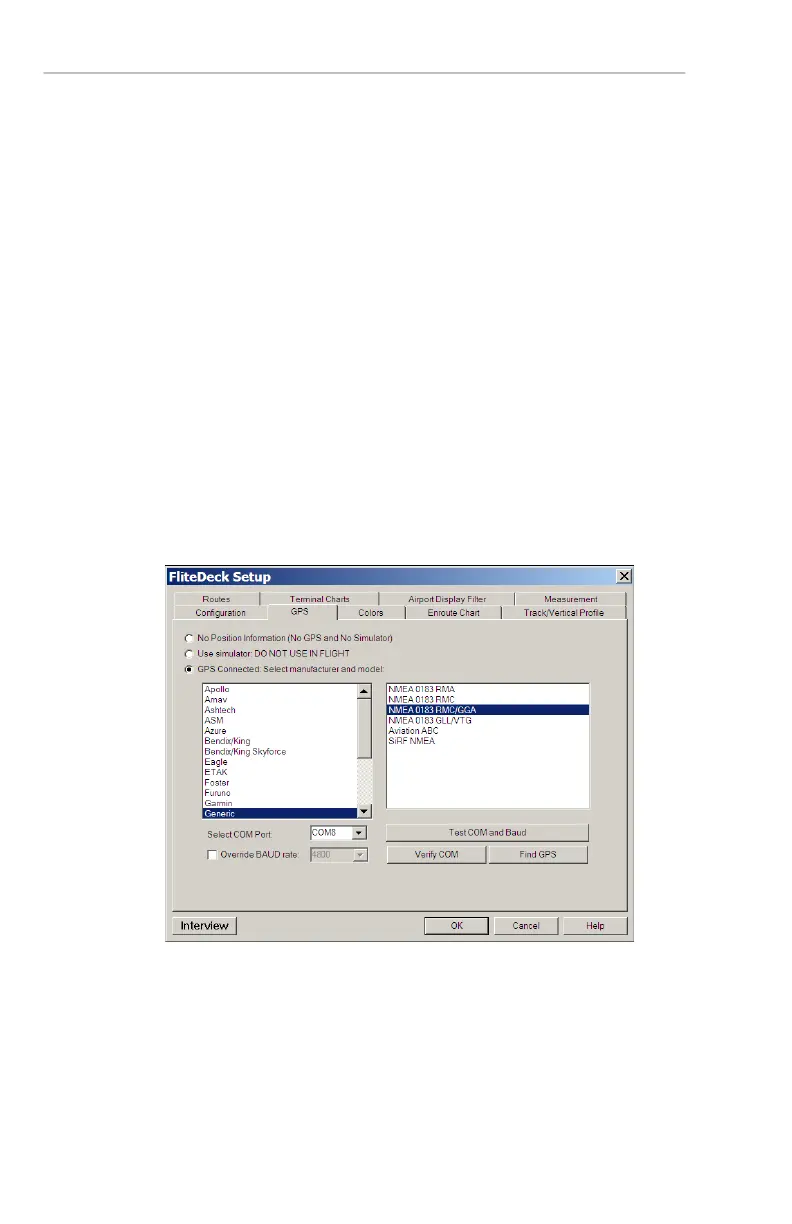
2. Select the GPS tab in the FliteDeck Setup menu.
Make the following selections in the GPS tab:
a. Select the GPS Connected: Select
manufacturer and model radio button.
b. Select Generic as the manufacturer and
NMEA 0183 RMC/GGA as the model.
c. In the Select COM port window, select the
same COM port as that selected in the GPS
setup on page 5 (in this example, COM8) from
the drop-down list.
d. Ensure the Override BAUD rate window is
not selected (un-checked).
d. To verify that your GPS is communicating with
FliteDeck3™, select Find GPS. The dialog
box in Step 3 will then appear.


 To Next Page