Need help?
Do you have a question about the GUSTARD R26 and is the answer not in the manual?
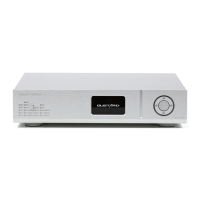
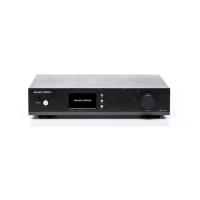
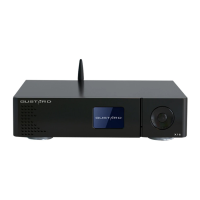
Describes the function of the power switch, screen, input/menu button, and scroll wheel.
Select input sources and adjust digital volume using the screen and encoder.
Navigate the menu and configure PCM filter settings like FAST, MID, SLOW.
Configure PCM NOS and DSD Direct modes to bypass internal filters for direct stream processing.
Adjust attenuation for gain applications and select between internal or external reference clocks.
Control phase inversion and adjust display brightness levels.
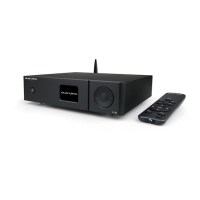
Explanation of remote buttons including Standby, Menu, Navigation, Back, and Volume controls.
Technical details on supported input interfaces, formats, and OS compatibility.
Performance metrics including frequency response, dynamic range, SNR, and output levels.
Information on power, dimensions, weight, and packing size.
Explains the 2-year free warranty and lifetime maintenance policy.
Lists circumstances under which warranty service is not provided.
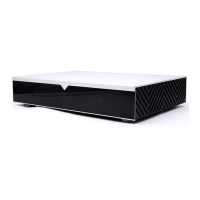
The GUSTARD R26 is a high-performance audio DAC designed to deliver exceptional sound quality. This device serves as a central component in a high-fidelity audio system, converting digital audio signals into analog sound for amplification and playback through speakers or headphones. Its sophisticated design and user-friendly interface make it suitable for audiophiles seeking precise control over their audio experience.
The primary function of the GUSTARD R26 is digital-to-analog conversion (DAC). It accepts various digital audio inputs, including Coaxial, AES, Optical, USB, IIS-H, Bluetooth, and LAN, and converts them into high-quality analog signals through its RCA and XLR outputs. This conversion process is critical for reproducing digital music files with accuracy and detail.
The R26 incorporates advanced features to optimize sound reproduction. It includes multiple PCM filters (FAST, MID, SLOW) that allow users to tailor the sound signature to their preference, ranging from detailed to soft. The device also offers PCM NOS (Non-Oversampling) and DSD DIRECT modes, which bypass internal interpolating FIR filters, sending the raw PCM or DSD stream directly to the R-2R ladder. These modes are particularly appealing to users who prefer to use external digital oversampling filtering from a high-performance PC, leveraging software digital filters for potentially higher sound quality and different listening experiences.
An integrated digital attenuator provides precise volume control with 90 steps from -90dB to 0dB. When the volume is set to 0dB, the attenuator can be bypassed. For systems without an independent pre-amplifier, the R26 features an ATTENUATION function that provides a -30dB analog attenuation. This is particularly useful when connecting the DAC directly to high-gain amplifiers or active speakers, allowing for a proper listening volume with less digital attenuation and thus better Dynamic Noise Ratio (DNR) performance.
The R26's clocking system is another highlight. It features a built-in clock generated by the Gustard-K2, a low-noise clock synthesizer with ultra-low phase noise and femtosecond-level jitter. This ensures high precision and stability for the audio clock, reaching ppb level frequency accuracy. The device also supports an external 10MHz clock input, allowing users to connect high-precision external clocks like the Gustard C16 or C18 for further enhancement of timing accuracy. The display indicates "EXT" when the external clock is working normally and "EXTERR" if it is lost or drifts significantly.
Phase inversion is another configurable option, allowing users to switch between non-inverted and inverted phases for RCA and XLR outputs. This can be useful for correcting phase issues in certain audio setups.
The GUSTARD R26 is designed for intuitive operation, both from its front panel and via a dedicated remote control.
The menu system allows users to configure various settings:
The R26 comes with a new model of remote control, which needs to be set to DAC mode by long-pressing the DAC key for 3 seconds.
The remote control is versatile and can also be configured to control other GUSTARD products, such as amplifiers (AMP mode) and player products (STREAM mode).
The R26 offers a comprehensive array of input and output options:
The device supports both 220V/110V voltage switching, with two switches that must be set to the same standard to prevent product damage. It also includes a power switch and a fuse for protection.
The GUSTARD R26 is designed for reliability and ease of use, with minimal user maintenance required beyond proper handling and power management.
The device includes a dedicated "Update Firmware" port, allowing users to keep the DAC's software up-to-date with the latest improvements and features. This ensures long-term compatibility and performance.
Users must ensure that the two AC standard switches on the back panel are correctly set to match the local power supply (115V or 230V) to prevent damage.
For optimal performance of the remote control, users are advised to:
To ensure the longevity of the device, it is important to:
The GUSTARD R26 is a robust and versatile audio DAC, offering a blend of high-performance audio processing, flexible connectivity, and user-friendly controls, making it a valuable addition to any serious audio setup.
 General
| Analog Outputs | RCA, XLR |
|---|---|
| USB Chip | XMOS XU216 |
| THD+N | <0.0005% |
| Dynamic Range | >120 dB |
| Output Level (RCA) | 2.5V RMS |
| Power Consumption | 15W |
| Digital Inputs | USB, IIS, Coaxial, Optical, AES |
| DAC Chip | R2R Ladder DAC |
| Supported Sample Rates (USB) | PCM: 44.1kHz - 768kHz, DSD: DSD64 - DSD512 |
| Supported Sample Rates (IIS) | PCM: 44.1kHz - 768kHz, DSD: DSD64 - DSD512 |
| Supported Sample Rates (Coaxial/Optical/AES) | PCM 44.1kHz-192kHz, DSD64 (DoP) |
| Output Level (XLR) | 5Vrms |

 To Next Page