15 of 41
8. Screen Adjustment
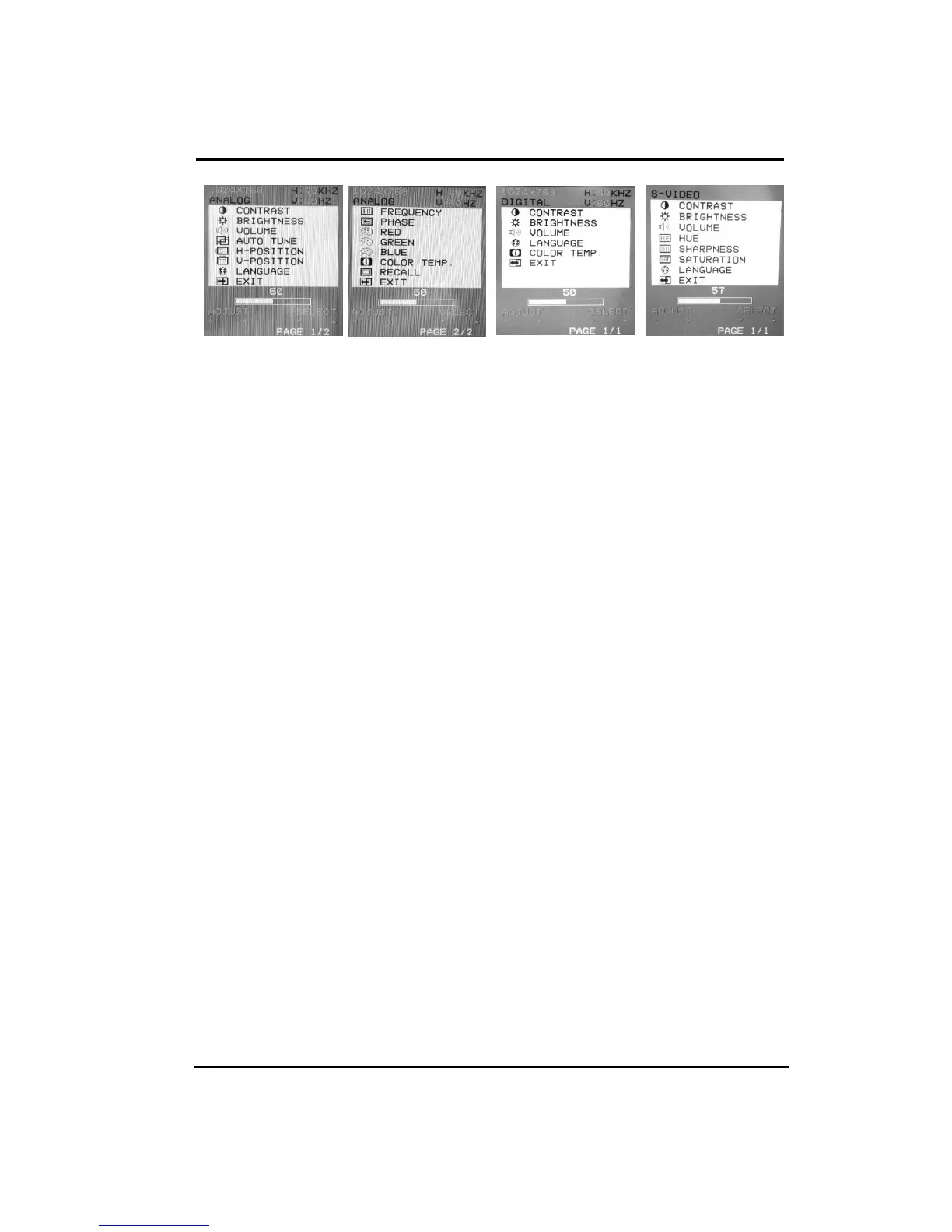
PC Analog Mode
PC Digital
Mode
S-Video/Video
Mode
CONTRAST
Adjust the contrast using “+
++
+” and “0
00
0” buttons.
BRIGHTNESS
Adjust the brightness using “+
++
+” and “0
00
0” buttons.
VOLUME
Adjust the speaker volume using “+
++
+” and “0
00
0” buttons.
AUTO TUNE
Press “ +
++
+” or “0
00
0” buttons to make LCD monitor adjust the related parameters
automatically for optimal display status.
H - POSITION
Pressing “+
++
+” moves the display image to the right; Pressing “0
00
0” moves the display
image to the left.
V - POSITION
Pressing “+
++
+” moves the display image upward; Pressing “0
00
0” moves the display image
downward.
LANGUAGE
This item is used to select OSD languages.
FREQUENCY
This item is used to decrease the vertical interference.
1.Select one display pattern from your computer.
2.Use“+
++
+” and “0
00
0” buttons on the LCD monitor to decrease the vertical interference to
get the optimal display.
PHASE
This item is used to decrease the horizontal interference.
1.Select one display pattern from your computer.
2.Use “+
++
+” and “0
00
0” buttons on the LCD monitor to decrease the horizontal interference
to get the optimal display.


 To Next Page