Custom calibration – pH
Items to collect: One or two calibration standards or samples of known pH value
1. Set the power to on.
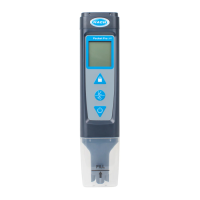
2. Remove the cap from the sensor.
3. Push and hold until "pH" shows.
4. Go to the settings menu. Make sure the bUFr setting is set to Cus (custom standard).
Refer to Configure the settings on page 11.
5. Push to go to calibration mode.
"C1" shows on the bottom line.
6. Rinse the sensor and cap with deionized water and blot dry.
7. Pour the calibration standard or sample into the cap to the fill line.
8. Put the sensor fully into the cap.
9. When the measurement is stable, push and until the pH value of the
calibration solution or sample shows on the display.
10. Optional: To measure a second pH calibration standard or sample of known value,
push , then do steps 6–9 again.
11. When the last measurement is stable, push and hold to save the calibration and go
to continuous measurement mode. "END" shows on the display.
Note: "ECAL" shows on the display if the calibration was not successful. Refer to
Troubleshooting on page 12.
12. Rinse the sensor and cap with deionized water and blot dry.
Custom calibration – conductivity
Item to collect: One calibration standard or sample of known value
1. Remove the cap from the sensor.
2. Set the power to on.
3. Push and hold
until "Cond" shows.
4. Go to the settings menu. Make sure that the Std setting in the conductivity settings
menu is set to Cus (custom standard). Refer to Configure the settings on page 11.
5. Push to go to calibration mode.
"C1" shows on the bottom line.
6. Rinse the sensor and cap with deionized water and blot dry.
7. Pour the calibration standard or sample into the cap to the fill line.
8. Put the sensor fully into the cap.
9. When the measurement is stable, push and until the pH value of the
calibration solution or sample shows on the display.
10. Push . The entered value will flash 3 times and then stop. "END" shows on the
display.
11. Rinse the sensor and cap with deionized water and blot dry.
Measurement
Note: Air bubbles under the probe tip when submerged can cause slow stabilization or error in
measurement. Shake the tester from side to side to remove air bubbles.
1. Set the power to on.
2. Remove the cap from the sensor.
3. If the lock icon shows on the display, push to go to continuous measurement mode.
4. Push and hold to select the parameter to measure (i.e., Conductivity).
Note: Only one parameter can be measured at one time.
10


 To Next Page