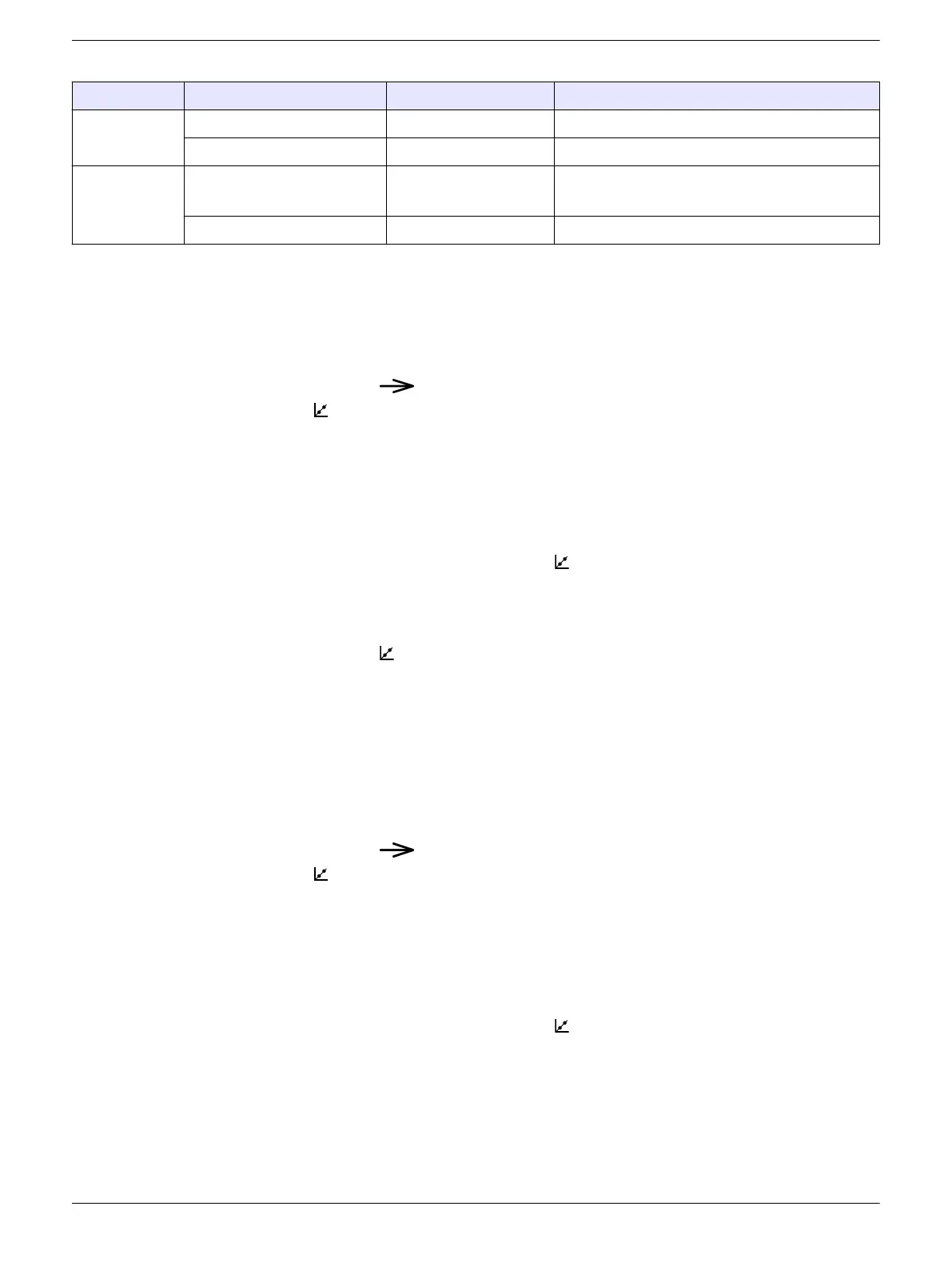
Table 3 Number of calibration points
Parameter Calibration procedure Calibration points Calibration standards
Conductivity Auto 1–3 147 µS/cm, 1413 µS/cm, 12.88 mS/cm
Custom 1 Any value
pH Auto 1–3 USA: 4.01, 7.00, 10.01
NIST: 4.01, 6.86, 9.18
Custom 1–2 Any value
Auto calibration – pH
Items to collect: One, two or three auto-recognition calibration standards
1. Set the power to on.
2. Remove the cap from the sensor.
3. Push and hold until pH shows.
4. Push to go to calibration mode.
The auto-recognition standard(s) to measure shows on the bottom line.
Note: If "C1" shows on the bottom line, do not continue. Set the tester to auto calibration mode.
Refer to Configure the settings on page 11.
5. Rinse the sensor and cap with deionized water and blot dry.
6. Pour the auto-recognition standard shown into the cap to the fill line.
7. Put the sensor fully into the cap.
8. When the measurement is stable, push
to save the measurement.
The measured value flashes three times.
9. Optional: To measure another calibration standard (maximum of 3), do steps 5–8
again.
10. Push and hold to go to continuous measurement mode. "END" shows on the
display.
11. Rinse the sensor and cap with deionized water and blot dry.
Auto calibration – conductivity
Items to collect: One, two or three auto-recognition calibration standards
1. Set the power to on.
2. Remove the cap from the sensor.
3. Push and hold until Conductivity shows.
4. Push to go to calibration mode.
The auto-recognition standard(s) to measure shows on the bottom line.
Note: If "C1" shows on the bottom line, do not continue. Set the tester to auto calibration mode.
Refer to Configure the settings on page 11.
5. Rinse the sensor and cap with deionized water and blot dry.
6. Pour the auto-recognition standard shown into the cap to the fill line.
7. Put the sensor fully into the cap.
8. When the measurement is stable, push to save the calibration and go to
continuous measurement mode. The measured value will flash 3 times and then stop.
Then, "END" shows on the display.
9. Optional: To measure another calibration standard (maximum of 3), do steps 4–8
again.
10. Rinse the sensor and cap with deionized water and blot dry.
9


 To Next Page