EasyManua.ls Logo

Hach sension ph31 - User Manual

Hach sension ph31
18 pages
Print Icon
To Next Page IconTo Next Page
Loading...
DOC022.97.90249
sensION
+ pH31
03/2013, Edition 3
User Manual
Manuel d'utilisation
Manual del usuario
Manual do Usuário
用户手册
取扱説明書
사용 설명서
คูมือผูใช

Questions and Answers

Summary

Specifications

General Specifications

Details on display, keyboard, dimensions, weight, power requirements, and environmental limits.

Measurement Performance

Specifications for resolution, measuring error, and reproducibility for pH, ORP, and temperature.

Connectivity and Data Storage

Information on data storage capacity and available connection types for the meter.

Advanced Features

Details on temperature correction and measurement display lock functionalities.

Safety Information

General Safety Notice

Manufacturer's disclaimer for misuse and user responsibility for application risks.

Hazard Indicator Definitions

Definitions for DANGER, WARNING, and CAUTION hazard statements.

Use of Hazard Information

DANGER Hazard Explanation

Indicates a potentially or imminently hazardous situation resulting in death or serious injury.

WARNING Hazard Explanation

Indicates a potentially or imminently hazardous situation resulting in death or serious injury.

Precautionary Labels and Notices

CAUTION Hazard Explanation

Indicates a potentially hazardous situation resulting in minor or moderate injury.

Instrument Damage Notice

Indicates a situation which, if not avoided, may cause damage to the instrument.

Symbol for Manual Reference

Explains a symbol referencing the instruction manual for operation and safety.

WEEE Disposal Information

Information regarding disposal of European electrical equipment.

Product Overview

Meter Functionality and Components

Describes the sensION+ meters' use for measuring water parameters and product components.

Product Component Identification

Instructions to check received components against Figure 1.

Installation

Probe Holder Assembly

Steps to assemble the probe holder and connect the magnetic stirrer.

Connecting to AC Power

Electrical Safety Warning

DANGER: Electrocution hazard warning for outdoor/wet locations, requires GFCI.

Power Connection Steps

Steps to connect the universal power adapter to the meter and an AC receptacle.

Connector Panel Overview

Identification of Meter Ports

Identifies all ports on the meter's connector panel, including STIRRER, ELECTRODES, and POWER IN.

User Interface and Navigation

Keypad Description

Explains the function of each key on the meter's keypad.

Display Screen Elements

Describes the information shown on the meter's display.

Basic Operation

Key Navigation Guide

Explains how to use keys to navigate menus, confirm options, and change values.

Meter Start-up and Shutdown

Instructions for powering the meter on and off, including a notice about probe connection.

Chemical Exposure Hazard Warning

WARNING: Hazard related to chemical exposure, requiring safety procedures and PPE.

Standard Operation

Language Selection

Steps to select the display language when powering on the meter for the first time.

Calibration

Calibration Settings Overview

Options for setting Calibration type, frequency, and display preferences.

Calibration Procedures

Calibration Settings Options

Details on options like Cal. frequency, Display mV, To a X value, Data introduction, and Factory adjust.

Calibration Type Selection

Explains different calibration types: Technical buffers, DIN19266 Buffers, User Buffers, and To a X value.

Standard Calibration Steps

Step-by-step guide for general liquid calibration using buffers.

Data Management

Viewing Calibration Data

Steps to view the most recent calibration data, including slope, offset, and deviation.

Setting Calibration Reminders

Instructions to set a reminder for the next calibration, from 0-23 hours or 1-7 days.

Initiating Sample Measurements

Steps to select and start a sample measurement from the main menu.

Configuring Measurement Parameters

How to change settings like Resolution, Stability, Display mV, Limits, and Isopotential.

Advanced Operation

Using Sample IDs

Associating readings with a sample ID for data organization.

System Configuration

Sample ID Assignment Options

Options for automatic sequential numbering or manual entry for sample IDs.

Data Output Selection

Options for outputting data: Deactivated, For Printer, or For Computer.

Date and Time Adjustment

Steps to change the meter's date and time settings.

Display Contrast Adjustment

Procedure to adjust the contrast of the display.

Temperature Calibration

Steps to adjust the temperature reading for accuracy at 25 °C and 85 °C.

System Settings and Data Handling

Stirring Settings Control

Instructions for turning the magnetic stirrer on/off and adjusting its speed.

Temperature Unit Selection

Steps to switch temperature units between Celsius and Fahrenheit.

Data Logger Display

How to view Measurement data, Electrode report, and Calibration data.

Deleting Logged Data

Procedure to delete Measurement data or Electrode report logs.

Sending Data to Peripherals

Steps to print Measurement data, Electrode data, Calibration data, etc.

Reporting and Maintenance

Report Output Configuration

Choosing output formats like Reduced, Standard, or GLP with user/header/sensor info.

General Maintenance and Safety

Warning against disassembly; qualified personnel for service; cleaning precautions.

Instrument Cleaning

Instructions for cleaning the instrument exterior with a moist cloth and mild soap.

Probe Cleaning

Guidance on cleaning the probe using specific agents for different contaminations.

Troubleshooting

Calibration Warnings and Errors

Lists common calibration errors and their solutions, including probe and buffer checks.

Measurement Warnings and Errors

Lists common measurement errors and their solutions, including probe and temperature checks.

Replacement Parts and Accessories

Replacement Parts List

Lists available replacement parts for the sensION+ meters with item numbers.

Consumables List

Lists consumables like pH buffer solutions and their item numbers.

Accessory Catalog

Lists accessories such as printers, software, and cables with item numbers.

Standard Solutions and Accessories

Additional Accessories

Lists additional accessories and supplies like magnetic stirrers, beakers, and holders.

Technical Buffer Solutions Reference

Information on technical buffer solutions and their pH/ORP values at varying temperatures.

Overview

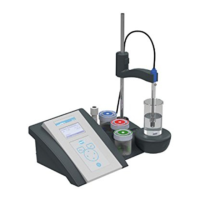
The Hach sensION+ pH31 is a versatile meter designed for measuring various parameters in water, specifically pH, ORP (mV), and temperature. It is suitable for both laboratory and field use, offering a range of features for accurate and reliable measurements.

Function Description

The sensION+ pH31 operates by connecting to a probe, which is then immersed in the sample to take measurements. It can measure pH with a high degree of precision, as well as Oxidation-Reduction Potential (ORP) in millivolts and temperature in Celsius or Fahrenheit. The meter is designed for continuous measurement, with stability and time-based options for display lock. Measurement data can be stored internally and transferred to a printer or PC for further analysis and record-keeping. The device supports various calibration types, including technical buffers, DIN19266 buffers, user-defined buffers, and calibration to a specific X value, ensuring accuracy across different applications. It also features a calibration reminder to help maintain measurement integrity over time.

Usage Features

The sensION+ pH31 offers a user-friendly interface with a clear liquid crystal, backlit display (128 x 64 dots) and a PET-protected keypad. Navigation is intuitive, utilizing dedicated keys for returning to previous menus, confirming selections, scrolling through options, changing values, and adjusting measuring units. The display provides comprehensive information, including concentration, units, temperature, calibration status, operator ID, sample ID, date, and time.

Key usage features include:

  • Language Selection: The display language can be easily selected upon initial power-on.
  • Data Output Management: Users can choose to deactivate data output, or connect to a printer (dot matrix or thermal) or PC (via Terminal, LabCom, or LabCom Easy software) for data transfer. This allows for efficient record-keeping and integration with laboratory information systems.
  • Sample ID: The meter supports assigning a sample ID to readings, which helps associate data with specific sample locations and improves data organization. This ID can be entered manually via a keyboard or barcode scanner, or automatically assigned as a consecutive number.
  • Date and Time Adjustment: The date and time can be easily changed through the system menu.
  • Display Contrast Adjustment: The display contrast can be adjusted to optimize visibility in different lighting conditions.
  • Temperature Adjustment: The temperature measurement can be fine-tuned at 25 °C (77 °F) and/or 85 °C (185 °F) to enhance accuracy, allowing users to compensate for minor discrepancies with a reference thermometer.
  • Stirring Control: The integrated magnetic stirrer can be turned on or off, and its speed adjusted, which is crucial for ensuring homogeneous samples during calibration and measurement.
  • Temperature Unit Selection: Users can switch between Celsius and Fahrenheit for temperature readings.
  • Data Logger: The meter includes a data logger that automatically stores measurement data, electrode reports, and calibration data. This log can hold up to 400 data points, with older points being overwritten as new data is added. Stored data can be viewed on the display or sent to a printer or PC.
  • Data Deletion: The entire measurement data or electrode report log can be deleted, which is useful after data has been successfully transferred to an external device.
  • Report Output Types: When connected to a printer or PC, various report output types are available, including reduced, standard, and GLP (Good Laboratory Practice) formats. These reports can include user names, company headers, and sensor identification (model and serial number), providing comprehensive documentation.
  • Calibration Procedure: The meter guides users through a straightforward calibration process using liquid calibration solutions. It prompts for operator ID, ensures proper probe rinsing, and confirms measurement stability before proceeding to the next calibration solution. Calibration results are briefly displayed, and if a printer is connected, a print menu opens for immediate output.
  • Calibration Settings: Users can configure calibration parameters such as stability criteria (Fast, Standard, Strict), calibration frequency (with a reminder), and options to display mV values.
  • Measurement Settings: The meter allows for adjustment of resolution, stability criteria for continuous or time-based measurements, and setting upper and lower limits for measurements, with an acoustic warning for out-of-limit readings.

Maintenance Features

The sensION+ pH31 is designed for ease of maintenance, with clear instructions for cleaning and troubleshooting.

  • Instrument Cleaning: The exterior of the instrument should be cleaned with a moist cloth and a mild soap solution. Users are advised against using harsh cleaning agents like turpentine, acetone, or similar products to protect the display and accessories.
  • Probe Cleaning: The probe should be cleaned as needed, with specific cleaning agents recommended for different types of contamination:
    • Proteins: Pepsin cleaning solution
    • Grease, oils, fats: Electrode cleaning solution
    • Limescale: 0.1 N HCl solution
  • Magnetic Stirrer Replacement: Instructions are provided for replacing the magnetic stirrer if it fails to start, ensuring continuous functionality of the device.
  • Troubleshooting Guide: The manual includes detailed tables for common problem messages, symptoms, possible causes, and corrective actions for both calibration warnings/errors and measurement warnings/errors. This allows users to quickly diagnose and resolve issues such as asymmetry, poor buffer/electrode conditions, unstable readings, and out-of-range pH or temperature.
  • Preventive Maintenance: The calibration reminder feature helps users adhere to a regular calibration schedule, ensuring the long-term accuracy and reliability of measurements.

Overall, the Hach sensION+ pH31 is a robust and user-friendly meter with comprehensive features for accurate pH, ORP, and temperature measurements, supported by practical usage and maintenance guidelines.

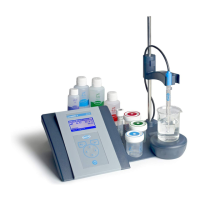
Hach sension ph31 Specifications

General IconGeneral
pH Accuracy±0.01 pH
pH Resolution0.01 pH
mV Range±1999 mV
mV Resolution0.1 mV
Temperature Resolution0.1 °C
DisplayLCD
Calibration PointsUp to 3 points
pH Range0 to 14 pH
Temperature Accuracy±0.5 °C
Temperature CompensationAutomatic
Power Supply4 AA batteries
Weight300 g
ElectrodeReplaceable
Temperature Range0 to 100 °C (32 to 212 °F)

Related product manuals