
 To Next Page

B
Barbara HopkinsAug 16, 2025
What to do if absorbance is greater than 3.5 on Hach Laboratory Equipment?
- BBrandon HayesAug 16, 2025
If the measured absorbance exceeds 3.5, dilute the sample and repeat the measurement.

What to do if absorbance is greater than 3.5 on Hach Laboratory Equipment?
If the measured absorbance exceeds 3.5, dilute the sample and repeat the measurement.
How to fix 'Concentration too high!' error on Hach DR 5000 Laboratory Equipment?
If the calculated concentration is higher than 999999, dilute the sample and repeat the measurement.
What to do if Hach DR 5000 is over measuring range?
If the measured absorbance is above the calibration range of the test, dilute the sample and repeat the measurement.
How to resolve 'Error Clean Cuvette' on Hach DR 5000?
The 'Error Clean Cuvette' message appears if the cuvette is soiled or there are undissolved particles in it. Clean the cuvette and allow any particles to settle.
Why does my Hach DR 5000 Laboratory Equipment show 'Error Please check the UV Lamp'?
This error appears when the lamp output is too low. Check the lamp and replace it if necessary.
What causes 'Under measuring range' on Hach DR 5000 Laboratory Equipment?
The 'Under measuring range' error appears when the measured absorbance is below the calibration range of the test. If possible, select a test with a lower measurement range or use a cuvette with a longer path length.
What does 'Negative result!' mean on Hach Laboratory Equipment?
A 'Negative result!' indicates that the calculated result is negative. Check the concentration of the sample.
How to fix 'Error Selfcheck stopped' on Hach DR 5000?
This error indicates the Self Check Test stopped while starting the instrument. Check the lamp and replace it if necessary. Also, ensure the lid is closed, then press Start Again.
How to resolve 'Error Barcode controlnumber' on Hach DR 5000?
The 'Error Barcode controlnumber' message indicates a deviation from the stored data. Update the data to resolve this issue.
What to do if Hach DR 5000 Laboratory Equipment shows 'Error Selfcheck stopped. Please remove the cuvette'?
This error means the Self Check Test stopped while starting the instrument. Remove the cuvette/sample cell from the cell compartment and press OK.
Details about the instrument's operational capabilities like mode, lamp, wavelength, accuracy, etc.
Information on the instrument's dimensions, weight, and operating/storage conditions.
Covers mains connection, interfaces, water resistance, and safety class of the instrument.
Crucial safety guidelines, hazard warnings, and precautionary labels for instrument operation.
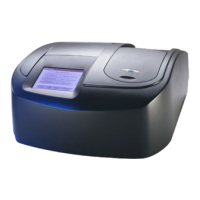
A general introduction to the DR 5000 Spectrophotometer, its capabilities, and application modes.
Instructions for unpacking the DR 5000 Spectrophotometer and its included accessories.
Details on USB connections, cell compartment, Multi Cell Holder, and optional adapters.
Illustrates the optical path of the light beam within the DR 5000 Spectrophotometer.
Step-by-step guide on how to correctly turn the instrument on and off.
Instructions for selecting the preferred language and understanding the self-check procedure.
Introduces touch screen usage, alphanumeric keypad, and the main menu.
Guides users through configuring instrument parameters like Operator ID, Sample ID, Date/Time, and Passwords.
Instructions for storing, recalling, sending, and deleting measurement data from the Data Log and scans.
How to select, configure, and use the instrument's pre-programmed analytical methods.
Details on using barcode-driven tests, including setup, updates, and software upgrades.
Guides on creating, programming, and managing custom analysis methods, including favorites.
Advanced method for defining custom measurement processes, sequences, and formulas.
Procedures for performing absorbance, concentration, and transmittance measurements at a single wavelength.
How to conduct measurements at multiple wavelengths and process the results.
Steps for recording and analyzing absorbance/transmittance spectra over a wavelength range.
Procedures for collecting and analyzing data over a specified period, including navigation.
Accessing instrument information and performing various performance and optical checks.
Guidelines for cleaning the spectrophotometer, its display, and sample cells.
Detailed instructions for replacing the tungsten and deuterium lamps safely.
Steps for replacing fuses to maintain electrical circuit protection against over-current conditions.
Procedures for inspecting and replacing the instrument's air filter pad.
Lists conditions and exclusions that are not covered by the product warranty.
Defines the exclusive remedies available for warranty breaches and liability limitations.
 General
| Brand | Hach |
|---|---|
| Model | DR 5000 |
| Category | Laboratory Equipment |
| Language | English |