EasyManua.ls Logo

Häfele HLS100 - User Manual

Häfele HLS100
13 pages
Print Icon
To Next Page IconTo Next Page
Loading...
HLS100 - USER MANUAL
USER MANUAL
HLS100
Question and Answer IconNeed help?

Do you have a question about the Häfele HLS100 and is the answer not in the manual?

Summary

Product Dimensions

Product Functions

Parameters

Technical specifications including material, power consumption, working voltage, and environment.

Functions & Features

Details various functions like sound/light prompts, scramble code protection, and low battery alerts.

Operations

Multi User Mode

Explains operation with multiple user codes for locking and unlocking.

Mode Introduction (Multi User)

Introduction to multi-user mode where any valid code can lock and unlock the device.

Set Lock into Multi User Mode

Step-by-step guide to configure the lock for multi-user mode.

Change Manager Code (Multi User)

Instructions for modifying the manager code in multi-user mode.

Change User Code (Multi User)

Notes that individual user codes are not set in multi-user mode.

How to Use User Code (Multi User)

Details the process of using a user code to lock and unlock the device.

Single User Mode

Details operation using a single, specific user code for access.

Mode Introduction (Single User)

Introduction to single-user mode where the lock stays locked until the code is entered.

Set Lock into Single User Mode

Steps to set up the lock for single-user mode operation.

Change Manager Code (Single User)

Guide to changing the manager code in single-user mode.

Change User Code (Single User)

Instructions for setting or changing the user code.

How to Use User Code (Single User)

Describes how to use the user code for unlocking and locking.

Limited Single User Mode

Explains operation where a code unlocks but doesn't re-lock without re-entry.

Mode Introduction (Limited Single User)

Introduction to limited single-user mode for unlocking without immediate re-locking.

Set Lock into Limited Single User Mode

Steps to configure the lock for limited single-user mode.

Change Manager Code (Limited Single User)

Instructions for changing the manager code in this mode.

Change User Code (Limited Single User)

Guide on how to change the user code.

How to Use User Code (Limited Single User)

Details the process of using the user code for access.

Reset Lock

Summary

Product Dimensions

Product Functions

Parameters

Technical specifications including material, power consumption, working voltage, and environment.

Functions & Features

Details various functions like sound/light prompts, scramble code protection, and low battery alerts.

Operations

Multi User Mode

Explains operation with multiple user codes for locking and unlocking.

Mode Introduction (Multi User)

Introduction to multi-user mode where any valid code can lock and unlock the device.

Set Lock into Multi User Mode

Step-by-step guide to configure the lock for multi-user mode.

Change Manager Code (Multi User)

Instructions for modifying the manager code in multi-user mode.

Change User Code (Multi User)

Notes that individual user codes are not set in multi-user mode.

How to Use User Code (Multi User)

Details the process of using a user code to lock and unlock the device.

Single User Mode

Details operation using a single, specific user code for access.

Mode Introduction (Single User)

Introduction to single-user mode where the lock stays locked until the code is entered.

Set Lock into Single User Mode

Steps to set up the lock for single-user mode operation.

Change Manager Code (Single User)

Guide to changing the manager code in single-user mode.

Change User Code (Single User)

Instructions for setting or changing the user code.

How to Use User Code (Single User)

Describes how to use the user code for unlocking and locking.

Limited Single User Mode

Explains operation where a code unlocks but doesn't re-lock without re-entry.

Mode Introduction (Limited Single User)

Introduction to limited single-user mode for unlocking without immediate re-locking.

Set Lock into Limited Single User Mode

Steps to configure the lock for limited single-user mode.

Change Manager Code (Limited Single User)

Instructions for changing the manager code in this mode.

Change User Code (Limited Single User)

Guide on how to change the user code.

How to Use User Code (Limited Single User)

Details the process of using the user code for access.

Reset Lock

Overview

The HLS100 is a digital lock designed for various applications, offering multiple operating modes and security features. It is primarily used for securing lockers and cabinets, providing a convenient and keyless access solution.

Function Description

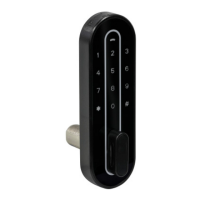
The HLS100 operates as a secure locking mechanism that can be programmed with different access codes. It features a keypad for inputting codes and a knob for manual locking and unlocking. The lock provides audio and visual feedback (beeps and light blinks) to indicate successful operations, errors, or low battery status. It supports a manager code for administrative functions and user codes for daily locking and unlocking.

Usage Features

The HLS100 offers three distinct operating modes: Multi User Mode, Single User Mode, and Limited Single User Mode, each catering to different usage scenarios.

Multi User Mode:

In this mode, the lock remains unlocked until a user inputs a code to secure it. Any 4-8 digit code can be used to lock the locker. To unlock, the same code must be entered. Once unlocked and the belongings are removed, the locker becomes available for the next user. This mode is ideal for shared lockers in public spaces like gyms or schools, where different users might need temporary access.

  • Locking: Input any 4-8 digit code, close the locker, and turn the knob to the locked position.
  • Unlocking: Input the same code, turn the knob to the unlocked position, and remove belongings.
  • Manager Code: A manager code must be programmed first. This code is crucial for emergency unlocks and for changing lock functions.
  • Setting the Lock to Multi User Mode: Input *#2#, then the manager code followed by #, and finally 1#. The lock will confirm with a motor reverse and a green light blink.
  • Changing the Manager Code: The factory setting for the manager code is 456789. To change it, input *#1#, then the old manager code followed by #, then the new manager code followed by # twice. The lock will provide audio and visual confirmation.
  • User Code in Multi User Mode: There is no need to set a specific user code in this mode; any 4-8 digit code can be used for locking and unlocking.

Single User Mode:

This mode is designed for individual users who require persistent access to a specific locker. The lock remains locked until the user code is entered to unlock it. After unlocking, the motor reverses, and the lock beeps to indicate it's ready to close. The knob can then be turned to the locked position without re-entering the code.

  • Unlocking: Input the user code, turn the knob to the unlocked position, and access belongings.
  • Locking: Turn the knob to the locked position. No code re-entry is needed.
  • Manager and User Code: Both manager and user codes must be set initially.
  • Setting the Lock to Single User Mode: Input *#2#, then the manager code followed by #, and finally 0#. The lock will confirm with a motor reverse and a green light blink.
  • Changing the Manager Code: The factory setting for the manager code is 456789. To change it, input *#1#, then the old manager code followed by #, then the new manager code followed by # twice. The lock will provide audio and visual confirmation.
  • Changing the User Code: The factory setting for the user code is 0123. To change it, input *#0#, then the old user code followed by #, then the new user code followed by # twice. The lock will provide audio and visual confirmation.
  • Important Note: If the manager code is used to unlock the lock, the user code will revert to its factory setting.

Limited Single User Mode:

In this mode, the lock remains unlocked until the user code is entered to lock it. Once unlocked, it stays in an unlocked state until the user code is entered again to secure it. This is suitable for situations where the locker needs to remain open for a period before being locked again by the same user.

  • Unlocking: Input the user code, turn the knob to the unlocked position, and access belongings. The lock will stay unlocked.
  • Locking: Input the user code and turn the knob to the locked position.
  • Manager and User Code: Both manager and user codes must be set initially.
  • Setting the Lock to Limited Single User Mode: Input *#2#, then the manager code followed by #, and finally 2#. The lock will confirm with a motor reverse and a green light blink.
  • Changing the Manager Code: The factory setting for the manager code is 456789. To change it, input *#1#, then the old manager code followed by #, then the new manager code followed by # twice. The lock will provide audio and visual confirmation.
  • Changing the User Code: The factory setting for the user code is 0123. To change it, input *#0#, then the old user code followed by #, then the new user code followed by # twice. The lock will provide audio and visual confirmation.
  • Important Note: If the manager code is used to unlock the lock, the user code will revert to its factory setting.

General Features:

  • Sound Prompts: The lock provides sound prompts for correct/incorrect code input and low battery.
  • Light Prompts: Green light indicates correct operation, red light indicates wrong operation, and blue light indicates low voltage.
  • Alarming Function: If an incorrect code is entered three times, the lock will shine red and beep. If entered five times continuously, the lock will be unavailable for 5 minutes, with the light blinking red during this period.
  • Scramble Code Protection: Users can input random numbers before and/or after the correct code to unlock, as long as the correct sequence is maintained. The total code length should be less than 20 digits.
    • Enabling Scramble Code: Input *#4#, then the manager code followed by #, and finally 0#.
    • Disabling Scramble Code: Input *#4#, then the manager code followed by #, and finally 1#.
  • Code Functions:
    • Manager Code: Used for changing lock functions and emergency unlocking. It is critical to keep this code secure.
    • User Code: Used solely for locking and unlocking.
    • Valid Password: All valid passwords must be 4-8 digits long.

Maintenance Features

Low Battery Alarm:

When the battery voltage drops below 2.4V, the lock's light will shine blue and it will emit "beep, beep" sounds every time it is opened. This serves as a reminder to the user to replace the batteries. The lock uses two CR2032 button cell batteries.

Reset Lock:

The HLS100 can be reset to its factory settings using two options:

  • Option 1 (Physical Reset): Press the "RESET" button on the back of the lock for 2 seconds. The lock will prompt with "beep beep beep" and the green light will blink twice, indicating a successful reset.
  • Option 2 (Code Reset): Input *#5#. The lock will prompt with "beep beep" and the green light will blink quickly. Then, input the manager code followed by # twice. This will reset the lock to its factory settings.

Important Information:

  • The # symbol is used for confirming inputs.
  • If the blue light blinks after opening the lock, it indicates low battery voltage, and the batteries should be changed.

Häfele HLS100 Specifications

General IconGeneral
Product TypeElectronic Lock
ModelHLS100
BrandHäfele
CategoryLocks
Mounting TypeSurface Mount
Key TypeRFID Card
ApplicationResidential
TypeElectronic Door Lock
MountingDoor

Related product manuals