EN
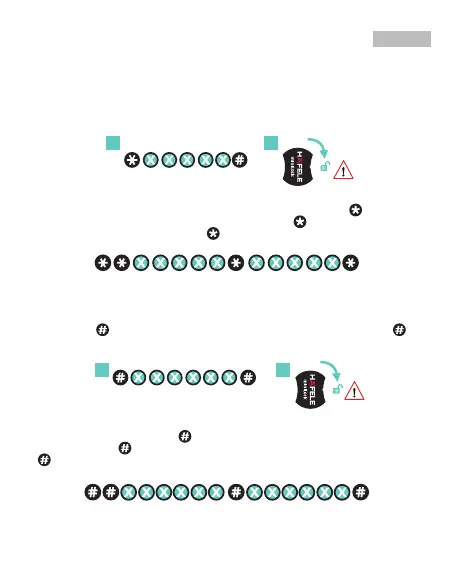
SERVICE PASSWORD: By default, service password is not active. Activate with
Program 5.1. Service password allows lock to be opened only and none of lock
features can be programmed.
OPENING WITH SERVICE PASSWORD: Default - <1-0-1-0-1>
If service password function is active, 1) press button and enter current 5-digit
service password and press button.2) Rotate handle within 5 seconds to opening
direction. You will get a confirmation beep from lock and green LED light will blink.
SERVICE PASSWORD
1 2
CHANGING SERVICE PASSWORD:
When you have selected service password in program menu, press
button
twice and enter current 5-digit service password. Press
button again and enter
new 5-digit service password. Press
button again and approve new password.
You will get a confirmation beep from lock and green LED lights will blink.
MASTER PASSWORD: Opens lock and grants access to all programming
features.
OPENING WITH MASTER PASSWORD: Default - <1-0-1-0-1-0>
1) Press the
button and enter current 6-digit master password and press
button. 2) Rotate handle within 5 seconds to opening direction.
You will get a confirmation beep from lock and green LED light will blink.
MASTER PASSWORD
1 2
CHANGING MASTER PASSWORD: Set new master password and test
BEFORE installing lock. Press
button twice, and then enter old 6-digit master
password. Press
button again and enter new 6-digit master password. Press
button again and approve new password. You will get a confirmation beep
from lock.
15

 To Next Page
 Loading...