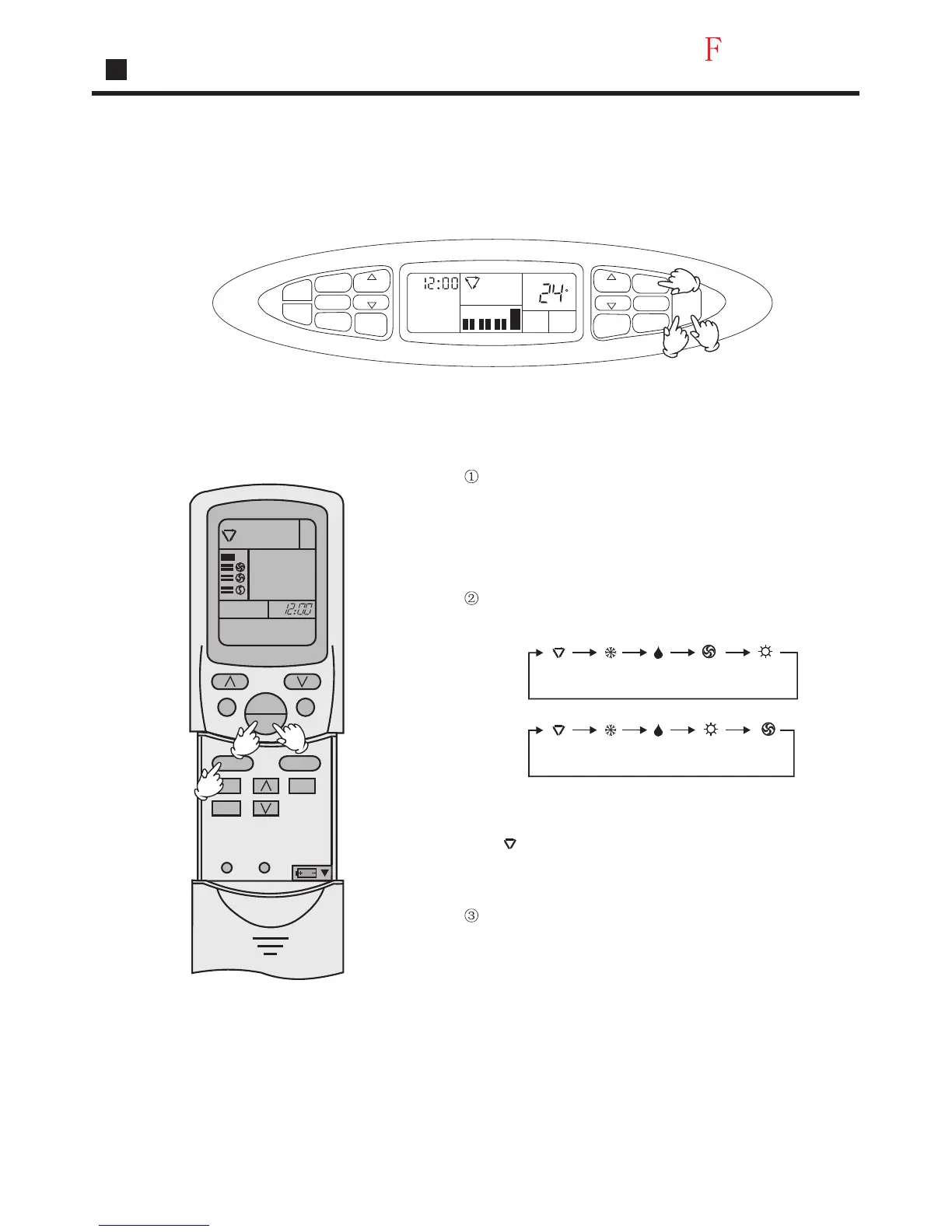
Remote-controlled Operation
Press ON/OFF button
Unit starts running.
The previous status appears on the
display
(except. TIMER, SLEEP and SWING mode)
Press MODE button. For each press, operation
mode changes as follows:
Note:
During Auto run operation, temp. Setting will not be shown in
LCD display, unit will select heating, cooling or fan operation
according to the room temp.
Press ON/OFF button
Unit stops running.
Select Auto run,
Manual
Remote
controlled
" " appears and auto run
starts.
AUTO
AUTO
COOL
COOL
DRY
DRY
HEAT
HEAT
FAN
FAN
AM
TIMER
TIME
TEMP
TEMP
TIME
CLOCK
SET
SLEEP
SWING
FAN SPEED
MODE
ON
OFF
LOW
MID
A
U
T
O
A
U
T
O
HIGH
ROOM
TEMP
C
Auto
Manual Operation
AM
AUTO
TEMP
SWING
MODE
CLOCK
TIMER
SLEEP
SET
FAN
ON
OFF
RESETLOCK
2
1
3
2
1
3
Operation
19




 To Next Page